



A stackable switch is a network switch that can be cabled to other switches of the same family so that the whole group runs as one switch. One management IP, one configuration, one set of spanning tree and routing decisions, and ports that are numbered switch by switch but managed together. A standalone switch does none of that. It has its own brain, its own IP address and its own configuration, and if you buy four of them you manage four switches.
That is the short answer. The longer answer is where most buying mistakes happen, because stacking is not free, it is not the only way to get redundancy, and it is not always the right call. We install and cable switch rooms for offices, warehouses and data rooms across Toronto and the GTA, and the question “should we stack these?” comes up whenever there is more than one switch in a rack. This guide is everything we would tell you across the table.
- Stackable vs standalone at a glance
- What switch stacking actually is
- How a switch stack works
- Things people confuse with stacking
- Benefits and drawbacks
- What happens when something fails
- Stacking by vendor
- Stackable switch examples
- Standalone switch examples
- Alternatives: MLAG, VSX, chassis
- Which one should you buy?
- Cabling and rack planning for a stack
- Buying checklist
- FAQ
Stackable vs standalone switches at a glance
If you only read one table, read this one.
| Question | Stackable switches (stacked) | Standalone switches |
|---|---|---|
| How many switches do you manage? | One logical switch, whatever the member count | Every switch separately |
| Management IP addresses | One for the whole stack | One per switch |
| Configuration file | One, shared by all members | One per switch, kept consistent by hand or by a controller |
| Uplink redundancy | Cross-stack link aggregation: uplinks from two members act as one link | Needs spanning tree blocking or a separate MLAG feature |
| Traffic between switches | High-speed stack links, often far faster than a normal uplink | Regular uplink ports, shared with everything else |
| If one switch fails | The rest keep running; the stack re-elects a controller if needed | Only that switch is affected |
| Software upgrades | All members upgrade together, usually with one reload window | One switch at a time, each on its own schedule |
| Shared risk | A bad config or software bug hits every member | Problems stay on the switch where they happen |
| Upfront cost | Higher: stackable models, stack cables or modules | Lower per port |
| Where the switches can sit | Usually in the same rack or the next one over | Anywhere a cable can reach |
| Best fit | Several switches in one closet, access layers that need redundant uplinks, growing sites | Single-switch sites, spread-out buildings, budget builds, simple networks |
What is switch stacking?
Switch stacking is a way of joining several physical switches so they share one control plane. The control plane is the part of the switch that thinks: it runs the configuration, builds the MAC address table, handles spanning tree, routing and management access. In a stack, one member runs that brain for everybody, a second member stands by to take over, and the rest act like line cards in a chassis. The data plane, the part that actually forwards frames, still runs on every member.
From the outside, you log in to one IP address and see one switch with a lot of ports. On Cisco the ports are numbered by member, so port 12 on the third switch in the stack becomes GigabitEthernet3/0/12. On Juniper and Aruba the naming differs, but the idea is the same: one device, many members.
Every major vendor has its own name for it, which is part of why the topic feels more confusing than it is:
| Vendor | What they call stacking | How members connect |
|---|---|---|
| Cisco Catalyst 9000 | StackWise (StackWise-80, 160, 320, 480, 1T) | Dedicated rear stack ports and proprietary stack cables |
| Cisco Catalyst 1300 | Stacking | Front-panel 10G SFP+ ports |
| Cisco Meraki MS | Physical stacking | Dedicated stack ports on stack-capable models |
| HPE Aruba CX | VSF (Virtual Switching Framework) | Front-panel ports assigned as VSF links |
| Juniper EX | Virtual Chassis | Virtual Chassis ports (VCPs), dedicated or converted uplinks |
| NETGEAR M4300 | Stacking | Front-panel 10G ports |
| Ubiquiti UniFi ECS-S | Switch Stacking | QSFP28 stacking cables in a ring |
| Fortinet FortiSwitch | Stacking (FortiSwitchOS 7.6.2 and later) | Designated stack ports on supported models |
What is a standalone switch?
A standalone switch is the default. It is a complete switch in one box with its own control plane, its own configuration and its own management address. You can connect standalone switches together with ordinary uplinks, and you can manage many of them from one cloud dashboard or controller, but each one still makes its own decisions. That independence is a weakness when you want them to act as one, and a strength when you want a problem on one switch to stay on that switch.
If you are new to switches in general, our guide to network switch types covers managed, unmanaged, PoE and Layer 3 switches first.
Worth knowing: many stackable switches are sold and run as standalone units. A Catalyst 9300 on its own is simply a standalone switch that could be stacked later. “Stackable” describes what a switch can do, not what it is doing.
How a switch stack works
Stack topology: ring or chain
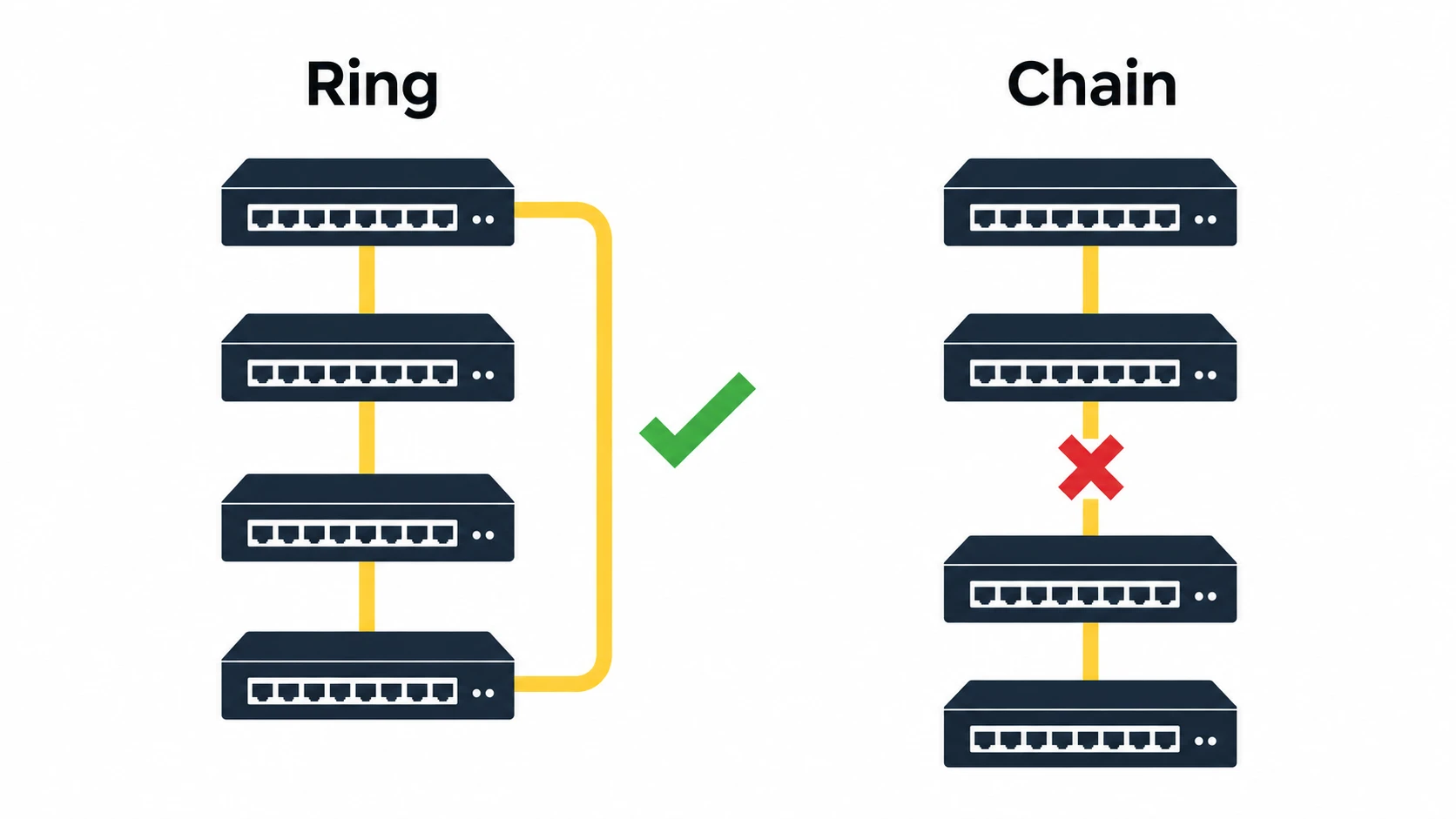
Members are cabled one to the next, and the last member cabled back to the first. That closed loop is a ring, and it is the layout every vendor recommends. If one stack cable fails in a ring, traffic goes the other way round and the stack keeps running at reduced stack bandwidth. If you leave the loop open, you have a chain. A chain works, but one failed cable in the middle splits it into two separate stacks, which is the situation you most want to avoid.
Active, standby and members
When a stack boots, the members elect a controller. Cisco calls it the active switch, Aruba calls it the conductor, and Juniper calls it the primary Routing Engine. A second member becomes the standby (or backup) and keeps a synchronized copy of the state so it can take over. On Cisco Catalyst 9200 and 9300 stacks, the election looks at the configured priority first (1 to 15, where the default is 1) and then the lowest MAC address, and stateful switchover (SSO) is on by default, so a failover keeps traffic moving.
In practice you set the priority on purpose. You want the active and standby to be the two members you chose, ideally the ones carrying the uplinks to your core, not whichever switch happened to have the lowest MAC address when the power came back.
One configuration, one management address
The controller holds one configuration for the whole stack. Add a new member with matching software and it joins, receives its config and its ports appear under a new member number. This is the day-to-day benefit people feel most: one SSH session, one SNMP target, one backup, one place to change a VLAN.
Stack bandwidth
Traffic that moves between members, for example a PC on member 1 talking to a printer on member 3, crosses the stack links instead of a normal uplink. On dedicated-port platforms this backplane is very fast. Cisco rates the Catalyst 9300 at 480 Gbps (StackWise-480), the 9300X at 1 Tbps (StackWise-1T), the 9300L at 320 Gbps, the 9200 at 160 Gbps and the 9200L at 80 Gbps. Platforms that stack over front-panel ports, such as the Catalyst 1300 or NETGEAR M4300, are limited to the speed of those ports, usually 10G each.
Cross-stack link aggregation
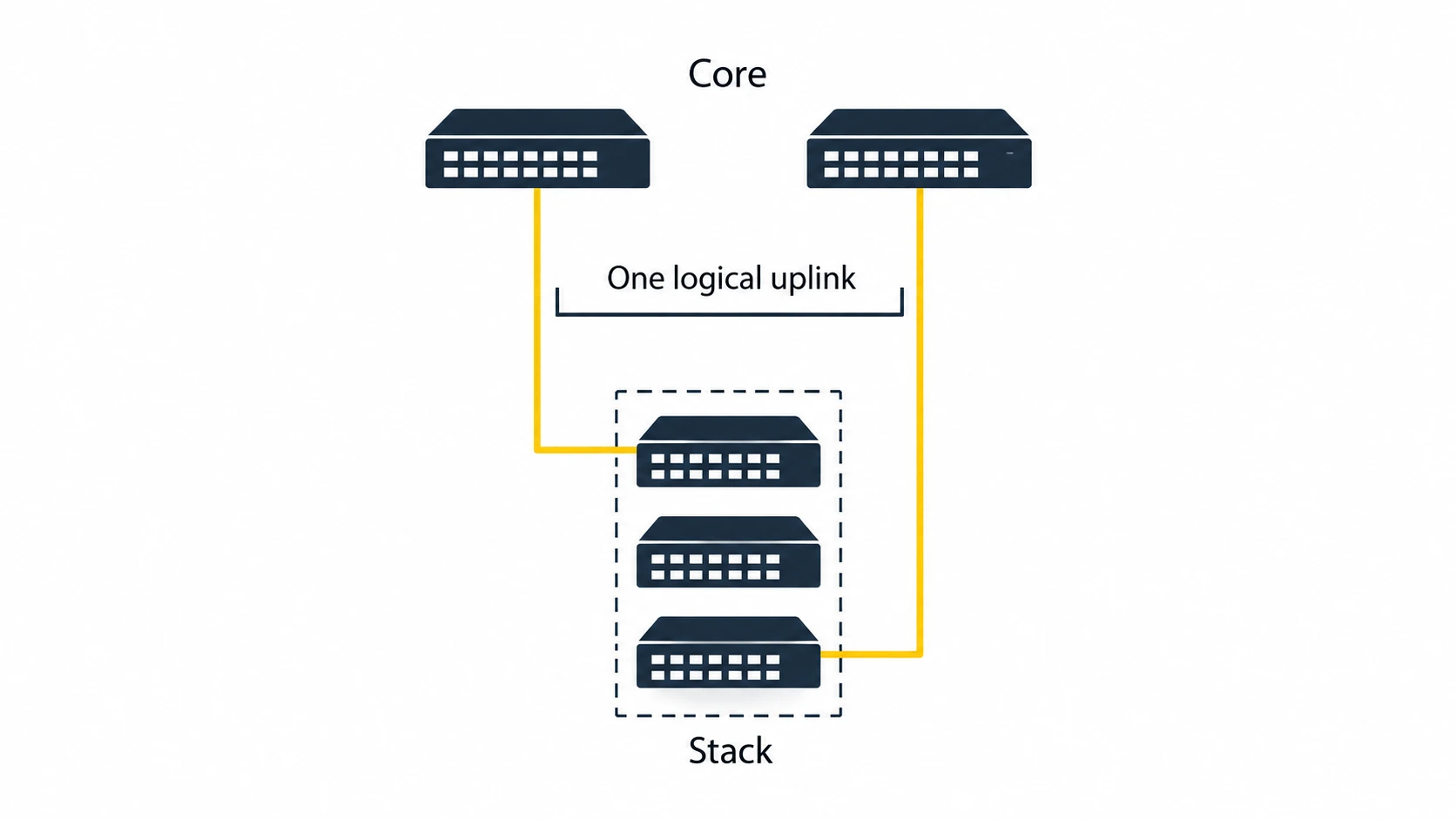
This is the feature that makes stacking worth paying for. You can build one link aggregation group (LACP, or EtherChannel on Cisco) using ports on two different members. Run one fiber uplink from the top member and another from the bottom member to your core or firewall pair, bundle them, and you have an uplink that survives the loss of either cable, either optic or either switch, with both links forwarding traffic. With standalone switches you get the same cabling, but one of those links usually sits blocked by spanning tree.
Stacked power
Some platforms also share power across the stack. Cisco StackPower pools the power supplies of up to four Catalyst 9300 switches in a ring, or up to eight with the XPS 2200 in a star layout, so a switch that loses a supply can borrow from its neighbours. Cisco’s guidance for an eight-switch data stack is two power stacks of four. This matters on PoE-heavy access layers where a lost power supply would otherwise drop every camera and access point on that switch.
Things people confuse with stacking
A lot of the “stackable vs standalone” questions we get are really about one of these.
| Term | What it really is | Single management IP? | Uplink redundancy |
|---|---|---|---|
| Stacking | Several switches share one control plane and act as one | Yes | Cross-stack link aggregation, all links active |
| Daisy-chaining | Standalone switches connected with ordinary uplinks, one after another | No | Only with spanning tree, which blocks the spare path |
| Link aggregation (LACP) | Several cables between two devices bundled into one logical link | Not applicable | Survives a cable failure, not a switch failure (unless the far end is a stack or MLAG pair) |
| MLAG, VSX, vPC | Two switches keep separate brains but present one link to devices below | No, two | Yes, and the pair can be upgraded one at a time |
| Cloud or controller management | One dashboard for many independent switches | No, but one screen | None by itself |
| Clustering (small business) | A management convenience on some low-end switches: one web login for several switches | Sometimes, for management only | None |
| Physically stacking switches | Mounting them one above the other in a rack | No | None. This one is just furniture |
The cloud dashboard point trips a lot of people up. UniFi, Meraki, Aruba Instant On and FortiGate-managed FortiSwitches all let you manage many switches from one screen. That is convenient, and for a lot of small networks it is enough. It is not stacking. Each switch still has its own control plane and there is no cross-switch link aggregation unless the platform specifically supports it.
Benefits and drawbacks of stackable switches
Why people stack
- Simpler management. One device to log in to, back up, monitor and document, no matter how many members.
- Better uplink redundancy. Cross-stack link aggregation keeps every uplink forwarding and survives a member failure.
- Fewer spanning tree headaches. The stack is one node to spanning tree, so there are fewer blocked links and fewer places for a loop to hide.
- Fast switch-to-switch traffic. Stack links carry east-west traffic without eating uplink bandwidth.
- Pay-as-you-grow ports. Add a member when the office grows instead of replacing a switch with a bigger one.
- Fewer uplinks to the core. Two uplinks for a four-member stack instead of two per switch saves core ports, optics and fiber strands.
- Shared power on platforms that support it.
What stacking costs you
- Higher price. Stackable models cost more than their standalone siblings, and stack cables, stack modules and power stack cables are extra on many platforms.
- Shared fate. One control plane means one configuration mistake, one software bug or one bad upgrade can take down every member at once. A standalone switch fails alone.
- Upgrade windows. All members must run the same software, and on most stacks an upgrade reloads every member, so the whole closet goes offline together unless the platform offers a faster or rolling upgrade method. Plan a maintenance window.
- Distance limits. Dedicated stack cables are short. Cisco’s Catalyst 9300 stack cables come in 50 cm, 1 m and 3 m lengths. The members have to live in the same rack or the rack next door.
- Model lock-in. Stacks generally have to be the same family. A Catalyst 9200 cannot stack with a 9200L, an Aruba 6200 cannot stack with a 6300, and a Meraki stack is limited to matching models apart from a few documented exceptions.
- Split-stack risk. If a chain breaks or two ring links fail, you can end up with two halves that both think they are in charge. Every vendor has split detection for this, but you have to cable and configure for it.
What happens when something fails
This is the table we wish every buyer read before choosing. It assumes a properly cabled ring with a configured standby.
| Failure | Stack of switches | Standalone switches |
|---|---|---|
| One member switch dies | Devices on that member go down. The rest keep running. Uplinks from other members keep forwarding | Devices on that switch go down. Anything daisy-chained behind it goes down too |
| The active (controller) switch dies | The standby takes over, usually with little or no traffic loss on the other members | Not applicable. Each switch is its own controller |
| One stack cable fails (ring) | Traffic goes the other way round the ring. Stack keeps running at reduced stack bandwidth | Not applicable |
| One stack cable fails (chain) | The stack can split into two independent stacks | Not applicable |
| One uplink cable or optic fails | With cross-stack link aggregation, the other uplink carries everything | Spanning tree unblocks a backup path after convergence, if one exists |
| A bad configuration change | Applies to every member at once | Applies to the switch you changed |
| Software upgrade | Usually the whole stack reloads together | One switch at a time |
| A power supply fails | With shared stack power, neighbours can cover it. Without it, that member goes down | That switch goes down unless it has a second supply |
Notice the pattern. Stacking protects you well against hardware failures, and less well against human and software ones. Standalone designs are the opposite. That single insight settles most of the debate.
Stacking by vendor: the numbers that matter
Maximum stack size is the most searched spec, so here it is for the platforms we see most. Always check the current data sheet for your exact model and software version, because vendors do change these limits over time.
| Series | Stacking technology | Max members | Stack links | Notes |
|---|---|---|---|---|
| Cisco Catalyst 9300 / 9300X | StackWise-480 / StackWise-1T | 8 | Rear stack ports, 480 Gbps / 1 Tbps | 9300X can stack with 9300 at 480 Gbps. StackPower available |
| Cisco Catalyst 9300L | StackWise-320 | 8 | Rear stack ports, 320 Gbps | Fixed uplinks, lower-cost 9300 |
| Cisco Catalyst 9200 | StackWise-160 | 8 | Rear stack ports, 160 Gbps | Cannot mix with 9200L |
| Cisco Catalyst 9200L | StackWise-80 | 8 | Rear stack ports, 80 Gbps | Cannot mix with 9200 |
| Cisco Catalyst 1300 | Front-port stacking | 4 to 8, by model | 10G SFP+ ports, DAC recommended | Ring or chain. Same family only |
| Cisco Meraki MS (MS150, MS250, MS350, MS390 and others) | Physical stacking, managed in Dashboard | 8 | 40G, 100G or 480G by model | Matching models only, except MS210 with MS225 |
| HPE Aruba CX 6200F | VSF | 8 | Front ports, 1G or 10G | Cannot mix with 6300 |
| HPE Aruba CX 6300 | VSF | 10 | Front ports, 10G, 25G or 50G | All VSF links should run at the same speed |
| HPE Aruba Instant On 1960 | Stacking, local or cloud managed | 4 | 10G uplink ports | Up to 288 ports as one switch |
| Juniper EX2300 | Virtual Chassis | 4 | 10G uplinks set as VCPs | No dedicated stack ports |
| Juniper EX3400 | Virtual Chassis | 10 | QSFP+ ports are VCPs by default | Any member can take any role |
| Juniper EX4400 | Virtual Chassis | 10 | Two rear 100G ports as four 50G VCPs | Any EX4400 model can take any role |
| NETGEAR M4300 | Stacking | 8 | 10G copper or fiber ports | M4300 with M4300 only |
| Ubiquiti UniFi ECS-S | Switch Stacking | 4 | QSFP28 cables in a ring | All members need the same port count |
| Fortinet FortiSwitch 624F / 648F | Stacking | 4 | Designated stack ports | Standalone mode only, not with FortiLink or MCLAG |
Stackable switch examples, by use case
Model lists age quickly, so rather than a shopping list, here is how the stackable families line up against the jobs we actually see.
| Situation | Stackable families that fit | Why |
|---|---|---|
| Small office, 50 to 150 users, one closet | Cisco Catalyst 1300, Aruba Instant On 1960, Meraki MS150 | Affordable, 10G uplinks, stacking over front ports is plenty at this size |
| Mid-size office with an IT team | Cisco Catalyst 9200 / 9200L, Aruba CX 6200F, Juniper EX2300 or EX3400 | Enterprise features, proper stack bandwidth, strong CLI and automation |
| Large campus access layer, high PoE | Cisco Catalyst 9300 / 9300X, Aruba CX 6300, Juniper EX4400, Meraki MS390 | High stack bandwidth, multigigabit ports for Wi-Fi 6E and 7, PoE budgets for cameras and access points |
| Cloud-managed multi-site business | Meraki MS stack-capable models, Aruba Instant On 1960 | Stacks configured and monitored from one dashboard across every site |
| UniFi-based network that needs a real stack | UniFi ECS-S series | The UniFi line that documents true stacking |
| Pro AV or broadcast network | NETGEAR M4300 | Stacks over standard 10G ports and is common in AV installs |
If you are weighing Cisco options specifically, our guides to popular Cisco Catalyst switches and small business Cisco switches go deeper on individual models.
Standalone switch examples, and when they are the smarter buy
Plenty of excellent switches do not stack at all, and that is fine. These are the kinds of standalone switches that make sense.
| Standalone family | Where it shines |
|---|---|
| Cisco Catalyst 1200, Cisco CBS250 | Small offices and branch sites with one switch, basic VLANs and PoE on a budget |
| UniFi Pro and Pro Max switches | UniFi networks where central management in UniFi Network is enough and each switch can stand on its own |
| Aruba Instant On 1930 | Simple app-managed networks where stacking is not needed |
| FortiSwitch models managed by a FortiGate | Fortinet shops that want switch policy managed from the firewall over FortiLink |
| Industrial DIN-rail switches | Plant floors, cabinets and outdoor enclosures. See our industrial vs commercial switches guide |
| Any single switch in a remote closet | Warehouse mezzanines, detached buildings and camera closets, where there is nothing nearby to stack with |
A standalone switch is the better buy when you only need one switch per location, when your switches sit in different rooms or buildings, when uptime during upgrades matters more than simpler management, or when the budget is tight and the network is simple. Two good standalone switches with a sensible design will outlast one badly planned stack every time.
Alternatives to stacking: MLAG, VSX, StackWise Virtual and chassis switches
Stacking is not the only way to make several switches behave well together. Once you get into core and distribution switching, these are the options on the table.
| Approach | Examples | How it works | Strength | Trade-off |
|---|---|---|---|---|
| Stacking | StackWise, VSF, Virtual Chassis | Many switches, one control plane | Simplest management, cross-member link aggregation | Shared fate, stack-wide upgrades |
| MLAG (multi-chassis link aggregation) | Aruba VSX, Cisco Nexus vPC, Arista MLAG, FortiSwitch MCLAG | Two switches, two control planes, one logical link to devices below | Upgrade one switch at a time with the other carrying traffic | Two devices to configure, usually limited to a pair |
| StackWise Virtual | Cisco Catalyst 9400, 9500, 9600 | Two switches joined over standard high-speed links as one logical switch | Stacking behaviour for core and distribution, over longer distances | Two members only, shared control plane |
| Chassis switch | Cisco Catalyst 9400, Aruba CX 6400 | One frame with line cards and redundant supervisors | Very high port density and redundancy in one box | High entry cost, big power and rack space |
| Standalone plus spanning tree | Any managed switch | Independent switches, redundant links blocked until needed | Cheap, simple, each switch fails alone | Idle backup links, slower failover, more to manage |
A common modern design uses stacks at the access layer, in each closet, and an MLAG or StackWise Virtual pair at the core. Each access stack connects to both core switches with a cross-stack bundle, and nothing in the path depends on a single box.
Stackable or standalone: which should you buy?
Here is how we would decide for the sites we see most often. None of this replaces a proper look at your building, but it will get you close.
| Your site | Our usual recommendation | Reason |
|---|---|---|
| One 24 or 48 port switch covers the site | Standalone | Nothing to stack with. Buy stackable only if growth is certain |
| Two to four switches in one closet | Stack | This is exactly what stacking was built for |
| Multi-floor office with an IDF on each floor | A stack per closet, uplinked to the core by fiber | One logical switch per floor, redundant uplinks, clean documentation |
| Warehouse with switches spread across the building | Standalone switches, or a stack in the main room only | Stack cables do not reach across a warehouse, and long-distance stacking adds split risk |
| Security camera or access control network | Usually standalone PoE switches, stacked only where several sit together | PoE budget and placement matter more than management |
| Server room or small data room | Stack or MLAG pair for top-of-rack | Servers with two NICs can bond across two switches |
| Site that can never go down, even for upgrades | MLAG pair rather than a stack | Upgrade one switch while the other carries traffic |
| Tight budget, simple network | Standalone with a cloud dashboard | Central visibility without paying for stacking hardware |
A rule of thumb that holds up: if the switches share a rack and share a job, stack them. If they are in different rooms or have different jobs, keep them standalone and connect them properly with fiber.
Cabling and rack planning for a switch stack
This is the part most switch guides skip, and it is where we spend our time. A stack is only as good as the cabling around it.
Keep the stack together
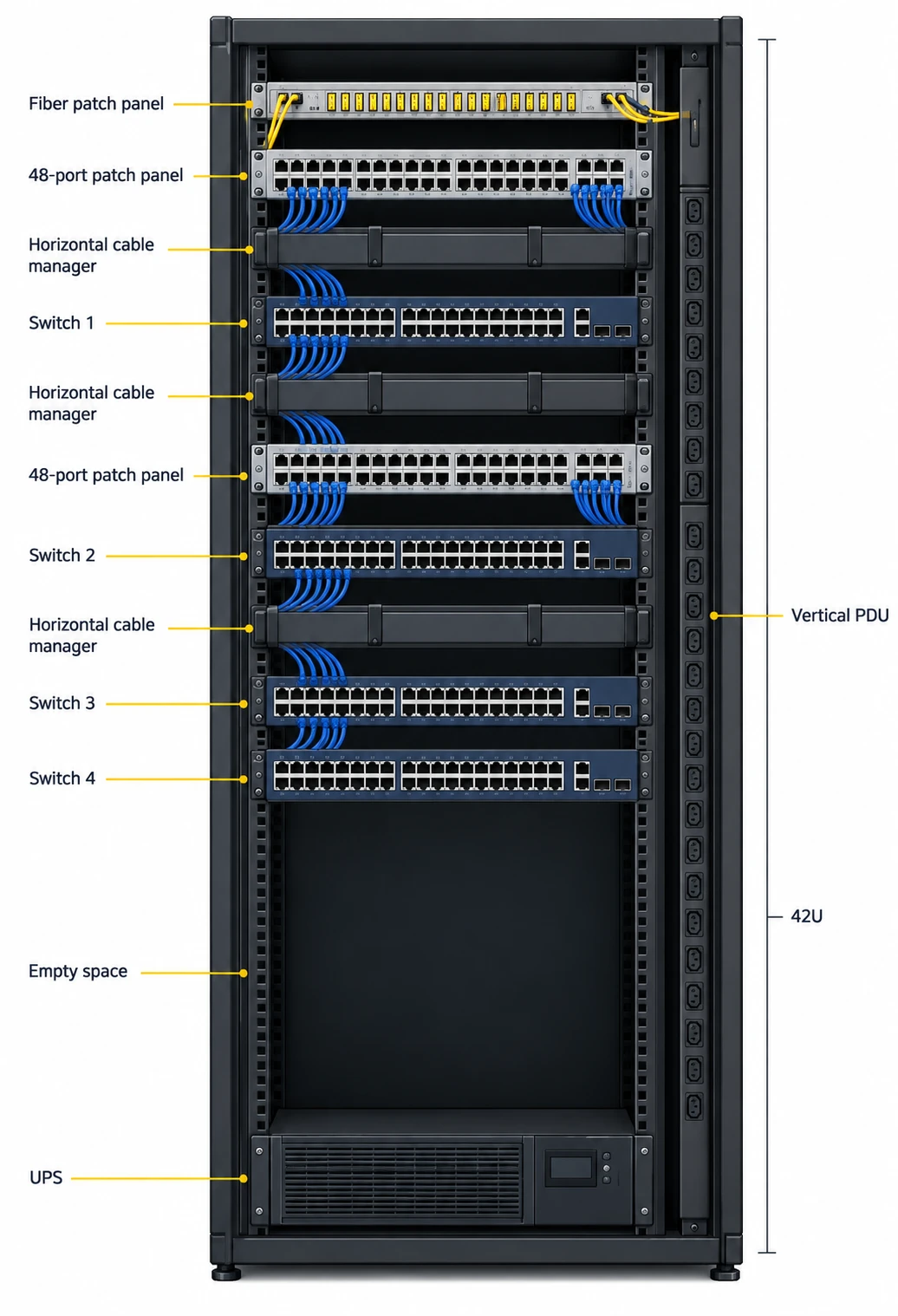
Dedicated stack cables are short, so stack members go in the same rack, mounted one above the other, with room for the stack cables at the back and the ring return cable from bottom to top. Leave one rack unit of space or a horizontal cable manager between switches so patch cords do not bury the stack ports. Our server rack size chart helps work out how many units a full stack, its patch panels and cable managers need.
Split the uplinks across members
Never land both uplinks on the same member. Put one on the top switch and one on the bottom switch, bundle them into a cross-stack link aggregation group, and run them to separate switches in the core if you have a pair. That uplink is usually fiber. Our fiber cabling team runs and certifies the backbone, and our fiber transceiver guide covers choosing the optics at each end.
Stacking between closets
Platforms that stack over front-panel ports, such as Aruba VSF, Juniper Virtual Chassis and the Catalyst 1300, can in principle stack across a building over fiber. It works, but it spreads one control plane over several rooms and makes a split stack more likely. For most buildings we would rather run a separate stack in each closet with fiber uplinks back to the MDF. If you do stack across rooms, use a ring with diverse fiber paths so one damaged cable does not split it.
Power and PoE
Plug stack members into different circuits or different outputs of the UPS, so one tripped breaker does not take out half the stack and trigger an election. Size the UPS for the full PoE load, not the switch idle draw. Our guides on PoE, PoE+ and PoE++ and UPS sizing cover the numbers.
The copper behind it
A 48-port stack member is 48 horizontal runs that all need to terminate cleanly, test properly and be labelled so someone can trace them later. That is network cabling and data cabling work, and it decides how usable the stack is far more than the switch model does. If you are planning multigigabit ports for new Wi-Fi access points, run Cat6A to those locations.
Buying checklist before you order a stack
- Count the ports you need now and in three years. Then decide whether that is one switch, a few in one room, or several spread out.
- Check where the switches will physically sit. Same rack means stacking is easy. Different rooms usually means standalone plus fiber.
- Confirm the stacking method. Dedicated stack ports, or front-panel ports that you give up for stacking.
- Check what is included. Stack cables, stack modules and power stack cables are separate parts on many models.
- Match the family and software. Members must be compatible models and run the same version.
- Plan the uplinks. Which members carry them, what speed, which optics, and where they land in the core.
- Add up the PoE budget per member for every camera, access point and phone.
- Plan your upgrade window. Know how long a stack-wide reload takes and when you can afford it.
- Configure priorities on purpose so you choose the active and standby switches.
- Budget for the cabling, patch panels and rack space, not just the switches.
Frequently asked questions
What is a stackable switch?
A stackable switch is a switch that can be connected to other switches of the same family with stack cables or stack ports so that the group operates as one logical switch, with one management IP address, one configuration and one control plane.
What is the difference between stackable and standalone switches?
Stacked switches share one control plane and are managed as a single device, with cross-member link aggregation for redundant uplinks. Standalone switches each have their own control plane, configuration and IP address, and each one fails, upgrades and is managed independently.
Is stacking the same as daisy-chaining?
No. Daisy-chaining connects independent switches with ordinary uplinks, and each switch stays separate. Stacking joins switches into one logical device over dedicated stack links, with one configuration and far higher bandwidth between members.
How many switches can you stack?
It depends on the platform. Cisco Catalyst 9200 and 9300 stacks take up to 8 members, Aruba CX 6300 and Juniper EX3400 and EX4400 take up to 10, and many small business platforms such as the Aruba Instant On 1960 take up to 4. Always check the data sheet for your model and software version.
Can you stack different switch models together?
Usually only within the same family. For example, the Catalyst 9300X can stack with the 9300, but the 9200 cannot stack with the 9200L, and Aruba 6200 and 6300 switches cannot share a stack. Mixing PoE and non-PoE models of the same family is often allowed, but not always: FortiSwitch stacks, for example, require identical models.
Do stacked switches need the same software version?
Yes. All members have to run the same software. Many platforms can automatically upgrade a new member to match the stack when it joins.
What happens if the main switch in a stack fails?
The standby switch takes over the controller role. On platforms with stateful switchover, such as Cisco StackWise, traffic on the other members keeps flowing. Only devices connected directly to the failed member lose connectivity.
Is a stack better than link aggregation?
They do different jobs and work best together. Link aggregation bundles cables between two devices. Stacking lets that bundle span two physical switches, so the uplink survives a whole switch failing, not just a cable.
Is stacking worth it for a small business?
If you have two or more switches in one closet, yes, usually. It simplifies management and gives you redundant uplinks. With only one switch, buy a good standalone switch, or a stackable one if you know you will add a second soon.
Are UniFi switches stackable?
Most UniFi switches are managed centrally in UniFi Network but do not stack. Ubiquiti documents true stacking for its ECS-S series, with up to 4 switches in a ring over QSFP28 cables.
How far apart can stacked switches be?
With dedicated stack cables, only a few metres. Cisco Catalyst 9300 stack cables come in lengths up to 3 m. Platforms that stack over standard ports can use fiber and reach much further, but spreading a stack across rooms increases the risk of a split stack.
Need a hand with your switch room?
We plan, cable and install switch rooms for offices, warehouses and data rooms across Toronto and the GTA, from structured cabling and server room cabling to racks and cabinets and the fiber between closets. If you are deciding between a stack and standalone switches, send us the floor plan and the equipment list and we will tell you what we would do. Request a free quote or call 1-647-846-1925.