
Fiber optic installation in Toronto and the GTA
We install, splice, terminate and test fiber optic cabling for offices, warehouses, multi-tenant buildings and campuses. Every strand is tested and labelled before handover, so you know each link will carry the speed you planned for.
When fiber is the right choice
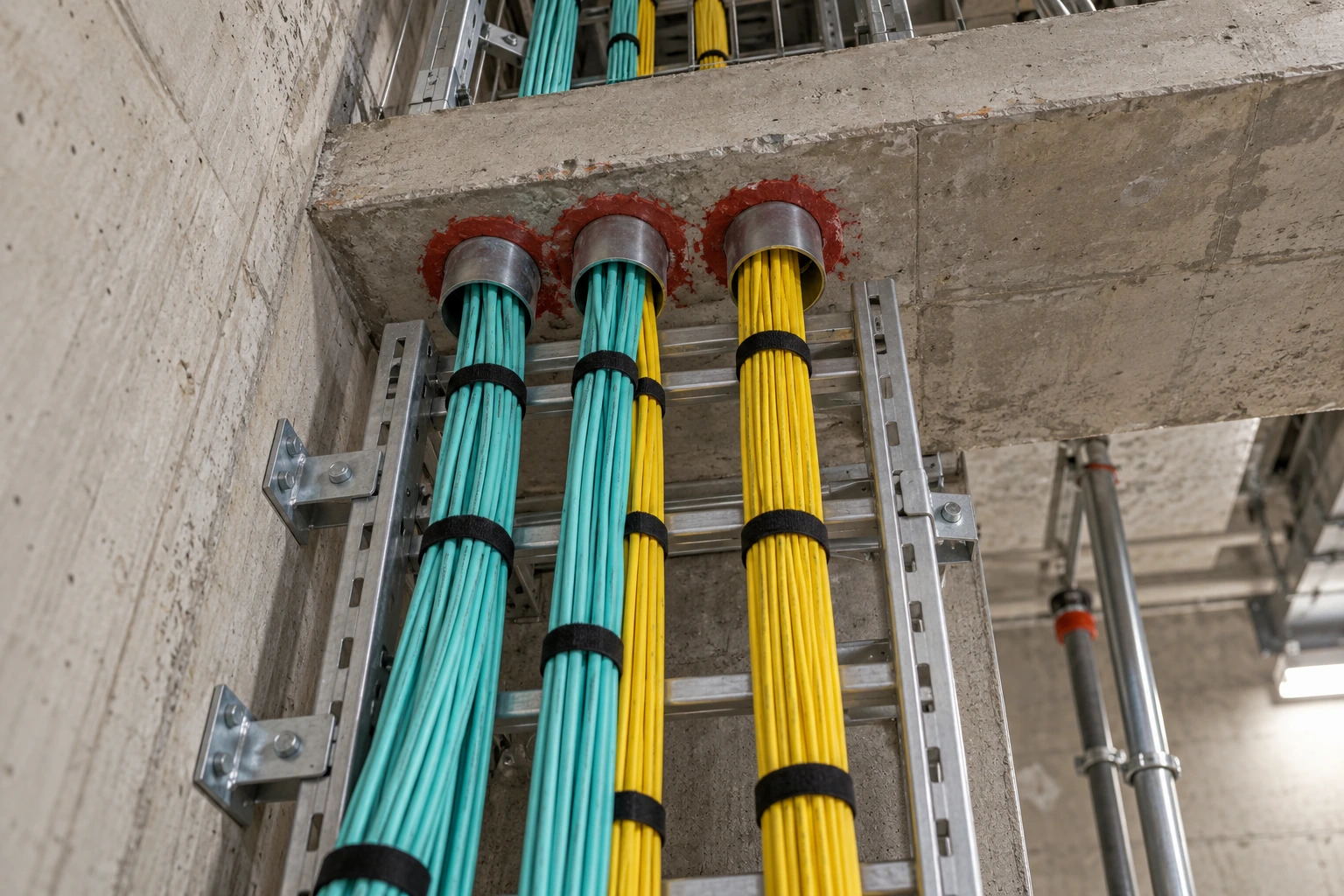
Copper Ethernet stops at 100 m, including patch cords. Fiber has no such limit inside a building, carries far more bandwidth, and is not affected by electrical noise from motors, lighting or power cables. Most of the fiber we install does one of these jobs:
- Backbones. Linking the main network room (MDF) to the closets (IDFs) on other floors or at the far end of a warehouse.
- Building to building. Connecting offices, plants and outbuildings on the same property through underground conduit.
- Server rooms. Uplinks at 10, 25, 40 and 100 Gb between switches, servers and storage.
- Carrier entrance. Extending an internet provider’s handoff from the building’s telephone room up to your suite.
- Noisy environments. Plant floors and electrical rooms where copper picks up interference.
If you are not sure where your rooms should go, our guide to MDF and IDF rooms explains the layout, and our network cable distance chart shows where copper runs out.
What we install
Building backbones
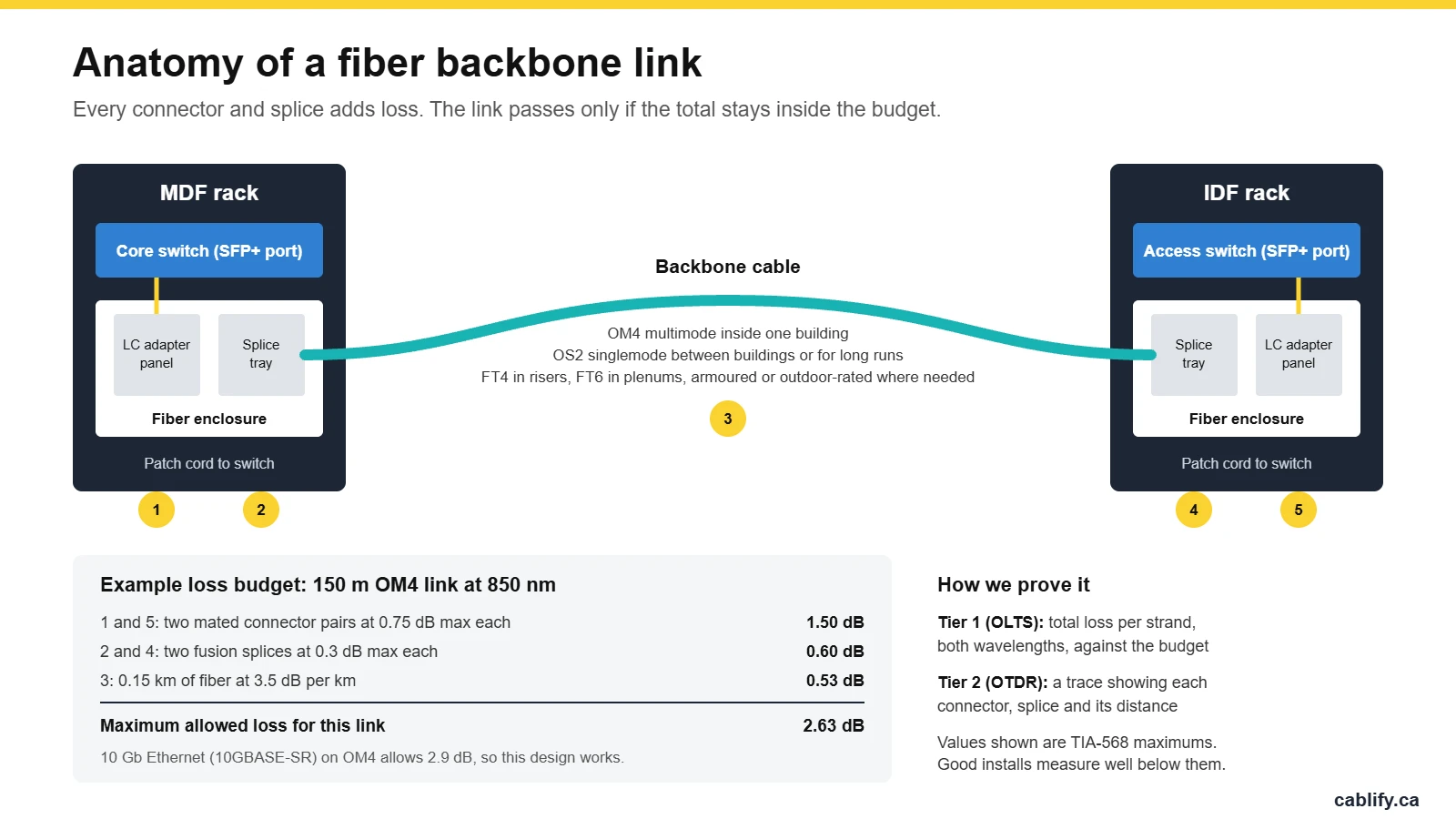
Multimode or singlemode fiber from the MDF to each IDF, with its own route back to the core for every closet. In multi-tenant towers we work with building management on riser access and firestopping. See our guide to fiber backbones for multi-tenant buildings.
Outdoor and building-to-building fiber
Outdoor-rated, water-blocked cable pulled through underground conduit between buildings, with armoured cable where it needs protection. Outdoor cable is spliced to indoor cable at an entrance enclosure near where it comes in. More on singlemode fiber installation.
Fusion splicing
Pigtails spliced onto backbone strands for the lowest possible loss, plus splices to extend or repair existing cable. Every splice sits in a protected tray inside a closed enclosure. Details on our fusion splicing services page.
Terminations
LC, SC and MPO connectors in rack-mount or wall-mount enclosures, with UPC or APC polish to match your equipment. See fiber terminations and our guide to UPC vs APC connectors.
Testing and documentation
Tier 1 loss testing on every strand, OTDR traces where the project calls for them, end-face inspection, labels on every port and an as-built drawing of the route and strand count.
Repair and troubleshooting
Cuts from renovation work, crushed cable, damaged connectors and links that suddenly go dark. We locate the fault with an OTDR and splice or replace the damaged section. For urgent outages, see emergency fiber repair.
Which fiber type, and how far it reaches
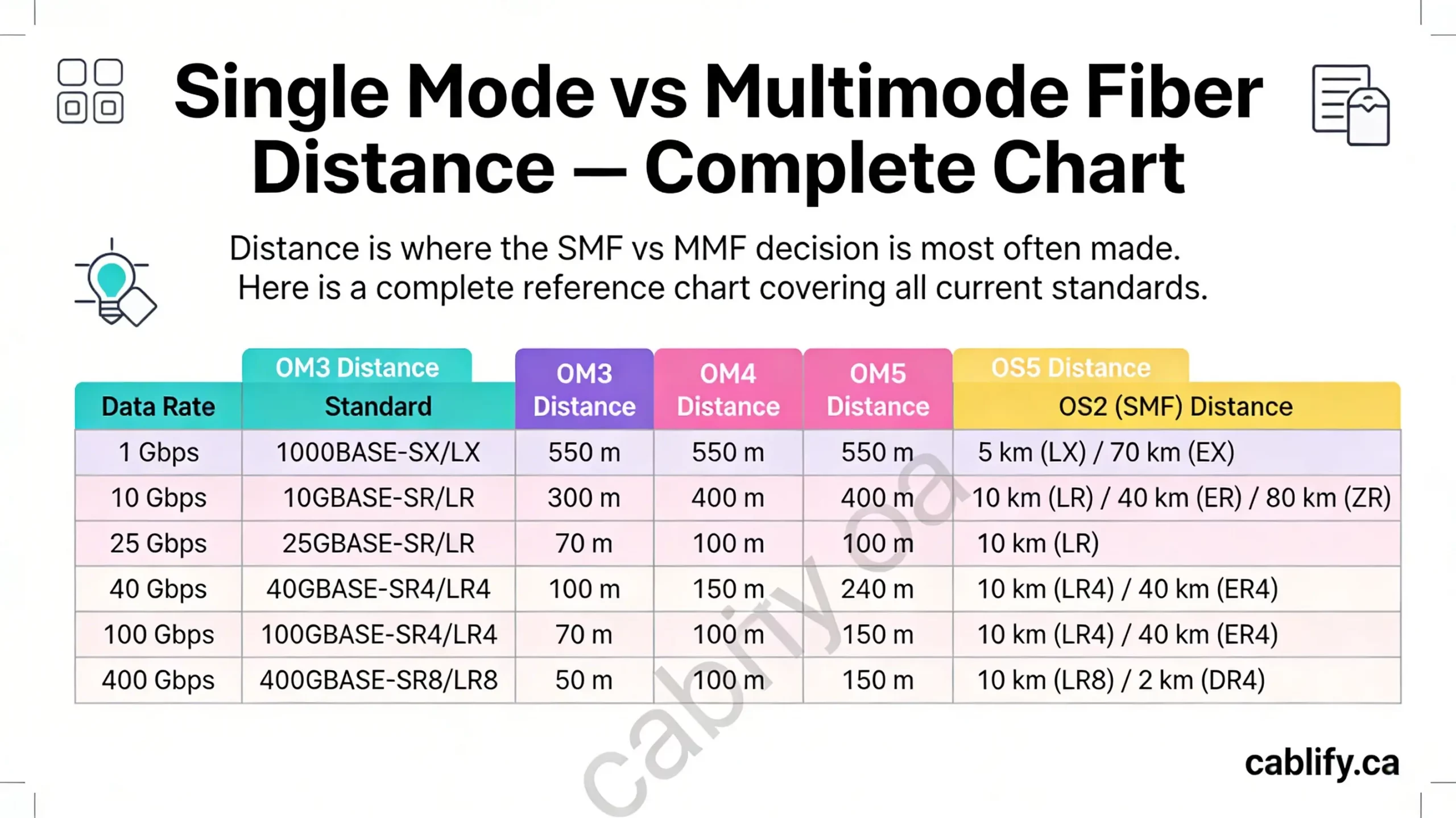
The fiber type decides how far a link can run at a given speed. These are the distances in the Ethernet standards for the most common optics.
| Type | Core | Jacket colour | 1 Gb (SX or LX) | 10 Gb (SR or LR) | Where we use it |
|---|---|---|---|---|---|
| OM1 | 62.5 µm | Orange | 275 m | 33 m | Older buildings. Usually replaced rather than extended. |
| OM2 | 50 µm | Orange | 550 m | 82 m | Older buildings. Fine for 1 Gb, limited for 10 Gb. |
| OM3 | 50 µm | Aqua | 550 m | 300 m | Backbones in smaller buildings. |
| OM4 | 50 µm | Aqua | 550 m | 400 m | Our usual choice for multimode backbones inside one building. |
| OM5 | 50 µm | Lime green | 550 m | 400 m | Data centres using shortwave multiplexing. |
| OS2 | 9 µm | Yellow | 5 km | 10 km | Between buildings, long runs, carrier links and backbones meant to last. |
Mixing types causes problems. An OM1 patch cord on an OM4 backbone adds loss at every joint, and multimode optics will not work on singlemode fiber. For choosing the right optics, see our fiber transceiver guide.
Singlemode or multimode?
Multimode fiber uses lower-cost optics and handles 10 Gb up to 400 m on OM4, which covers almost any single building. It has been the standard choice for in-building backbones for years.
Singlemode fiber reaches kilometres instead of hundreds of metres, and it is not limited by speed the way multimode is. The cable itself costs about the same or less than OM4. The optics cost more, though the gap has narrowed a lot.
For links between buildings, singlemode is the only practical option. For new backbones inside a building we often suggest singlemode, or a hybrid cable with both types, so the fiber does not limit the next round of switch upgrades.
Cable ratings: where each type can go
Fiber cable is rated for the space it runs through. In Canada the flame ratings are FT4 and FT6. Using the wrong cable can fail an inspection or a landlord’s review.
| Location | What the cable needs |
|---|---|
| Ceilings that are not used for return air | FT4 (riser) rated cable |
| Risers between floors | FT4 rated cable, through firestopped sleeves or slots |
| Return air plenum ceilings | FT6 (plenum) rated cable |
| Warehouses, cable tray, areas with rodents or forklifts | Armoured cable, or cable inside innerduct |
| Underground conduit between buildings | Outdoor-rated, water-blocked cable |
| Where outdoor cable enters a building | A splice to indoor-rated cable at an entrance enclosure close to the entry point |
Fusion spliced or pre-terminated?
There are three ways to put connectors on a fiber backbone. The right one depends on the route, the timeline and how many strands you need.
| Method | Best for | Trade-off |
|---|---|---|
| Fusion-spliced pigtails | Most backbones, outdoor links and any run where the length is not known in advance | Needs a fusion splicer and more time on site, but gives the lowest loss |
| Pre-terminated MPO trunks and cassettes | Server rooms and data centres with high strand counts and 40 or 100 Gb links | Fast to install and factory tested, but must be ordered to the exact length |
| Field-installable connectors | Small jobs and quick repairs | No splicer needed, but higher loss per connector |
For pre-terminated trunks and patch cords made to length, see custom fiber cables or buy fiber optic cables.
What you get at handover
A fiber link that tests well on day one but has no records turns into guesswork the first time something changes. Every job we finish includes the paperwork your IT team or the next contractor will need.
Loss test results are recorded per strand at both wavelengths and checked against the loss budget for the application. On backbones and outdoor runs, OTDR traces show the distance to every connector and splice, which makes any future fault much faster to find.
- Loss test results for every strand
- OTDR traces where specified
- End faces inspected and cleaned
- Enclosures, ports and cables labelled
- As-built drawing of the route
- Spare strands recorded
- Dust caps on unused ports
Fiber problems we are called in to fix
Many of the fiber calls we get are not broken cable. These are the faults we see most often.
- Dirty connectors. Dust on a connector end face is the most common cause of high loss and dead links. Every connector should be inspected with a scope and cleaned before it is plugged in.
- Reversed polarity. Transmit connected to transmit, so the link never comes up. Our guide to fixing fiber polarity walks through it.
- Mismatched parts. OM1 patch cords on an OM4 backbone, multimode optics on singlemode fiber, or an APC connector pushed into a UPC port.
- Tight bends and crushed cable. Over-tightened cable ties, cable pinched in a tray or a door, and slack coiled too small inside an enclosure.
- Cuts during renovations. Fiber that was never labelled or recorded gets cut when walls or ceilings are opened. An OTDR finds the break, and a splice or a new section fixes it.
Fiber installation across the GTA
We work across Toronto and the GTA, from downtown office towers to industrial parks in Mississauga, Vaughan and Brampton. We also cover Markham and Richmond Hill, Oakville, Hamilton and Burlington, Aurora and Newmarket and Barrie.
Fiber optic installation FAQ
How much does fiber optic installation cost?
It depends on the number of strands, the distance, the route, how many locations are connected and whether the ends are spliced or pre-terminated. A backbone between two rooms on the same floor is a small job. Underground runs between buildings cost more because of the conduit work. We quote from floor plans or after a site visit.
What is the difference between singlemode and multimode fiber?
Singlemode fiber has a 9 µm core and carries light over kilometres. Multimode fiber has a 50 or 62.5 µm core and uses lower-cost optics, but reaches only a few hundred metres at 10 Gb. Multimode is common inside buildings and singlemode is used between buildings and for long runs.
How far can fiber optic cable run?
At 10 Gb, OM3 multimode reaches 300 m, OM4 reaches 400 m and OS2 singlemode reaches 10 km with standard LR optics. Copper Ethernet, by comparison, is limited to 100 m.
What is fusion splicing?
Fusion splicing joins two fibers by melting their ends together with an electric arc. It gives a permanent joint with very low loss, and it is how we attach connectors to backbone cable and repair cut fiber.
How is fiber optic cable tested?
Tier 1 testing uses a light source and power meter to measure the total loss of each strand and compare it to the allowed budget. Tier 2 testing adds an OTDR trace, which shows the loss and distance of every connector and splice along the link.
Can a cut fiber optic cable be repaired?
Yes. We find the break with an OTDR, then fusion splice the cable or replace the damaged section with a new length and two splices. The link is retested after the repair.
Is fibre the same as fiber?
Yes. Fibre is the Canadian and British spelling and fiber is the American one. Cable makers and spec sheets mostly use fiber, so you will see both on this site.
Do you install fiber in Mississauga and Vaughan?
Yes. We install fiber across Toronto and the GTA, including Mississauga, Vaughan, Brampton, Markham, Oakville, Hamilton and Burlington.
Related services
Fiber is usually one part of a larger network. See our structured cabling, network cabling, data cabling and server room cabling services, or go straight to fiber terminations, fusion splicing and emergency fiber repair.
Planning a fiber run?
Send us the locations you need to connect, a floor plan or rough distance, and the speed you need. We will recommend the fiber type, strand count and termination method, and give you a clear quote. Call 1-647-846-1925.