
We install, service and take over door access control for commercial buildings.
Card and fob readers, mobile credentials, keypads, biometrics, intercom entry and elevator control. One door or a hundred. New installs, and takeovers of systems someone else walked away from.

What we install
Card and fob readers
Proximity and encrypted smart card readers at the door, with the credentials issued and revoked from one place. The most common commercial setup and still the cheapest to run.
Mobile credentials
The phone becomes the credential. Nothing to hand out, nothing to collect back, and revoking access takes seconds rather than a locksmith visit.
Keypads and PIN entry
Cheap, no credential to lose, and fine on a low traffic back door. Weakest option on a main entrance because codes get shared and rarely get changed.
Biometric readers
Fingerprint, palm and facial readers where the credential must not be transferable. Brings privacy obligations with it, which we go through before anything is specified.
Intercom and video entry
Door release for visitors and deliveries, with video verification. Standard on multi-tenant buildings and anywhere reception is not staffed all day.
Elevators, gates and turnstiles
Floor by floor elevator control, parking gates, man traps and turnstiles. The parts of access control most contractors quietly leave out of the quote.
What sits behind one controlled door
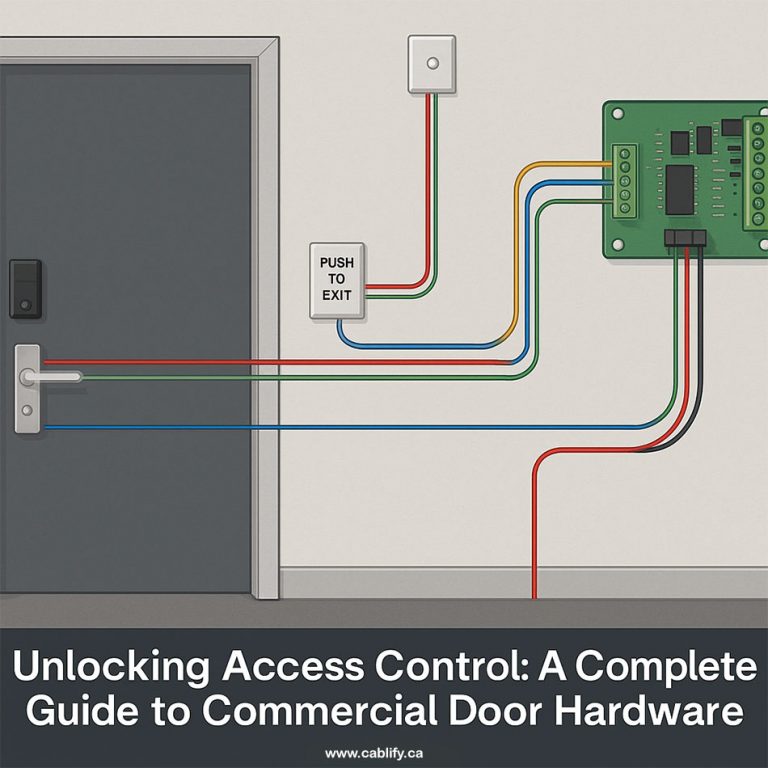
A single access controlled door is seven or eight separate parts, and most of the trouble we get called out to fix comes from one of them being specified wrong at the start.
- The reader at the door, which reads the credential and nothing else
- The controller, usually in a closet, which decides whether the door opens
- Lock hardware, either an electric strike, a maglock or an electrified lever set
- A request to exit device, so leaving the room does not raise an alarm
- A door position contact, so the system knows when a door is propped
- Power supply and battery backup, sized for the lock and the door count
- The credential itself, whether a card, a fob, a phone or a fingerprint
- Software, on a local server or in the cloud, where the rules live
- Cabling between all of it, which is where the gauge and the run length start to matter
Our guide to access control cables and the one on selecting the correct wire gauge cover the part that gets skipped most often.
Fail-safe, fail-secure and the fire code
This is the decision that matters most and the one most often got wrong. A fail-safe lock unlocks when power is cut. A fail-secure lock stays locked. They are not interchangeable and the choice is not about preference.
In Ontario a building has to let people out without a key, without special knowledge and without a second action. A magnetic lock holds a door shut with power, so on a designated egress door it has to release on the fire alarm, on power loss, and on an emergency release button at the door. An electric strike behind a lever set is usually fail-secure, because the lever still opens mechanically from the inside.
Get this backwards and you either have a door that traps people or a door that unlocks the building every time the power flickers. We work it out door by door, and the local fire official has the final word on egress, not us and not the software vendor. Before handover we test every door in both directions, including with the fire alarm active.
Choosing the credential
| Credential | Strength | Weak point | Best for |
|---|---|---|---|
| Proximity fob or card | Cheap, familiar, works offline | Older 125 kHz formats clone in seconds with a $30 device | General staff access, if the format is encrypted |
| Encrypted smart card | Cannot be cloned the way legacy prox can | Costs more per credential, reader must support it | Anywhere the door actually matters |
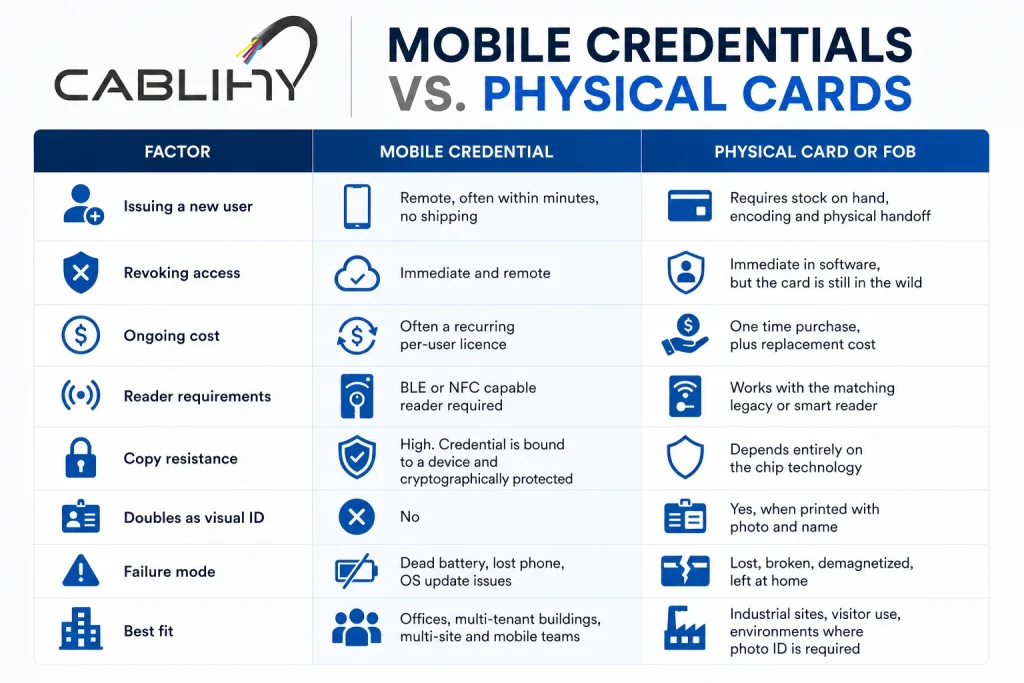
| Mobile credential | Nothing to issue or collect, instant revoke | Depends on the phone and on a running app | Offices with turnover, contractors, multi site |
| PIN keypad | No credential to lose, lowest cost | Codes get shared and almost never get changed | Low traffic service doors |
| Biometric | Cannot be handed to someone else | Privacy obligations, slower throughput, higher cost | Server rooms, cash handling, controlled substances |
Most buildings end up with two or three of these rather than one. Our full breakdown of access control credential types goes through the trade-offs in detail.
Cloud or on-premise
Cloud systems put the software on the vendor’s servers and you manage doors from a browser. On-premise keeps the server in your building. Both still control the door locally, so a network outage does not unlock or lock out your building either way.
Cloud wins on multi-site, on remote administration, and on never having to patch a server. It costs a subscription per door, forever. On-premise has no recurring licence on most platforms but you own the server, the backups and the upgrade path.
If your organisation has rules about where data physically lives, ask any cloud vendor where their Canadian tenancy actually sits before you sign. It is a short question that occasionally produces a long silence.
What access control costs
Prices move with the door, not with the software. A door with an existing lever set, an open ceiling above it and a closet twenty feet away is straightforward. A glass storefront door with no power near it, through a finished wall, is a different job at the same reader price.
| Scope | Typical range | What moves the number |
|---|---|---|
| Single door, basic reader and strike | From around $1,500 installed | Existing hardware, power nearby, cable route open or closed |
| 10 doors, around 50 users | $6,000 to $15,000 and up | Maglocks versus strikes, controller count, cloud licences, fire panel tie-ins |
| Adding a door to an existing system | Per door, usually well under the first door | Spare controller capacity is the whole question |
Three things push a quote up that buyers rarely budget for: fire alarm interface on maglocked egress doors, power where there is none, and door hardware that has to be replaced because the existing lever cannot be electrified. We price those as separate lines so you can see them.
Cloud platforms add a per door subscription on top. Over five years that often exceeds the hardware, so it belongs in the comparison rather than in a footnote.
Taking over a system someone else installed
A good share of our access control work starts with a building that already has a system and no longer has the installer. Usually the software licence is in someone else’s name, nobody has the admin password, and the person who knew which controller fed which door has left.
That is a recoverable position more often than people expect. We document what is actually there, identify the panels and reader formats, work out what can be kept and what has reached the end of support, and give you a written route from where you are to a system you control. Sometimes that means a firmware and licence transfer, sometimes it means reusing the cable and the door hardware and replacing the head end.
What we will not do is tell you to rip out working hardware because it is easier to quote a new system.
Power cuts and internet outages
- Power loss. Controllers run on battery backup. Expect four to eight hours on a typical panel, less if it is driving several maglocks
- Egress doors on maglocks release on power loss by design, which is the point of fail-safe
- Fail-secure strikes stay locked, and people still get out through the lever from inside
- Internet loss on a cloud system. Doors keep working. Controllers hold the credential list locally and keep deciding
- What you lose during an outage is remote administration and live event logging, not entry
- Events get buffered and upload when the link returns, so the audit trail survives
If a vendor cannot tell you plainly what happens to each door in each of those cases, that is worth noticing.
What it connects to
- Security cameras, so a badge event pulls up the footage from that door at that second
- The fire alarm panel, for release of maglocked egress doors on alarm
- Elevators, for floor by floor control in multi-tenant buildings
- Active Directory or your HR system, so a leaver loses building access the same hour they lose email
- Visitor management, for contractor and delivery access with an expiry on it
- Time and attendance, where badge events feed payroll
- Intercom and buzzer entry on multi-tenant and condo buildings
The Active Directory link is the one most worth doing and the one most often skipped. Buildings where offboarding is manual are the buildings where old credentials keep working for months.
Where we work
We cover Toronto and the wider GTA, including Mississauga, Vaughan, Brampton, Markham, Richmond Hill, Scarborough, North York, Etobicoke, Oakville, Burlington, Milton and Hamilton, and we travel out to Barrie, Guelph, Kitchener and Waterloo for multi-site work. Most door surveys across the GTA get booked within a few days.
Common questions
How much does access control cost per door?
A single door with an existing lever set, power nearby and an open cable route starts around $1,500 installed. The number climbs when the door needs a maglock with a fire alarm interface, when there is no power at the opening, or when the existing hardware cannot be electrified and has to be replaced. A ten door system with around fifty users typically lands between $6,000 and $15,000 before any cloud subscription.
What is the difference between fail-safe and fail-secure?
A fail-safe lock unlocks when power is removed. A fail-secure lock stays locked. Magnetic locks are fail-safe by nature, which is why on an egress door they must release on the fire alarm, on power loss and on an emergency button. Electric strikes behind a lever set are usually fail-secure, because the lever still opens mechanically from inside. The door and the fire code decide which one you get, not preference.
Will the doors still work if the internet goes down?
Yes. On both cloud and on-premise systems the controller at the door holds the credential list locally and keeps making decisions. What you lose during an outage is remote administration and live event reporting. Events are buffered and upload when the connection returns, so the audit trail is not lost.
What happens during a power failure?
Controllers run on battery backup, typically four to eight hours and less if they are holding several magnetic locks. Maglocked egress doors release, which is the intended behaviour. Fail-secure doors stay locked and people still exit through the lever from inside.
Can you take over a system installed by someone else?
Usually. We document what is on site, identify the panels and reader formats, and tell you what can be kept and what has reached end of support. Where the software licence sits with a previous installer we work through the transfer. We will not tell you to replace working hardware because a new system is easier to quote.
Can existing doors be converted to card or fob entry?
Most can. It depends on whether the existing lever set can be electrified, whether there is a path for power and cable to the opening, and whether the door is on a designated egress route. Glass storefront doors and heritage or solid concrete surrounds are the two situations that add real cost.
Do I need a permit for access control in Ontario?
The low voltage side generally does not require an electrical permit, but any new power circuit feeding a panel does and that is licensed electrical work. Where the system ties into the fire alarm, the interface has to be done properly and verified. The local fire official has the final say on anything affecting egress.
Can you integrate access control with our cameras and HR system?
Yes. Camera integration lets a badge event pull the footage from that door at that moment, which is what makes an incident investigable rather than guessable. Linking to Active Directory or your HR system means a departing employee loses building access at the same time as their email, which is the single most useful integration and the one most often left out.
Guides worth reading first
- Choosing the right door access control system
- Commercial door hardware, in full
- Credential types compared
- Types of door locks used in access control
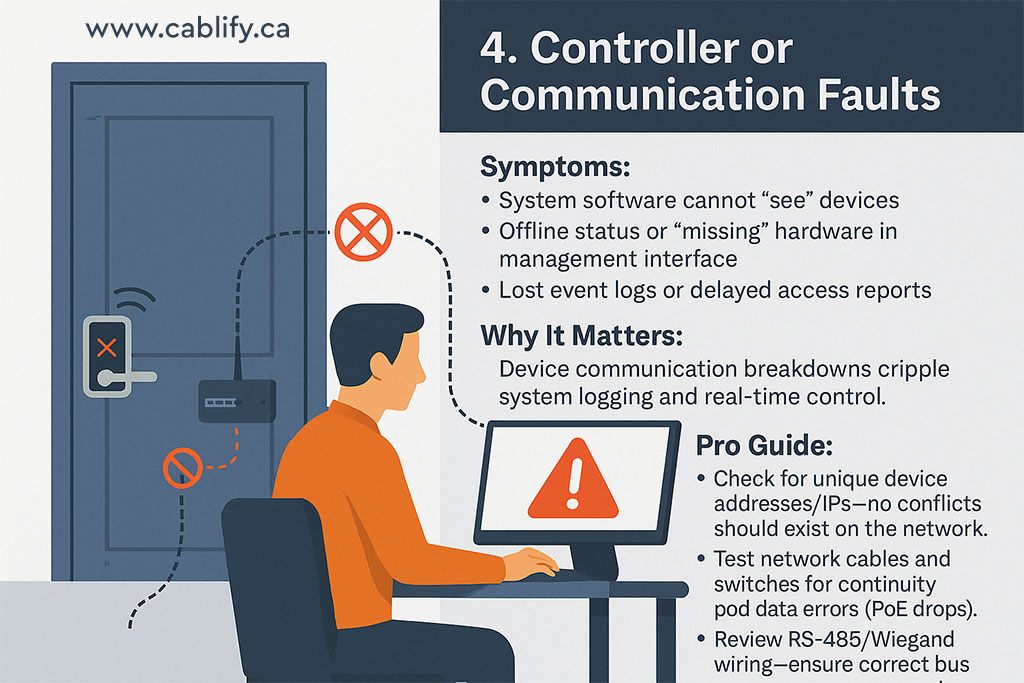
- Troubleshooting door access failures
- Fire code compliance checklist for property managers
- Access control cables explained
- Contactless and mobile access control in Canada
- UniFi door access control, complete guide
- Cloud based access control
Related services
See access control installation in Toronto, card reader installation, UniFi Access installation, security camera installation and structured cabling.
Start with a door survey, not a product
We walk every door on your list, record what is there, flag the egress doors, and put an itemized price in front of you before any work starts. No charge for the visit. Call 1-647-846-1925.