
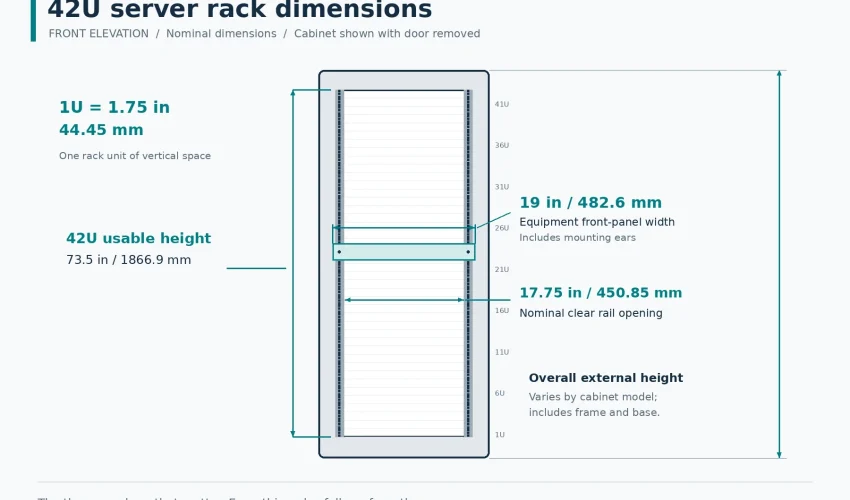
One rack unit is 1.75 inches, or 44.45 mm. A 42U cabinet gives you 73.5 inches of usable mounting height. The rack is 19 inches wide at the rails, and depth varies from 600 mm to 1200 mm depending on what goes in it.
That answers the search. The rest of this guide is the part that stops you ordering the wrong cabinet, which happens more often than you would think. Depth, weight, door clearance and airflow cause more problems on site than height ever does.
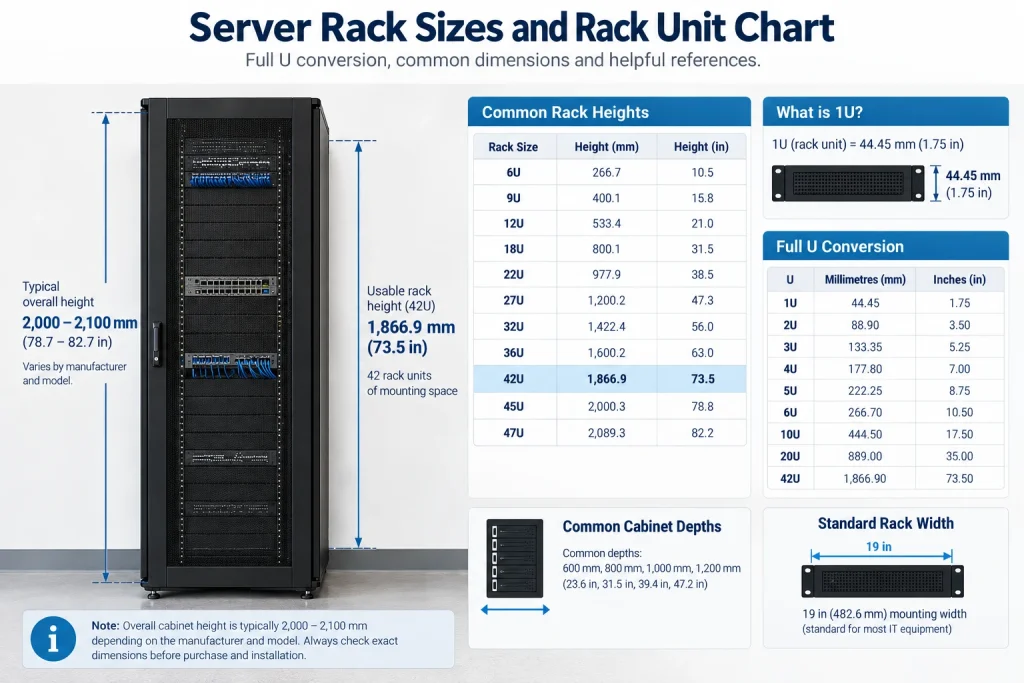
Rack unit conversion chart
Scroll sideways to view all columns.
| Rack units | Inches | Millimetres | Feet |
|---|---|---|---|
| 1U | 1.75 in | 44.5 mm | 0.15 ft |
| 2U | 3.50 in | 88.9 mm | 0.29 ft |
| 3U | 5.25 in | 133.4 mm | 0.44 ft |
| 4U | 7.00 in | 177.8 mm | 0.58 ft |
| 5U | 8.75 in | 222.2 mm | 0.73 ft |
| 6U | 10.50 in | 266.7 mm | 0.88 ft |
| 7U | 12.25 in | 311.2 mm | 1.02 ft |
| 8U | 14.00 in | 355.6 mm | 1.17 ft |
| 9U | 15.75 in | 400.1 mm | 1.31 ft |
| 10U | 17.50 in | 444.5 mm | 1.46 ft |
| 11U | 19.25 in | 489.0 mm | 1.60 ft |
| 12U | 21.00 in | 533.4 mm | 1.75 ft |
| 15U | 26.25 in | 666.8 mm | 2.19 ft |
| 16U | 28.00 in | 711.2 mm | 2.33 ft |
| 18U | 31.50 in | 800.1 mm | 2.62 ft |
| 20U | 35.00 in | 889.0 mm | 2.92 ft |
| 22U | 38.50 in | 977.9 mm | 3.21 ft |
| 24U | 42.00 in | 1066.8 mm | 3.50 ft |
| 27U | 47.25 in | 1200.2 mm | 3.94 ft |
| 30U | 52.50 in | 1333.5 mm | 4.38 ft |
| 32U | 56.00 in | 1422.4 mm | 4.67 ft |
| 36U | 63.00 in | 1600.2 mm | 5.25 ft |
| 37U | 64.75 in | 1644.7 mm | 5.40 ft |
| 38U | 66.50 in | 1689.1 mm | 5.54 ft |
| 42U | 73.50 in | 1866.9 mm | 6.12 ft |
| 45U | 78.75 in | 2000.3 mm | 6.56 ft |
| 47U | 82.25 in | 2089.2 mm | 6.85 ft |
| 48U | 84.00 in | 2133.6 mm | 7.00 ft |
| 52U | 91.00 in | 2311.4 mm | 7.58 ft |
To convert any value yourself: multiply rack units by 1.75 for inches, or by 44.45 for millimetres. Going the other way, divide inches by 1.75.
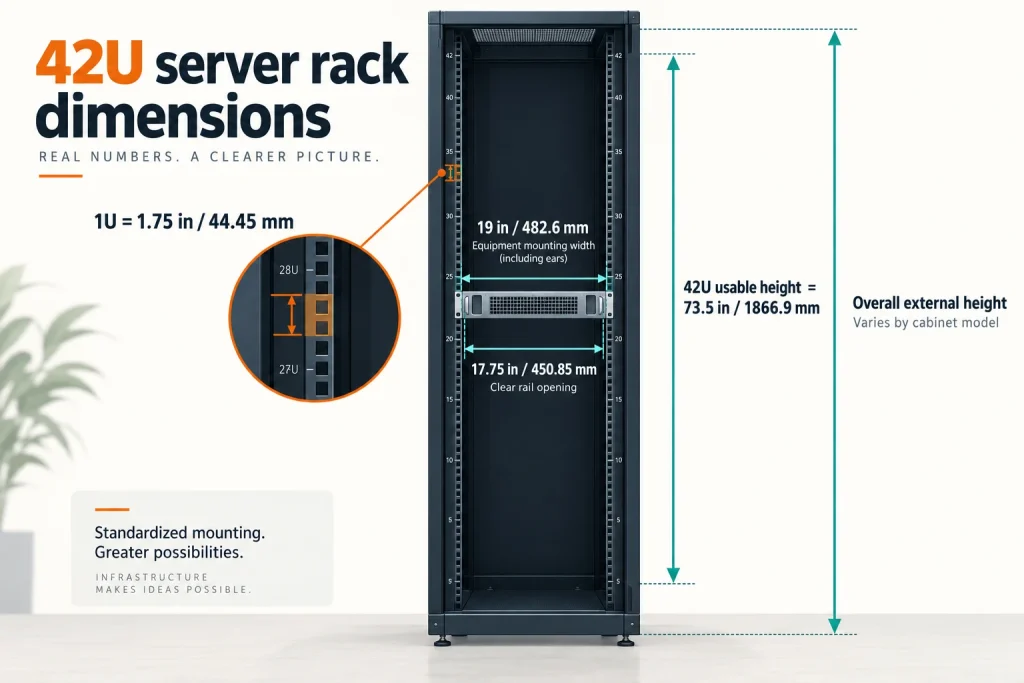
Note that these numbers are the usable mounting height, not the height of the cabinet. A 42U cabinet is taller than 73.5 inches once you add the frame, top panel and casters. More on that below, because it is the number that gets people stuck in a doorway.
42U server rack dimensions diagram
What a rack unit actually is
The rack unit comes from EIA-310, the standard that defines the 19 inch rack. It has barely changed since the 1950s, which is why a switch made this year still bolts into a frame made forty years ago.
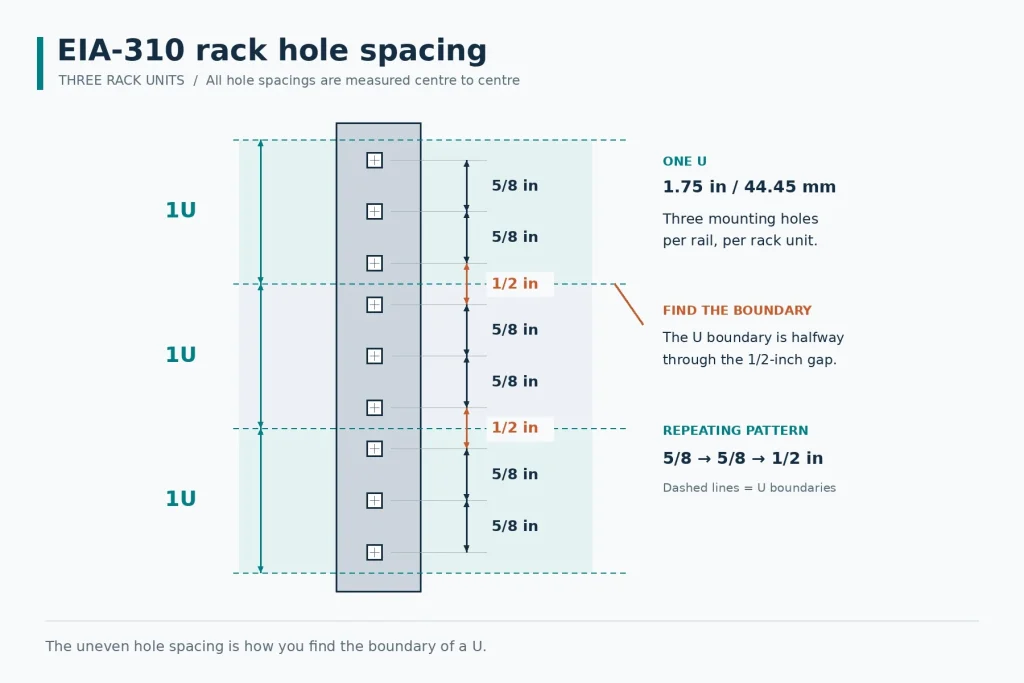
Each U is 1.75 inches of vertical space, and within that space there are three mounting holes. They are not evenly spaced. The pattern is 0.625 inches, 0.625 inches, then 0.5 inches, repeating up the rail. That uneven gap is how you find where one U ends and the next begins, and it is worth learning to spot, because mounting a device half a U out of alignment is a classic way to lose an hour.
Most rails are marked with a line or a number every U. If yours are not, count the holes in groups of three and look for the tighter pair.
EIA-310 hole spacing
Why 19 inches, and what is actually 19 inches
This trips people up when they measure a rack and get a different number. Here is what each dimension refers to:
- 19 in (482.6 mm) is the width of the equipment front panel, and the width across the mounting rail flanges
- 17.75 in (450.85 mm) is the clear opening between the rails, which is the real constraint on how wide a chassis can be
- 18.312 in (465.1 mm) is the horizontal distance between the hole centres on the two rails
So a 19 inch rack does not have a 19 inch opening. If a piece of equipment is described as 19 inch rack mount, it means the front panel measures 19 inches and the body fits inside 17.75.
Other rack widths you will run into
- 10 inch (half rack). Small wall boxes for a router, a small switch and a patch panel. Common in home and very small office installs. Nothing standard mounts in one except gear made specifically for it
- 23 inch. Telecom. Central offices, carrier gear, some legacy PBX. If you inherit a 23 inch frame in an older building, standard 19 inch equipment needs adapter brackets
Unless you are working on carrier equipment, 19 inch is the only width worth planning around.
Common rack and cabinet heights
| Size | Usable height | Typical use |
|---|---|---|
| 4U to 6U | 7 to 10.5 in | Small wall box. Router, small switch, a patch panel |
| 9U | 15.75 in | Wall mount for a small office IDF |
| 12U | 21 in | The most common wall mount size. 24 to 48 ports plus a switch and UPS |
| 15U to 18U | 26 to 31.5 in | Large wall mount, or a small floor cabinet under a desk |
| 22U to 27U | 38.5 to 47 in | Half height floor cabinet. Small server room, retail back office |
| 36U to 38U | 63 to 66.5 in | Where ceiling height or a raised floor limits you |
| 42U | 73.5 in | The default full size cabinet. Most common by a wide margin |
| 45U to 48U | 78.75 to 84 in | Higher density. Needs ceiling height and a clear delivery route |
| 52U | 91 in | Data centre and colocation. Rarely seen in a commercial office |
If you are choosing between a 42U and a taller cabinet for an office server room, take the 42U. The extra U in a 48 are usually unreachable without a step stool, and the taller cabinet makes the delivery and installation harder for very little gain.
Usable U versus overall height, and the doorway problem
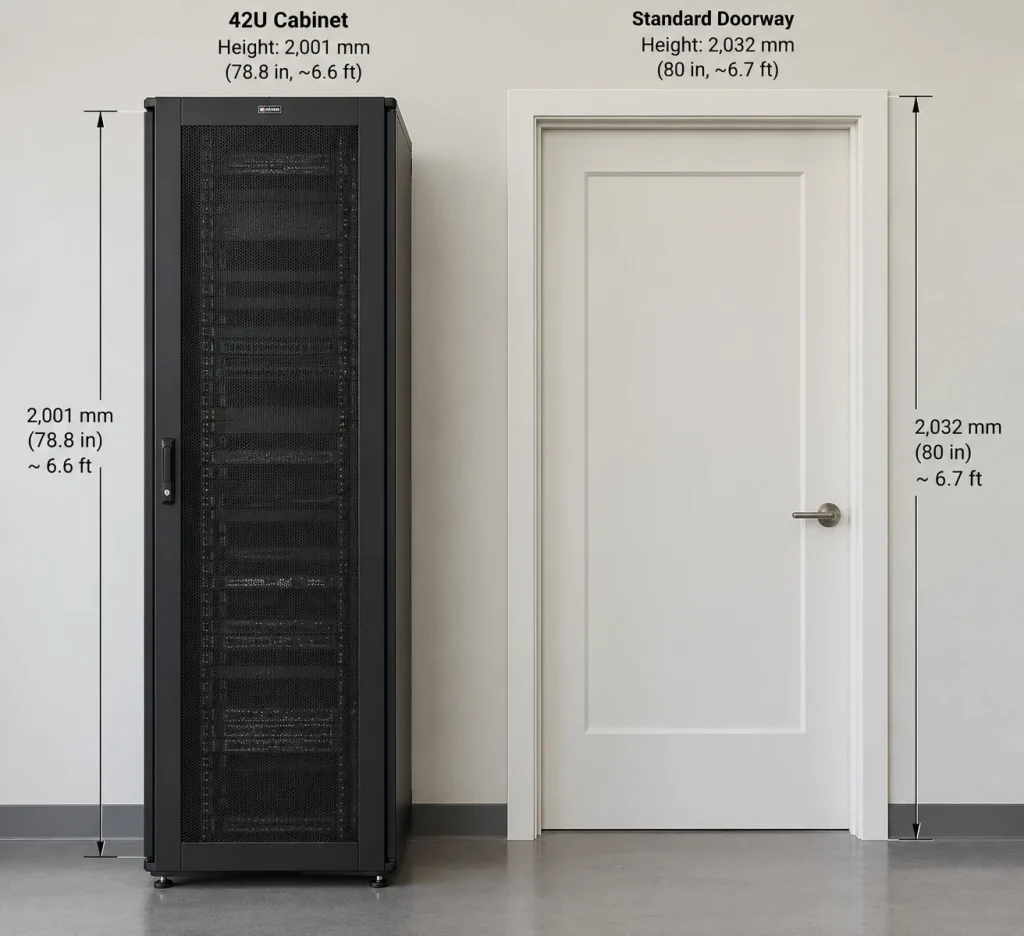
A 42U cabinet has 1866.9 mm of usable rail. The cabinet itself is usually somewhere between 2000 mm and 2100 mm tall once you add the frame, the top panel and casters.
A standard commercial door opening is 2032 mm, or 80 inches. So a 42U cabinet on casters is often taller than the door it has to go through, and always taller than the door frame allows once you account for the threshold and the fact that you cannot tilt a loaded cabinet.
What this means in practice:
- Order cabinets with removable casters, or plan to remove them and skate the cabinet in on a pallet jack
- Measure the full delivery route, not just the server room door. Loading dock, corridor, elevator car height, elevator door height, any fire door with a closer
- Elevator car height is the one that catches people. Many older GTA office buildings have cars under 2100 mm
- If the route will not take a full cabinet, use two shorter cabinets or an open frame rack assembled on site
We have walked into more than one project where a cabinet was sitting in a lobby because nobody measured the elevator. It is a ten minute check.
42U cabinet against a standard doorway
Rack depth, the dimension people get wrong
Height is easy to plan. Depth is where cabinets get ordered wrong, because people size to the equipment and forget everything behind it.
Common cabinet depths
- 600 mm. Patching only. Patch panels, a shallow switch, nothing else. Too shallow for most switches with rear facing power supplies
- 800 mm. Comms cabinet. Access switches, patch panels, a small UPS, an NVR. This covers most offices
- 1000 mm. The general purpose server cabinet. Handles most 1U and 2U servers with room behind for cabling and a vertical PDU
- 1070 to 1200 mm. Deep servers, chassis switches, high density cabling, or where you want proper rear working space
Typical equipment depths
| Equipment | Typical depth |
|---|---|
| Patch panel | 40 to 130 mm |
| Access switch, 24 or 48 port | 250 to 450 mm |
| Chassis or core switch | 450 to 800 mm |
| NVR | 350 to 500 mm |
| Rack mount UPS, 2U to 3U | 400 to 700 mm |
| 1U server | 600 to 800 mm |
| 2U server | 700 to 850 mm |
How to work out the depth you need
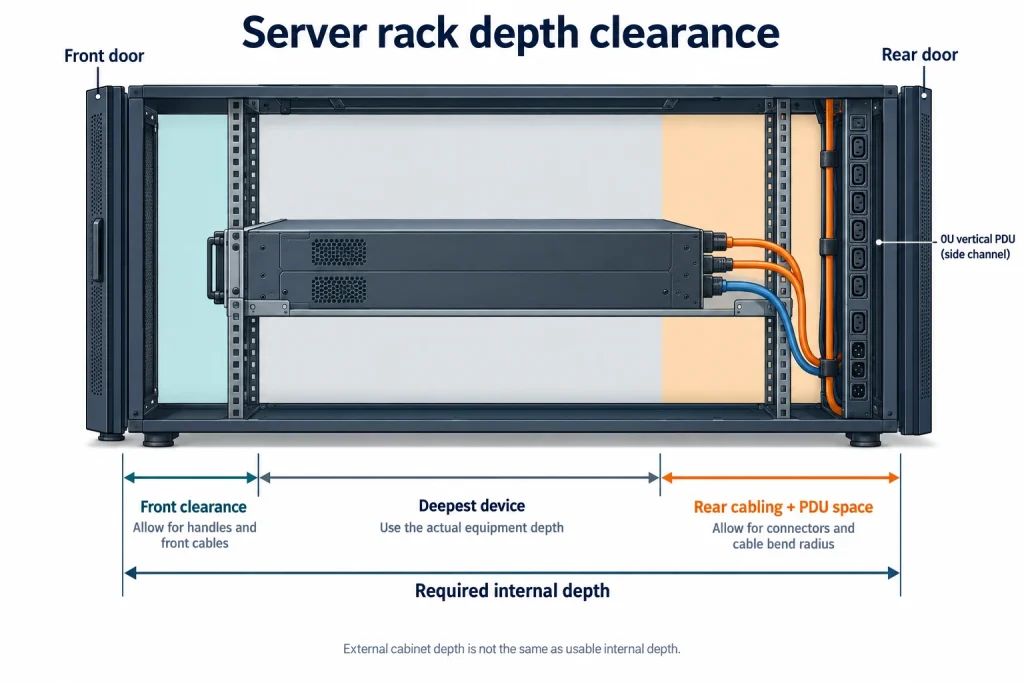
Take the deepest device you will ever put in the cabinet, then add:
- 50 to 75 mm at the front for the door and for cables coming off front ports
- 100 to 150 mm at the rear for power cords, cable management and a vertical PDU
- More if you use cable arms on servers, which add 100 mm or so on their own
A 750 mm server in a 1000 mm cabinet leaves 250 mm split front and rear. That works. The same server in an 800 mm cabinet leaves 50 mm, and you will be fighting the rear door for the life of that rack.
Rack depth clearance diagram
Cabinet width: 600 mm versus 800 mm
The rails are always 19 inches. The cabinet around them is not.
A 600 mm wide cabinet is the standard. It fits the rails with a small side channel, and it lines up with 600 mm floor tiles in a raised floor room.
An 800 mm wide cabinet gives you roughly 100 mm of vertical channel on each side. That space is where vertical cable managers, 0U PDUs and fibre slack live. If the cabinet is going to hold a lot of patching, 800 mm is worth the extra floor space, and it is the difference between a cabinet you can work in and one you dread opening.
Rule of thumb: if you have more than two 48 port patch panels in the cabinet, go 800 mm.
Open frame, enclosed cabinet, or wall mount
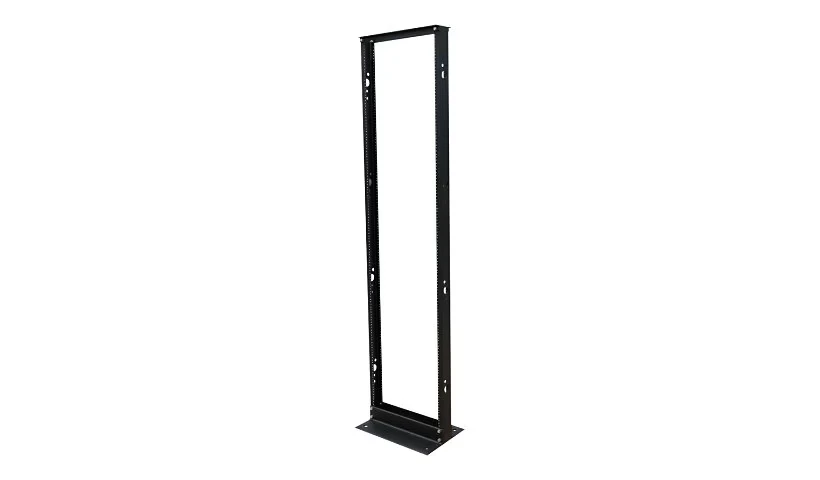
Two post open frame
A pair of vertical channels bolted to the floor, usually in a 3 inch or 6 inch channel width. Cheap, fully accessible, excellent for patch panels and shallow switches. Not suitable for servers, because a server hung off two posts at the front will sag and the mounting flanges will eventually deform. Some telecom gear is centre mounted on two post frames, which is a different arrangement again.
Four post open frame
Front and rear rails, no doors or side panels. Supports full depth equipment properly, gives you the best airflow of any option, and costs less than an enclosed cabinet. The trade off is zero physical security and zero containment, so it belongs in a locked room.
Enclosed cabinet
Doors, side panels, lock. What you want in any space that is shared, walked through, or accessible to people who do not work in IT. Perforated front and rear doors are essential, at least 60% open area, otherwise you are choking the airflow of everything inside.
Wall mount
4U to 18U hung on a wall. Standard for small IDF closets. Two things to watch. First, depth is limited, commonly 400 to 600 mm, so measure your switch before you order. Second, the wall has to take the load. A loaded 12U cabinet can hit 60 to 80 kg, and it needs to land on studs or proper anchors into concrete or block, not drywall anchors.
Swing frame wall cabinets, where the whole rack hinges out from the wall plate, are worth the extra money in any closet you will service more than once.
Two post open frame rack
Mounting holes: square, threaded and round
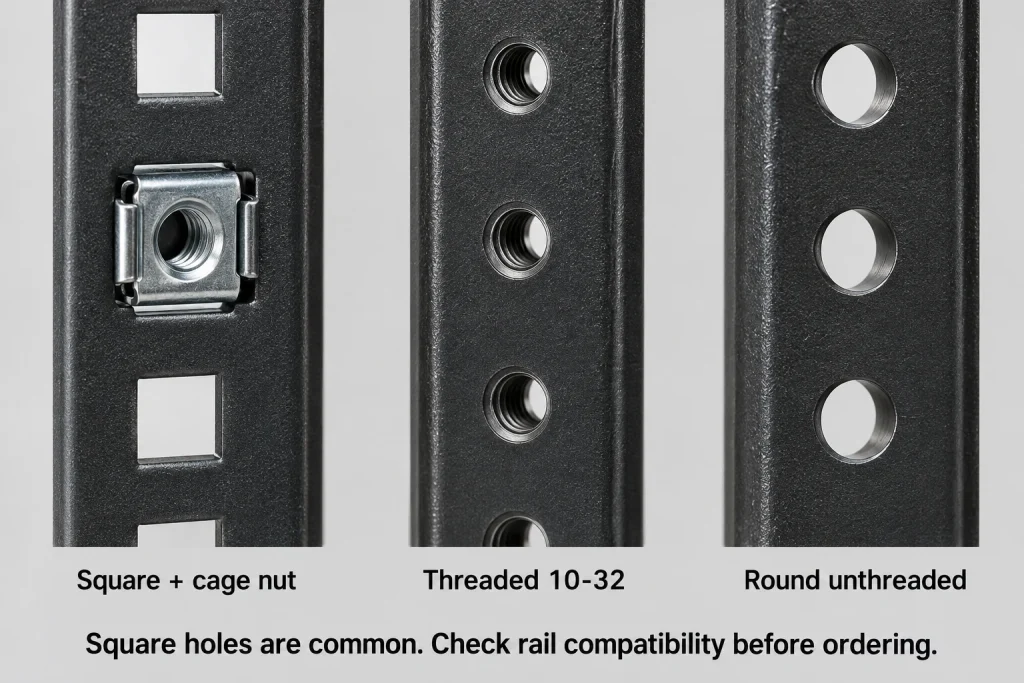
- Square hole (9.5 mm). The current standard on server cabinets. You snap in cage nuts to suit whatever thread you need, so the rack is not locked to one fastener size. Nearly all modern server rails are designed for square hole and tool-lessly clip straight in
- Threaded round. Usually 10-32 UNF or 12-24 UNC in North America, M6 elsewhere. Common on older racks and on two post frames. The thread is easy to strip and easy to cross, and if it goes you have lost that hole permanently
- Round unthreaded. Takes clip nuts. Less common, mostly older equipment
Two practical points. Check which hole type you have before ordering server rails, because a square hole rail will not mount to a threaded rack without an adapter. And keep a jar of spare cage nuts and screws in the room. Running out mid install is a special kind of frustrating.
Rack mounting hole types compared
Weight, load ratings and floor loading
Cabinet specs list two numbers and people read the wrong one.
- Static load is what the cabinet holds standing still and levelled on its feet. Often 1000 to 1500 kg on a good server cabinet
- Dynamic load is what it holds while being rolled on casters. Always much lower, frequently half the static figure. This is the number that matters on delivery day
Rough loaded weights:
- Empty 42U cabinet: 100 to 150 kg
- Comms cabinet with patch panels, two switches and a small UPS: 200 to 400 kg
- Loaded server cabinet: 600 kg and up, easily over 1000 kg with a large UPS
The floor question nobody asks
A 600 by 1000 mm cabinet occupies 0.6 square metres. Load it to 800 kg and that is roughly 1,330 kg per square metre, or about 13 kPa spread out. Office floors are typically designed for a live load in the region of 2.4 kPa. And the load is not spread out, it goes through four casters or four levelling feet as point loads.
Most of the time this is fine, because there is a safety factor and the surrounding floor is empty. But on an upper floor, in an older building, or with several loaded cabinets in one room, get a structural engineer to confirm. It costs very little compared to the alternative. Ground floor slab on grade, you can stop worrying.
Airflow, blanking panels and 0U equipment
Almost all rack equipment pulls cool air in the front and exhausts hot air out the back. That only works if the front and the back are separated.
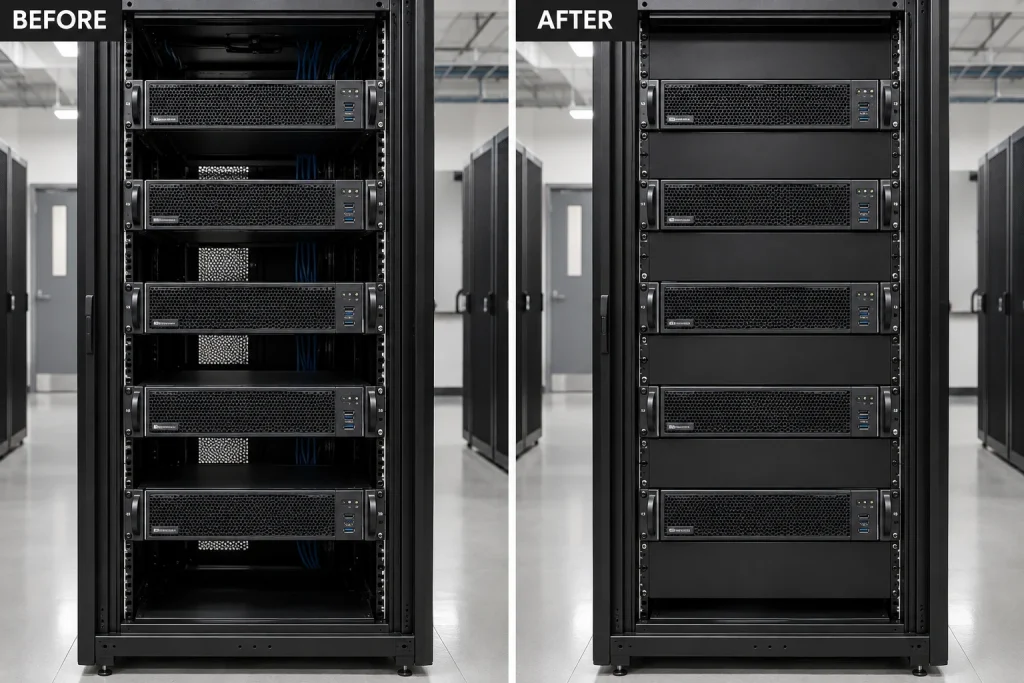
Every empty U with no blanking panel is a hole between the hot side and the cold side. Hot exhaust air loops back around to the front and gets pulled straight back into the equipment above and below. Inlet temperature climbs, fans ramp, and you get a room that is hot for no obvious reason. Blanking panels are a few dollars each and they are the highest return item in the entire cabinet.
The same applies to the side channels in an 800 mm cabinet and to unused cable entry points. Seal them.
0U equipment
Vertical PDUs mount in the rear side channel and consume no rack units, which is where the 0U name comes from. In an 800 mm cabinet you can run two of them, one per side, for A and B feeds. In a 600 mm cabinet you usually cannot, and you end up giving up 1U or 2U to a horizontal PDU instead.
That is a real argument for the wider cabinet. Two horizontal PDUs plus horizontal cable managers can eat 6U before you have installed anything that does work.
Blanking panels before and after
How to size a rack: a worked example
Sixty person office, single floor, one comms room. Here is the count:
| Item | U |
|---|---|
| Fibre enclosure for the building backbone | 1U |
| Horizontal cable manager | 1U |
| 48 port patch panel (workstations) | 2U |
| Horizontal cable manager | 1U |
| 48 port patch panel (workstations, phones, APs) | 2U |
| Horizontal cable manager | 1U |
| 24 port patch panel (cameras and door controllers) | 1U |
| Horizontal cable manager | 1U |
| 48 port PoE switch | 1U |
| 48 port PoE switch | 1U |
| 24 port PoE switch | 1U |
| Firewall | 1U |
| NVR | 2U |
| Access control panel shelf | 2U |
| UPS | 3U |
| Spare UPS battery pack | 2U |
| Subtotal | 23U |
Now the part people skip. Add 40 to 50% growth space. Not because you plan to grow, but because you always do. New camera run, a second firewall, somebody’s server, a switch that gets replaced before the old one comes out.
23U plus 50% is about 35U. So you buy a 42U cabinet, 800 mm wide for the patching, 1000 mm deep. You blank the unused U, and you have a room that still works in five years.
Buy the 24U cabinet that exactly fits today’s list and you will be buying a second cabinet inside two years, which costs more than the bigger cabinet would have, and leaves you with a split room.
Finished comms cabinet
Mistakes we see in the field
- No U budgeted for cable management. Patch panels stacked directly on each other, switches directly above. There is nowhere for 96 patch cords to go, so they hang across the front and you cannot read a port label
- Cabinet against a wall. No rear access. Every change becomes a two person job to pull the cabinet out
- Cabinet too shallow. Rear door will not close, so it comes off and never goes back on
- Solid front door. Looks tidy, cooks the equipment
- No blanking panels. The cheapest fix in the room, skipped on nearly every install we inherit
- Heavy gear mounted high. UPS at the top, cabinet becomes top heavy and unstable on casters. Heavy items go at the bottom, always
- No labelling. A rack elevation drawing and TIA-606 labelling take an hour at handover and save days over the life of the room
Building or rebuilding a server room?
Cablify designs and builds comms rooms across Toronto and Southern Ontario. Cabinet selection, rack builds, patching, cable management, labelling and full certification test reports at handover. As a Hubbell Certified Installer we can register the finished system for a 25 year warranty.
Call 1-647-846-1925
Frequently asked questions
How many inches is 1U?
One rack unit is exactly 1.75 inches, or 44.45 mm. Multiply the number of rack units by 1.75 for inches, or by 44.45 for millimetres.
How tall is a 42U rack?
A 42U rack gives 73.5 inches (1866.9 mm) of usable mounting height. The cabinet itself is normally 2000 to 2100 mm tall once you include the frame, top panel and casters, which is why it often will not clear a standard 2032 mm doorway.
Are all server racks 19 inches wide?
Almost all IT equipment is 19 inch, meaning a 19 inch front panel with 17.75 inches of clear opening between the rails. Ten inch half racks exist for small wall boxes, and 23 inch racks are used in telecom, but neither takes standard 19 inch equipment without adapters.
What depth of rack do I need?
Take your deepest device, add 50 to 75 mm at the front for the door and front cabling, and 100 to 150 mm at the rear for power and cable management. Patching only can work in 600 mm. Most offices want 800 mm. Anything with servers wants 1000 mm or more.
What is a 0U device?
Equipment that mounts in the vertical side channel at the rear of a cabinet rather than on the 19 inch rails, so it uses no rack units. Vertical PDUs are the common example. You generally need an 800 mm wide cabinet to fit them.
How much weight can a server rack hold?
Good server cabinets are rated around 1000 to 1500 kg static. The dynamic rating, which applies while the cabinet is being rolled on casters, is usually much lower. Check both, and check the floor loading if the room is on an upper level.
Do I need blanking panels?
Yes. Every open rack unit lets hot exhaust air recirculate to the front of your equipment, which raises inlet temperatures and makes fans work harder. Blanking panels cost a few dollars each and are the highest value item in the cabinet.
Can I wall mount a rack?
Up to about 18U, yes. Watch two things. Depth on wall cabinets is often only 400 to 600 mm, so check your switch will fit. And the cabinet must be anchored into studs, concrete or block, because a loaded 12U can reach 60 to 80 kg.
Related guides: Conduit fill for data cables, Cat6A cabling installation, Cat8 cabling, Cable category speeds compared.
Planning a full install? Start with our data cabling in Toronto page, or see everything we do on the Cablify homepage.
Read next
- Planning a server room or IDF closet for a mid-size office
- Cable management and fire safety in commercial installs
- Electrical work for IT rooms, the key components
Need this done at your site? See our Cabinet and Rack Installation page or call 1-647-846-1925.