
Access Control Credentials Guide: Cards, Key Fobs, Mobile Credentials, Smart Cards & More
An access control credential is the thing a person presents at a door to prove who they are. It can be a card, a key fob, a smartphone, a PIN, a fingerprint or an RFID tag on a vehicle. The credential itself does not grant entry. It identifies the user to the access control system, which then decides whether that person is allowed through that door at that time.
On this page
- What is an access control credential?
- Physical format vs credential technology
- Access control key fobs
- Proximity cards (125 kHz)
- Proximity tags and adhesive credentials
- Smart cards (13.56 MHz)
- Mobile access credentials
- Vehicle window tags and long range credentials
- PIN credentials
- Biometric credentials
- Multi-factor access control
- Credential comparison table
- 125 kHz vs 13.56 MHz
- Credential compatibility
- Migrating from legacy prox
- Card accessories
- How to choose a credential
- Credential management
- FAQ
When people plan an access control system, most of the conversation goes to readers, controllers, door hardware and software. The credential usually gets decided last, often by price. That is backwards. The credential is the only part of the system your staff touch every day, and it largely determines how hard the system is to defeat.
Credentials fall into four groups: physical credentials such as cards, fobs and tags; digital credentials such as smartphone and wallet-based credentials; knowledge-based credentials such as PIN codes; and biometric identifiers such as fingerprint or facial recognition.
The choice affects security, convenience, administrative workload, replacement cost, compatibility with readers you already own, and how well the system scales. A cheap credential that gets shared, cloned or never revoked costs far more than the price difference on the purchase order.
Quick comparison of access control credential types
| Credential | How it works | Security potential | Commonly used for |
|---|---|---|---|
| 125 kHz proximity card or fob | Reader powers the card, card returns a fixed number | Low. Generally no encryption or mutual authentication | Legacy systems, low risk interior doors |
| 13.56 MHz smart card or fob | Reader and card exchange data over a two-way protocol | Medium to high, depending on the chip and how keys are managed | New commercial installations, corporate ID badges |
| Mobile credential (NFC or BLE) | Phone presents a cryptographic credential to the reader | Medium to high, with device-level protection available | Offices, multi-tenant buildings, distributed workforces |
| PIN code | User enters a number on a keypad | Low on its own, useful as a second factor | Back doors, after hours, shared spaces |
| Biometric | Reader matches a live sample against a stored template | High for verifying the person, with privacy obligations | Server rooms, labs, cash handling areas |
| UHF vehicle tag | Long range reader detects a tag on the vehicle | Varies. Identifies the vehicle, not the driver | Gated lots, yards, loading areas, condo garages |
What Is an Access Control Credential?
An access control credential is a physical, digital or biological identifier that a person presents to a reader so an access control system can decide whether to unlock a door, gate, turnstile or elevator floor.
The sequence at a typical door looks like this:
User → Credential → Reader → Controller or access platform → Authorization decision → Door unlocks or access is denied
Each step does a different job. The credential holds an identifier. The reader captures that identifier and passes it to the controller, usually over Wiegand or OSDP wiring. The controller or cloud platform looks up that identifier, checks the access levels and schedules attached to it, and either releases the lock or refuses and logs the attempt.
Two words get used interchangeably in marketing but mean different things in practice:
- Identification answers the question “which credential number is this?” A basic proximity card does only this.
- Authentication answers the question “can this credential prove it is genuine?” That requires a cryptographic exchange between the card and the reader, which only smart credentials and mobile credentials can do.
It also matters that holding a credential is not the same as having access. Permissions live in the software, not on the card. One employee badge might open the front door from 7am to 7pm on weekdays, the second floor at any time, and nothing else in the building. Revoking that badge takes seconds in the software and does not require collecting anything from the person.
Good to know: This is the single biggest advantage of electronic credentials over mechanical keys. A lost key means rekeying cylinders. A lost card means deleting a record.
Physical Format vs Credential Technology
This distinction causes more purchasing mistakes than any other topic in access control, so it is worth being blunt about it.
Card, fob and tag describe the shape of the credential. They tell you nothing about the technology inside it.
A key fob on a keyring might contain a 1980s-era 125 kHz proximity chip that broadcasts a fixed number to anyone who asks. The identical looking fob beside it might contain an encrypted 13.56 MHz smart chip performing mutual authentication with the reader. Same plastic, same size, very different security.
The same applies to cards. Two white PVC cards can look identical and behave completely differently at the reader. This is why “we need more access cards” is never enough information to place an order.
| Physical format | Possible technology inside | Typical applications |
|---|---|---|
| ISO card (credit card size) | 125 kHz prox, 13.56 MHz smart card, DESFire, iCLASS, Seos, multi-technology | Employee photo ID badges, tenant cards, visitor passes |
| Key fob | 125 kHz prox or 13.56 MHz smart credential | Offices, condos, warehouses, staff who do not need a photo badge |
| Adhesive tag or disc | Low frequency or high frequency RFID | Retrofitting a device, equipment, contractor tools, phone cases |
| Wristband or silicone tag | Usually 13.56 MHz | Gyms, pools, healthcare, wet or gloved environments |
| Smartphone or smartwatch | NFC, Bluetooth Low Energy, wallet-based credential | Modern commercial and multi-tenant systems |
| Windshield or headlight tag | Usually passive UHF RFID | Parking gates, secure yards, fleet entrances |
Compatibility note: Exact compatibility always depends on the reader and the access control platform. A card that carries the right chip can still be rejected because the card format, facility code or encryption keys do not match what the reader expects.
Access Control Key Fobs
A key fob is a small hard-shell credential designed to hang on a keyring. Electrically it works the same way as a card of the same technology. The reader’s antenna generates a field, the fob draws power from that field, and it responds with its data. There is no battery in a standard access control key fob.
Fobs are popular in offices, condominiums, industrial buildings and property management for practical reasons. They survive pockets, toolbelts and laundry cycles better than a printed card. They do not need to be printed, encoded with a photo or laminated. And people keep them on the keys they already carry.
Advantages of key fobs
- Durable moulded housing that resists bending, cracking and moisture better than a PVC card
- Low unit cost and easy to keep spares in stock
- Simple to issue and simple to deactivate the moment one goes missing
- No printing, no card printer, no photo capture workflow
- Available in the same technologies as cards, including encrypted smart credentials
Limitations of key fobs
- No surface for a photo, name or company branding, so they cannot double as visual ID
- Easy to hand to someone else, which makes clear issuing policy important
- Because they live on a keyring, a lost set of keys is also a lost credential
- Security depends entirely on the chip inside, not on the fact that it is a fob
Best applications for key fobs
Condominium and apartment residents, warehouse and shop floor staff, contractors on short assignments, and any environment where a photo badge is not required. Fobs are also the pragmatic choice where cards get destroyed quickly.
Security note: “Key fob access control” is a form factor, not a security level. If someone tells you a building uses fobs, you still do not know whether those fobs are cloneable in ten seconds or protected by AES encryption. Ask what technology the fobs use.
Proximity Cards: 125 kHz Prox Explained
Proximity cards, usually shortened to prox cards, are the low frequency contactless credentials that dominated commercial access control from the late 1980s onward. They operate at 125 kHz, which sits in the low frequency RFID band. Common families include HID Prox, EM4100 and compatible chips, Indala and AWID.
The operation is simple by design. The reader continuously emits a 125 kHz field. When a card enters that field, the coil in the card harvests enough energy to power the chip, and the chip transmits its stored number back to the reader. Typical read range at a standard wall reader is roughly 5 to 15 cm, though larger antenna readers built for gates and mullion applications can reach further.
That number is usually formatted as a Wiegand card format. The most common is the 26-bit format, which carries an 8-bit facility code and a 16-bit card number. That gives 255 facility codes and 65,535 card numbers, which is why duplicate numbers turn up across unrelated buildings and why larger organizations move to 35-bit or custom formats.
Prox remains common for good reasons. The installed base is enormous, cards and fobs are inexpensive, readers are widely available, and the technology is dependable in industrial conditions. If a facility has hundreds of working prox readers, replacing every one at once is rarely realistic.
Are Proximity Cards Still Secure?
Standard 125 kHz proximity cards should not be considered a high security credential today. They are still perfectly operational and still widely deployed, but “still working” and “best available security” are two different statements.
The reason is architectural rather than a specific flaw. A typical prox credential transmits a static number and does not perform mutual authentication or encrypt what it sends. Anything that can read the number can also reproduce it. Card copying devices and open research tools such as the Proxmark family can capture and rewrite many common 125 kHz credentials, and blank writable cards are inexpensive. This is well documented in the security research community and is not a rumour.
The practical way to think about it: prox is fine for interior doors where the consequence of an unauthorized entry is low, and it is a poor choice for perimeter doors, server rooms, cash handling areas, controlled substance storage or anywhere a copied credential creates real risk.
Best for: Maintaining an existing prox deployment, low risk interior doors, and short term compatibility while a facility plans a migration. Not the default choice for a new high security installation.
Proximity Tags and Adhesive Credentials
Proximity tags cover the small format credentials that are neither a full size card nor a keyring fob. Common versions include adhesive discs and squares, silicone wristbands, and small tags designed to clip onto a lanyard or tool.
Functionally they are the same class of device as cards and fobs. The difference is where they can be mounted. An adhesive tag can be stuck to the back of a phone case, a tablet used by shift staff, a piece of shared equipment or a clipboard. Wristbands suit environments where staff wear gloves or work around water.
Tags come in both low frequency and high frequency versions. An adhesive tag is not automatically a legacy prox tag, and it is not automatically a secure one either. Check the part number and the chip family before assuming it will work with your readers.
Good to know: Adhesive RFID tags are sensitive to what they are stuck to. Mounting a standard tag directly on metal will usually detune the antenna and kill the read range. On-metal versions exist and are worth specifying if the surface is metallic.
Smart Cards: 13.56 MHz Contactless Credentials
Contactless smart cards operate at 13.56 MHz in the high frequency RFID band and follow international standards such as ISO/IEC 14443 and ISO/IEC 15693, depending on the product family. The important difference from prox is not the frequency. It is that a smart card contains a microprocessor and can hold a genuine two-way conversation with the reader.
That capability opens up several things prox cannot do:
- Mutual authentication. The reader proves itself to the card and the card proves itself to the reader before any credential data is released.
- Encrypted communication. Data on the air interface is protected, so capturing the exchange does not hand over a reusable credential.
- Multiple applications on one card. Separate protected data areas can hold door access, cashless vending, secure print release, transit and time and attendance on the same badge.
- Larger data capacity. Enough for certificates, biometric templates or several credential objects rather than a single number.
Common smart credential families
- MIFARE Classic. Widely deployed and inexpensive, but its proprietary Crypto1 cipher was publicly broken by academic researchers in 2008 and practical attacks are well known. Treat it as a legacy technology for security purposes, closer to prox than to modern smart credentials.
- MIFARE DESFire (EV1, EV2, EV3). NXP’s higher security line, supporting AES-128 and 3DES with three-pass mutual authentication and per-application key sets. DESFire EV3 carries Common Criteria EAL5+ certification for hardware and software and adds features such as a proximity check to help mitigate relay attacks. This is the technology most often specified for new secure deployments.
- HID iCLASS. HID’s original 13.56 MHz platform. Legacy iCLASS has been the subject of published security research, and HID positions iCLASS SE and Seos as its current higher assurance platforms.
- HID Seos. A standards-based credential using AES-128 and HID’s Secure Identity Object data model. It is not tied to one chip family, which is why the same Seos credential can exist on a card, a fob or a phone.
Security note: The words “smart card”, “13.56 MHz” and “MIFARE” on a datasheet do not by themselves indicate a secure credential. A DESFire EV3 card issued with a default or shared key, read by a reader running in a backward-compatible mode, is not delivering the security the chip is capable of. Implementation, reader configuration, credential encoding and key management decide the real outcome.
Key management is the part most buyers never see. Someone has to generate the encryption keys, load them into the readers and the credentials, control who holds them, and have a plan if they are ever exposed. Some manufacturers manage this for you in a hosted service, some hand you a key ceremony and a custody obligation. Ask which model you are buying into before you commit to a platform.
Mobile Access Credentials
A mobile access credential turns a smartphone or smartwatch into the credential. The credential itself is a cryptographic object issued to that specific device, stored in a secure area of the phone or inside a managed app, and presented to the reader over a short range radio.
Three delivery methods dominate, and they behave differently enough that the distinction matters when you are specifying readers.
NFC mobile credentials
Near Field Communication operates at 13.56 MHz and is built on the same ISO/IEC 14443 foundation as contactless smart cards. The user experience is a tap, with a working range of a few centimetres. That short range is a security feature, because it makes it very difficult to trigger a read without the user intending it. NFC is the natural fit for turnstiles, elevators and high traffic doors where a deliberate tap is exactly what you want.
Bluetooth Low Energy (BLE) credentials
BLE operates in the 2.4 GHz band and can work from a few centimetres out to several metres, depending on how the reader is configured. That flexibility is useful for parking gates, accessible entrances, and situations where a user cannot easily reach a reader. It also has to be tuned carefully. A BLE reader set to a long range in a busy lobby can pick up phones that were never meant to trigger a door. Most platforms handle this with configurable read ranges and gesture requirements such as twist, shake or in-app confirmation.
Digital wallet credentials
Wallet-based credentials place the badge directly into Apple Wallet or Google Wallet rather than a vendor app. On supported implementations the user holds their iPhone or Apple Watch near the reader and the door opens, and Express Mode allows this without waking or unlocking the device. Administrators can require Face ID or Touch ID at higher security doors. Apple states that badge data stays on the device, so Apple does not see which doors a user opens.
Wallet support is not universal. It requires the access control platform, the reader firmware and the credential provider to all support the program, and it typically involves a commercial arrangement between the platform vendor and Apple or Google. Verify support against your specific platform and reader model rather than assuming it.
Benefits of mobile credentials
- Issued and revoked remotely, with no physical handoff and nothing to collect back. New hires can be provisioned before their first day, and departures cut off the same hour
- No card stock, printer consumables or encoding station to maintain
- People are more careful with phones than with plastic, and they notice a missing phone almost immediately
- The phone’s own protections, including biometric unlock and secure element storage, add a layer a card cannot offer
- Well suited to multi-site organizations where couriering cards is slow and expensive
Considerations before going mobile
- Licensing. Many platforms charge per credential, annually or as a one time issuance fee. Model the cost over five years, not one.
- Reader compatibility. Older readers will not support BLE or NFC mobile credentials. This is a reader replacement, not a firmware update.
- Device diversity. Older phones, locked-down work phones and users who carry no smartphone all need a plan.
- Battery and availability. A dead phone is a person standing outside, which is why most sites keep a small pool of physical credentials.
- Personal device policy. Putting a company credential on a personal phone needs clear policy and communication, especially in unionized or privacy-sensitive workplaces. Wallet-based credentials tend to meet less resistance than dedicated apps.
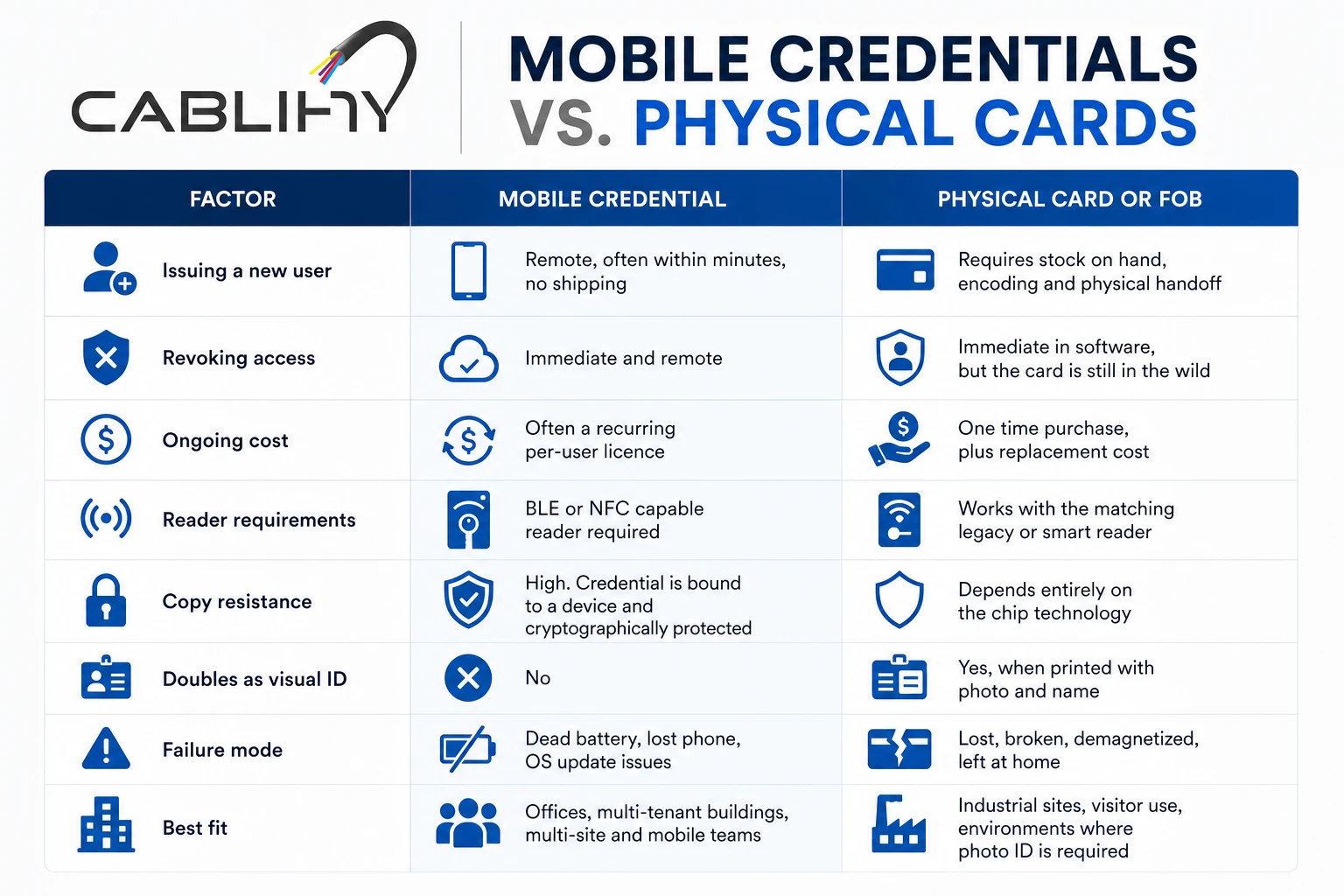
Mobile credentials vs physical cards
| Factor | Mobile credential | Physical card or fob |
|---|---|---|
| Issuing a new user | Remote, often within minutes, no shipping | Requires stock on hand, encoding and physical handoff |
| Revoking access | Immediate and remote | Immediate in software, but the card is still in the wild |
| Ongoing cost | Often a recurring per-user licence | One time purchase, plus replacement cost |
| Reader requirements | BLE or NFC capable reader required | Works with the matching legacy or smart reader |
| Copy resistance | High. Credential is bound to a device and cryptographically protected | Depends entirely on the chip technology |
| Doubles as visual ID | No | Yes, when printed with photo and name |
| Failure mode | Dead battery, lost phone, OS update issues | Lost, broken, demagnetized, left at home |
| Best fit | Offices, multi-tenant buildings, multi-site and mobile teams | Industrial sites, visitor use, environments where photo ID is required |
Good to know: Most facilities do not go all-in on one credential type. A common pattern is mobile credentials for staff, printed smart cards for anyone who needs a visible photo badge, and a small inventory of fobs for contractors and visitors.
Vehicle Window Tags and Long Range Vehicle Credentials
Vehicle credentials are the most frequently overlooked part of an access control design, and they are the part most likely to be specified incorrectly.
The core difference is range. A door credential is deliberately short range so that presenting it is a conscious act. A vehicle credential has to be read while a car is approaching a gate at 10 or 20 km/h, from several metres away, without the driver rolling down a window.
Most long range vehicle systems use passive UHF RFID, operating around 902 to 928 MHz in North America and following the EPC Gen2 standard, also published as ISO/IEC 18000-63. Passive UHF tags carry no battery. With an appropriate long range reader they can be read at distances up to roughly 10 to 15 metres, depending on the reader, antenna, tag and installation. Some higher end automatic vehicle identification systems use active or 2.45 GHz technologies instead.
Vehicle credential formats
- Windshield stickers. Thin adhesive UHF tags applied to the inside of the glass, usually behind the rearview mirror. Most are designed to be tamper-evident so removal destroys the tag and prevents transfer to another vehicle.
- Headlight tags. Mounted on the headlight lens or bumper area. These are the answer for vehicles with metallized, athermic or heated windshields, which block or badly weaken UHF signals through the glass.
- Hang tags. Hung from the mirror and moveable between vehicles. Convenient for shared fleet vehicles, and correspondingly easier to pass around.
- Licence plate recognition. Not an RFID credential at all, but frequently paired with tags as a secondary check or as the primary method for visitor lanes.
Where vehicle credentials are used
Parking garages and condo visitor gates, gated residential communities, employee parking lots, distribution centres and truck yards, secure equipment compounds, fleet depots and municipal works yards.
Read range and lane design
Datasheet read ranges are achieved in ideal conditions. In the field, results depend on antenna aim, mounting height, tag placement on the vehicle, weather and what else is operating nearby in the same band.
The design questions that matter: where does the gate need to start opening so the vehicle is not forced to stop, how wide is the read zone, will it capture a vehicle in the adjacent or exit lane, and what happens when two vehicles queue nose to tail. A reader that reads too far causes as many problems as one that reads too little, because it opens the gate for the wrong car.
Security note: A vehicle tag identifies the vehicle, not the driver. If it matters who is behind the wheel, pair the tag with a driver credential at a second point, or use the tag for the lot and a personal credential at the building door.
PIN Credentials and Keypad Access
A PIN is a knowledge-based credential. The user types a code into a keypad and the system compares it to a stored value. Nothing has to be carried, nothing gets lost, and nothing has to be manufactured or shipped.
Those advantages are real, and so are the weaknesses:
- Codes get shared. A PIN can be passed along in a text message, and there is no way to know it happened.
- Codes get observed. Keypads are watched, in person and by the camera you installed for other reasons. Worn keys on an old keypad narrow the guesswork considerably.
- Shared codes destroy accountability. If eight people use one code, the log tells you a door opened but not who opened it, which undermines the reason most facilities install access control.
- Codes rarely get changed. The code set at commissioning is often still in use years later, including by people who have left.
PINs work far better as a second factor than as a primary credential. Card plus PIN means an attacker needs both the physical credential and the knowledge. Many facilities schedule this, requiring card only during business hours and card plus PIN after hours.
Best for: Unique per-user PINs paired with a card or mobile credential at sensitive doors, and time-limited codes for short term contractor access. Avoid one shared code for a whole department.
Biometric Credentials
Biometric readers verify a physical characteristic rather than something the user carries. The common types in commercial buildings are fingerprint and facial recognition, with iris or vein pattern recognition in higher security settings.
Biometrics differ from every other credential in one important way. A card can be handed to a colleague and a PIN can be spoken aloud, but a fingerprint cannot easily be lent to someone else. That is the security argument, and it is a strong one for doors where you must know exactly who walked through.
The counterweight is that biometric data is personal information with obligations attached. In Canada, the Office of the Privacy Commissioner has issued guidance for businesses on processing biometrics under PIPEDA. Plan for these themes before you buy hardware:
- Necessity and proportionality. Be able to explain why a less intrusive method would not achieve the same goal.
- Express consent. Consent should be meaningful and specific to biometric collection, not buried in a general policy.
- Alternatives. Provide another way in for people who cannot or will not enrol, including for accessibility reasons.
- Retention and deletion. Delete templates when the purpose ends, such as when an employee leaves.
- Safeguards. Store templates encrypted, and prefer systems that store a mathematical template rather than a reusable image.
Practical design notes: enrolment takes supervised staff time, fingerprint readers struggle in cold, wet, dusty or gloved environments, and facial recognition is affected by lighting and mounting height. Throughput is slower than a tap, so biometrics usually belong at specific interior doors rather than the main lobby.
Multi-Factor Access Control
Multi-factor access control requires two or more independent factor types at the same door. The three factors are:
- Something you have such as a card, fob or mobile credential
- Something you know such as a PIN
- Something you are such as a fingerprint or facial match
Two cards is not multi-factor. Two of the same factor type only doubles the same weakness.
Common combinations in commercial buildings:
- Card plus PIN. The most widely deployed option, supported by nearly every keypad reader.
- Mobile credential plus phone biometric. The reader requires the phone to be unlocked with Face ID or a fingerprint before releasing the credential. Convenient, because the second factor is already part of how people use their phone.
- Smart card plus biometric reader. Used where identity must be certain, sometimes with the biometric template stored on the card itself rather than in a central database.
Typical places to require it: server rooms and MDF or IDF closets, data centre cages, pharmacy and controlled substance storage, laboratories, cash rooms and vaults, evidence rooms, and restricted operational areas such as utility control rooms.
Good to know: Applying multi-factor to every door is a reliable way to get people propping doors open. Apply it where the risk justifies the friction, and consider scheduling it so the requirement only applies outside normal hours.
Access Control Credential Comparison Table
Security ratings below describe the potential of the technology, not a guarantee. A well implemented smart credential and a badly implemented one can sit at opposite ends of the range.
| Credential type | Convenience | Security potential | Easy to revoke | Relative cost | Best use |
|---|---|---|---|---|---|
| Key fob | High, lives on existing keys | Depends on the chip inside | Yes, instantly | Low | Condos, warehouses, staff without photo ID |
| Proximity card (125 kHz) | High | Low. Static number, no encryption | Yes | Lowest | Legacy compatibility, low risk interior doors |
| Proximity tag or adhesive tag | High for its niche | Same as the chip inside | Yes | Low | Equipment, phone cases, wet environments |
| Smart card (13.56 MHz) | High | Medium to high with proper key management | Yes | Medium | New installs, corporate ID badges |
| Mobile credential | Very high, phone already in hand | Medium to high, device biometrics available | Yes, nothing left behind | Medium, often recurring | Offices, multi-site organizations |
| PIN code | High, nothing to carry | Low alone, strong as a second factor | Yes, but shared codes may have spread | Lowest | Second factor, temporary and after hours access |
| Biometric | Medium, needs enrolment | High for confirming the individual | Yes, delete the enrolment | Highest per door | Server rooms, labs, cash handling |
| Vehicle UHF tag | Very high for drivers | Varies, identifies vehicle not driver | Yes, tag stays on the car | Medium, plus reader cost | Gated lots, yards, fleet entrances |
125 kHz Proximity vs 13.56 MHz Smart Credentials
Frequency by itself does not determine security. It determines range, data rate, and which standards a credential can follow. Security comes from the credential technology, the authentication protocol and how the system was implemented. The reason 13.56 MHz credentials are generally more secure is that the higher data rate and the standards built on it make real cryptographic exchanges practical, and legacy 125 kHz architectures were never designed for that.
| 125 kHz proximity | 13.56 MHz smart credential | |
|---|---|---|
| RF band | Low frequency | High frequency |
| Typical standards | Largely proprietary formats | ISO/IEC 14443, ISO/IEC 15693 |
| What the credential sends | A fixed identification number | Data released after a cryptographic exchange |
| Mutual authentication | Generally not supported | Supported on modern platforms such as DESFire and Seos |
| Encryption | Generally none | AES-128 or 3DES, depending on product |
| Typical read range | Roughly 5 to 15 cm at a standard reader | Roughly 2 to 10 cm at a standard reader |
| Data capacity | Just an identifier | Kilobytes, with multiple protected applications |
| Copy resistance | Low. Widely documented cloning of common formats | High when keys are properly managed |
| Cost per credential | Lowest | Moderately higher |
| Mobile credential support | No | Yes, NFC shares the same 13.56 MHz foundation |
Compatibility note: A 125 kHz reader cannot read a 13.56 MHz credential, and the reverse is equally true. They are different radios. Multi-technology readers solve this by including both, which is what makes a phased migration possible.
Credential Compatibility: Why Not Every Card Works With Every Reader
You cannot assume that any RFID card or fob will work with any access control reader. Several independent layers all have to line up.
- Frequency. 125 kHz and 13.56 MHz readers are not interchangeable.
- Chip technology. A 13.56 MHz reader configured for DESFire will not necessarily read a MIFARE Classic or an iCLASS card, even though all three are 13.56 MHz.
- Card format. The bit structure the reader expects, such as 26-bit H10301, a 35-bit corporate format or a custom format. A mismatch here produces a read with no valid decode.
- Facility code. Many systems only accept cards carrying a specific facility code, so an otherwise valid card is rejected.
- Credential number range. Numbers already in use, or outside the range the software expects, cause conflicts.
- Encryption keys. With encrypted credentials, the reader and the card must share the correct keys. Without them, nothing happens.
- Manufacturer ecosystem. Some credential programs are deliberately closed, and cards can only be sourced through the manufacturer or an authorized channel.
- Platform support. The head-end software also has to understand the credential format you are issuing.
Before ordering replacement credentials, gather four things: the reader make and model from the label on the back of a unit, the exact part number of a working existing credential, the card format and facility code from the access control software, and the software platform and version. With those four items an integrator can specify a matching credential with confidence. Without them, ordering is guesswork.
Good to know: Ordering “the same cards we had before” from a general supplier is one of the most common ways a facility ends up with a box of 500 credentials that no reader in the building will accept. The photo on the website tells you nothing about the chip.
Migrating From Legacy Proximity Credentials
Most organizations with a large 125 kHz deployment cannot replace everything in a weekend, and they do not need to. A phased migration works well when it is sequenced properly.
- Inventory the readers. Record every reader by door, make, model and technology. Most sites discover a mix of generations they did not know they had.
- Identify the current credential technology. Confirm the chip family, card format and facility code in use, not just the brand printed on the card.
- Check what the controllers and software support. Older panels may be limited to specific Wiegand formats or may not support OSDP. This determines whether reader replacement alone is enough.
- Deploy multi-technology readers. Readers that accept both the legacy prox credential and the new smart or mobile credential let you swap hardware without interrupting anyone’s access.
- Issue new credentials in phases. Start with the highest risk doors and the largest user groups. New hires get the new credential from day one.
- Run both technologies temporarily. Set an end date and communicate it clearly. Open-ended dual support tends to become permanent.
- Turn off legacy support. Once adoption is high, disable the prox side in the readers and purge old credential records. Skipping this step means the migration bought you nothing on the security side.
Two upgrades pair naturally with a credential migration. Moving reader-to-controller wiring from Wiegand to OSDP with Secure Channel encrypts the link between the reader and the panel, which closes a well known attack path where wiring is accessible. And if readers are being replaced anyway, that is the cheapest moment to add BLE or NFC support so mobile credentials become an option later without a second truck roll.
Card Accessories: Holders, Lanyards and Reels
Accessories do not change the electronic technology inside a credential, but they have a real effect on whether credentials survive and whether people present them properly.
- Badge holders and sleeves. Vinyl or rigid holders protect against bending, cracking and abrasion. Rigid holders earn their cost in industrial settings where cards get sat on.
- Lanyards. Keep badges visible, which supports a challenge culture in secure facilities. Specify breakaway lanyards anywhere near machinery, since a standard lanyard is a real safety hazard around moving equipment.
- Badge reels. Let a user reach a wall reader without removing the badge. Repeated flexing at the slot is the most common cause of premature card failure, so a reel plus a rigid holder extends card life considerably.
- Clips and armbands. Useful for uniforms without lapels, and in healthcare and food handling environments.
- Printable ID cards. Direct-to-card or retransfer printers let one card serve as credential and visual ID. Retransfer printing is generally preferred for cards containing a chip, because it prints to film rather than directly over the chip area.
- Slot punches. Cards with an embedded antenna need a proper slot punch. Punching in the wrong place cuts the antenna loop and permanently kills the card. Pre-slotted card stock avoids the problem entirely.
Compatibility note: Metal card holders and metal wallets can block or weaken the RF field and prevent a card from reading. If someone reports a card that “works sometimes”, check what they are carrying it in before you replace it.
How to Choose the Right Access Control Credential
Work through these factors in order. The first two usually narrow the field faster than anything else.
1. Security requirements
What is behind the doors, and what does an unauthorized entry actually cost? A storage room and a pharmacy do not need the same credential. Sites handling regulated data, controlled substances, cash or critical infrastructure should be looking at encrypted smart or mobile credentials, with multi-factor at the most sensitive doors.
2. Existing reader compatibility
If you own 60 working prox readers, your realistic options are to keep buying prox or to budget a phased reader replacement. This constraint often decides the outcome, so establish it first.
3. User count and turnover rate
Under 30 users, administration is simple whatever you choose. Several hundred users with high turnover changes the maths, because issuing, collecting and reissuing physical credentials becomes a recurring labour cost that mobile credentials largely eliminate.
4. Visitors and contractors
Visitors need something issued in seconds that expires automatically. Temporary cards or fobs with an expiry date are usually more practical than asking a visitor to install anything, though some platforms can send a time-limited mobile pass by link.
5. Mobile and distributed workforce
Staff who move between sites benefit most from mobile credentials, because remote issuance removes courier costs and delays entirely.
6. Replacement frequency and environment
Track how many credentials you replace annually and why. Heavy breakage points to fobs, rigid holders or reels. Heavy loss points to mobile credentials.
7. Vehicle and parking access
Gated lots and yards need their own decision: long range UHF tags for vehicles, short range credentials at building doors, and a plan for how both report into the same software.
8. Budget over five years
Compare the total, not the unit price. Physical credentials cost more in replacements, printing and administrative time, while mobile credentials often carry a recurring licence. Neither is automatically cheaper.
9. Scalability and multi-site plans
If more buildings are coming, choose a technology and platform that can issue and manage credentials centrally. Retrofitting central administration later is expensive.
10. Employee ID integration
If badges must show a photo and name, you need printable card stock, which rules out fobs as the sole credential and adds a printer and a workflow to the project.
Examples by facility type
These are starting points, not rules. The right answer depends on the doors, the risk and the equipment already installed.
- Small office, 10 to 40 staff. Smart cards or fobs, or mobile credentials if the readers support them. Administration is light enough that either works well.
- Large corporate office. Encrypted smart card badges with photo ID, plus mobile credentials for staff who prefer them, managed centrally with directory integration for automatic onboarding and offboarding.
- Warehouse or distribution centre. Durable fobs or rigid-held cards for the floor, UHF windshield tags at the yard gates, and a plan for how driver and vehicle credentials relate.
- Condominium or apartment building. Fobs and mobile credentials, with strong lifecycle management. Turnover is the real problem in residential buildings, and stale fobs accumulate quickly.
- Medical or professional clinic. Smart credentials throughout, with multi-factor at records storage and medication storage.
- High security facility. Encrypted smart credentials with multi-factor authentication at controlled doors, OSDP Secure Channel wiring, and audited credential issuance.
If you are weighing these options for a specific building, the practical starting point is a site walk to document existing readers and door hardware before any credential decision gets made. That is normally the first step in designing commercial door access control systems for an occupied facility.
Credential Management Matters as Much as Credential Technology
The most secure credential on the market provides nothing if the database behind it is not maintained. In practice, poor credential management defeats far more access control systems than cryptographic weakness does.
The practices that matter:
- Assign every credential to a named person. Records like “Fob 47” or “Spare 3” make audit logs useless at exactly the moment you need them.
- Do not share credentials. Sharing removes individual accountability and makes it impossible to answer who was in a space.
- Revoke immediately on loss. Deactivation takes under a minute. Make sure staff know who to call and that the process works after hours.
- Tie issuance and revocation to HR. A termination should automatically trigger a deactivation. Directory integration automates this well.
- Set expiry dates on temporary credentials. Contractors and long term visitors should have credentials that stop working on a date, without anyone remembering to intervene.
- Audit the active credential list quarterly. Reconcile it against the current staff roster. Facilities doing this for the first time usually find a surprising number of active credentials belonging to people who left.
- Purge stale records. Disabling is good. Deleting old records after your retention period is better housekeeping.
- Use access levels and schedules. Give people the doors they need during the hours they need. Everyone-everywhere-always is not access control.
- Control spare credential inventory. Pre-encoded credentials sitting in an unlocked drawer are a live vulnerability. Lock unassigned stock up and count it.
- Review legacy technology yearly. Ask whether the credential technology in use still matches the risk. A decision that was reasonable in 2012 may not be reasonable now.
Frequently Asked Questions
What is an access control credential?
An access control credential is a card, key fob, tag, smartphone, PIN or biometric identifier that a person presents to a reader so an access control system can verify who they are and decide whether to unlock a door. The credential identifies the user. The system decides on access.
What are the most common types of access control credentials?
The most common are 125 kHz proximity cards and fobs, 13.56 MHz contactless smart cards, mobile credentials on smartphones, PIN codes, biometric identifiers, and UHF RFID tags for vehicle access.
What is the difference between a key fob and an access card?
Only the physical shape. A fob is a small keyring-mounted credential, and a card is a flat wallet-sized credential that can be printed with a photo. Both can contain the same technology, from basic prox to encrypted smart chips.
What is the difference between a proximity card and a smart card?
A proximity card transmits a fixed identification number with no encryption. A smart card contains a microprocessor and can perform mutual authentication and encrypted communication with the reader. Prox identifies. Smart cards authenticate.
Are 125 kHz proximity cards secure?
They are not considered a high security credential today. Standard prox cards send a static number without encryption or mutual authentication, and copying common formats is well documented. They remain suitable for low risk interior doors and legacy compatibility, but not for new high security installations.
Can access control key fobs be copied?
It depends entirely on the technology inside. Common 125 kHz prox fobs can be copied with inexpensive equipment. Encrypted smart credentials such as DESFire or Seos are designed to resist copying, because the data is protected by keys that are not exposed during a read.
Are mobile credentials more secure than access cards?
Mobile credentials are generally more secure than legacy proximity cards, because they use cryptographic authentication, are bound to a specific device and can require a phone biometric before release. Compared with a well implemented encrypted smart card, the gap is much smaller, and both are strong options.
What is a mobile access credential?
A mobile access credential is a digital credential issued to a specific smartphone or smartwatch and presented to a reader over NFC or Bluetooth Low Energy. It can be issued and revoked remotely, with no physical card to produce or collect.
Can I use my smartphone instead of an access card?
Yes, if your readers and your access control platform support mobile credentials. Older readers typically do not, so this usually means replacing readers with BLE or NFC capable models rather than a software change alone.
What frequency do proximity cards use?
Traditional proximity cards operate at 125 kHz in the low frequency RFID band.
What frequency do smart cards use?
Contactless smart cards operate at 13.56 MHz in the high frequency band, following standards such as ISO/IEC 14443 and ISO/IEC 15693. NFC uses the same frequency, which is why NFC phones can work with compatible smart card readers.
What is a DESFire credential?
MIFARE DESFire is a family of 13.56 MHz smart card chips from NXP that supports AES-128 and 3DES encryption with three-pass mutual authentication and separate protected applications on one card. DESFire EV3, the current generation, carries Common Criteria EAL5+ certification and includes a proximity check feature intended to mitigate relay attacks.
Can any RFID card work with any access control system?
No. The frequency, chip technology, card format, facility code and encryption keys all have to match what the reader and the software expect. A card can be physically identical to the one you use and still be rejected.
What happens when an employee loses an access card?
The card should be deactivated in the access control software immediately, which makes it useless at every reader in the system. A replacement is then issued with a new credential number. This is why electronic credentials are far easier to manage than mechanical keys, which require rekeying.
How do vehicle windshield access tags work?
A passive UHF RFID tag is applied to the windshield or headlight of the vehicle. A long range reader at the gate, typically operating around 902 to 928 MHz in North America, detects the tag as the vehicle approaches and sends the identifier to the access control system, which opens the gate if the vehicle is authorized. Read distances of roughly 10 to 15 metres are achievable depending on the equipment and the installation.
Which access control credential is best for a business?
For most new commercial installations, an encrypted 13.56 MHz smart credential or a mobile credential is the best default, with multi-factor authentication at high security doors. The right answer for a specific site depends on the readers already installed, the number of users, staff turnover and the risk behind each door.
Planning a New System or a Credential Upgrade
Credential selection is not a shopping decision made in isolation. It is tied to the readers on your walls, the panels in your closets, the software you administer and the level of risk behind each door. The facilities that get the most from their access control systems are usually the ones that matched the credential to the risk and then kept the credential database clean.
If you are planning a new system, replacing ageing prox readers or evaluating a move to mobile credentials, Cablify designs and installs commercial access control systems across Ontario. You can learn more about access control installation in Toronto and the GTA, including reader upgrades, credential migration planning and integration with existing security systems.