


Buying a UPS is easy. Getting it to physically connect is where people get stuck. A 3000VA rack unit arrives with a plug that does not fit the outlet in the rack. A server has a power cord that will not enter the UPS. A replacement UPS looks identical to the old one but has a different input plug. None of this lives in one place, so people guess, and guessing with power gets expensive.
This is the single reference. Every connector you will meet on a UPS, what it looks like, what it is rated for, what circuit it needs, and which UPS sizes use it. We install and power server rooms across the GTA, so this is the same guidance we give clients before they order.
UPS plug and connector types
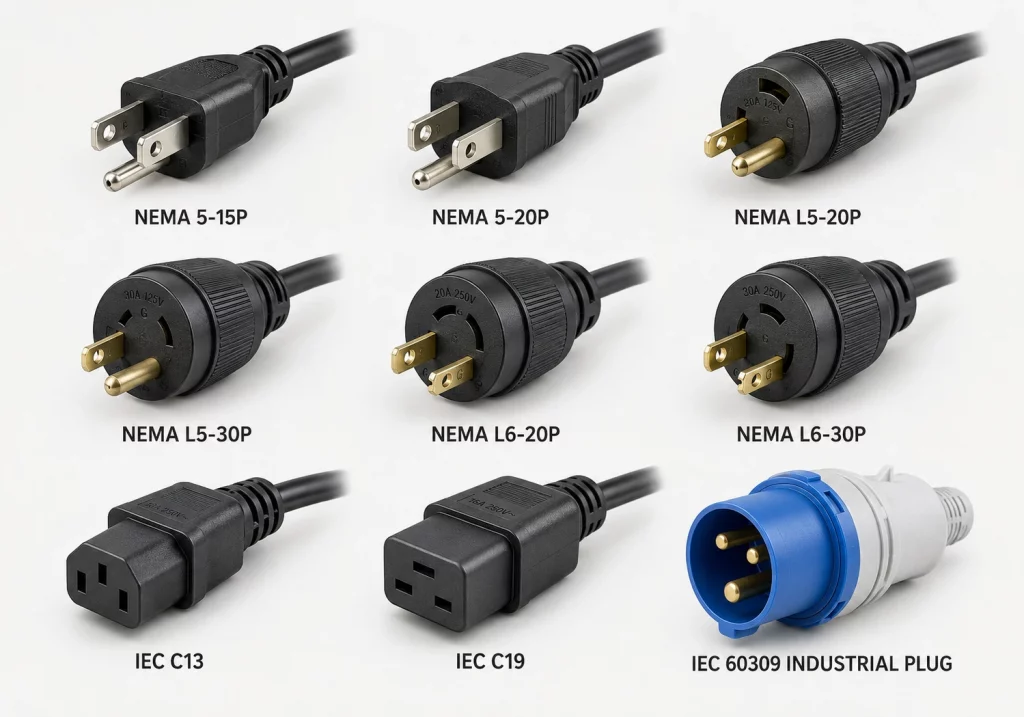
The nine connectors that cover almost every UPS installation.
The Quick Answer
UPS plugs fall into three families:
- NEMA plugs are used in North America. Straight blade types like 5-15P and 5-20P, plus twist lock types like L5-30P and L6-30P.
- IEC 60320 connectors are the small computer-style connectors used worldwide, mainly C13/C14 and C19/C20.
- IEC 60309 connectors are the round, colour-coded industrial plugs used on large and three-phase UPS.
Above roughly 10 kVA, most UPS units drop plugs entirely and are hardwired to a terminal block by an electrician.
First, the Three Connection Points
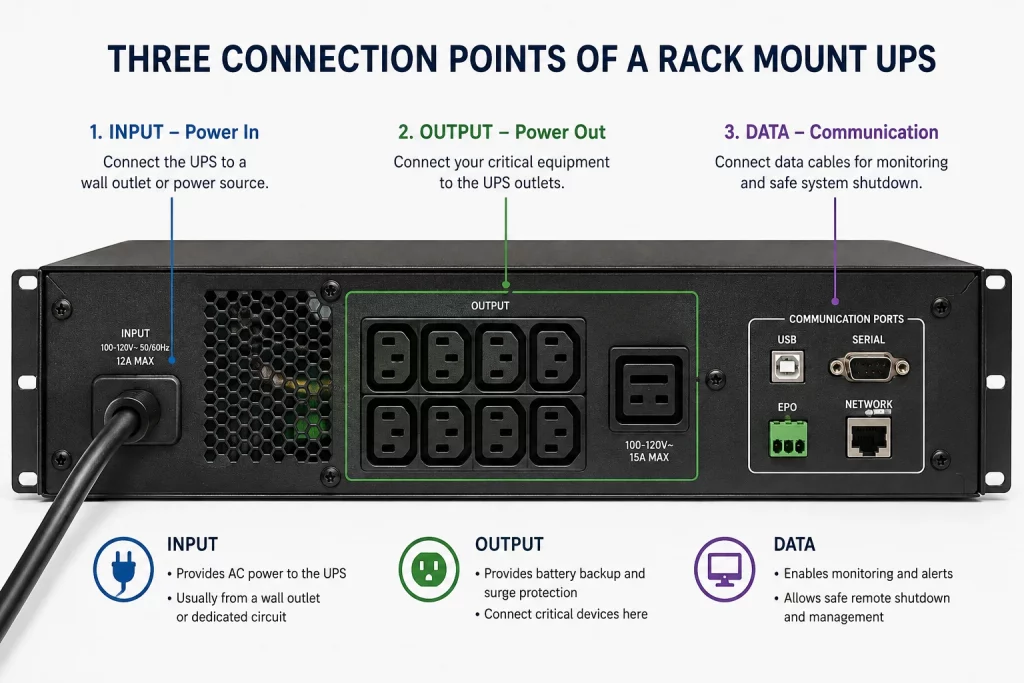
Every UPS has three separate connection areas. People mix them up constantly, so start here. The input side feeds power in, the output side is where your gear plugs in, and the data side is what makes the unit manageable.
| Connection point | What it is | Common connectors |
|---|---|---|
| Input | The cord or terminal that feeds power into the UPS from the building. | NEMA 5-15P, 5-20P, L5-30P, L6-30P, C14, C20, IEC 60309, hardwire |
| Output | The sockets your equipment plugs into. | NEMA 5-15R, 5-20R, L5-30R, L6-30R, C13, C19, Schuko, BS 1363 |
| Data and control | Ports for monitoring, shutdown and alarms. | USB Type-B, RS-232 DB9, RJ45 network card, EPO terminal, dry contact |
The three UPS connection points
Part 1: UPS Input Plugs, the Wall Side
The input plug tells you exactly what circuit your electrician needs to provide. Match this first, because you cannot change it without changing the UPS. Short descriptions below, full ratings in the comparison table further down.
NEMA 5-15P. The everyday North American plug. Two flat blades and a round ground pin. 15A at 125V, continuous limit 1,440VA. Fits both 15A and 20A outlets. Found on most UPS from 350VA to 1500VA.
NEMA 5-20P. Same as the 5-15P but the neutral blade is turned sideways. 20A at 125V, continuous limit 1,920VA. It will not fit a plain 15A outlet, and that is deliberate. You need a 5-20R outlet, not an adapter. Common on 1500VA to 2200VA units.
NEMA L5-30P. A round twist lock plug. Push in and twist a quarter turn to lock. 30A at 125V, continuous limit 2,880VA. Used on 2200VA to 3000VA rack UPS and external battery packs. It locks because a rack cord that gets bumped should never drop the load.
NEMA L6-20P and L6-30P. Same round locking body as the L5, but no neutral, just two hot legs and a ground, and the blade pattern differs so they will not cross-connect. Run at 208V or 240V. This is the standard for modern data centre rack UPS from 2 kVA to 5 kVA. Running at 208V roughly doubles the power available on the same amperage.
NEMA L14-30P and L21-30P. Larger locking plugs for split-phase and three-phase feeds. The L21-30P (five blades, 120/208V three phase) is the common input on 8 kVA to 10 kVA three-phase rack UPS in North America.
IEC C14 and C20 inlets. Recessed chassis inlets rather than cord-end plugs. A C14 caps input at 15A and is found on compact rack UPS up to about 1500VA. A C20 is larger, handles 16A to 20A, and appears on 208V and 230V rack UPS in the 2 kVA to 3 kVA range.
Hardwired terminal block. A metal cover plate with brass lugs labelled L1, L2, L3, N and ground. Standard on everything above about 6 kVA and effectively all UPS above 10 kVA. Needs a licensed electrician, a local disconnect, correctly sized conductors and inspection.
NEMA twist lock plug types
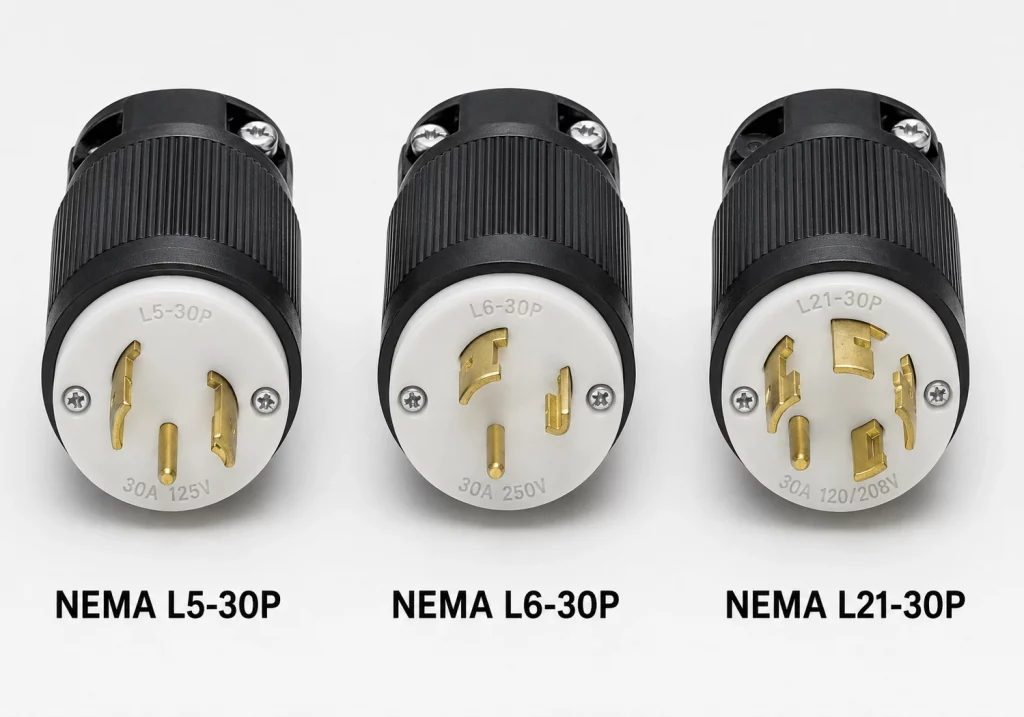
Twist lock plugs look alike from a distance. The blade pattern is what makes them incompatible.
Part 2: UPS Output Receptacles, the Equipment Side
Output sockets determine what you can plug in and how many devices you can protect.
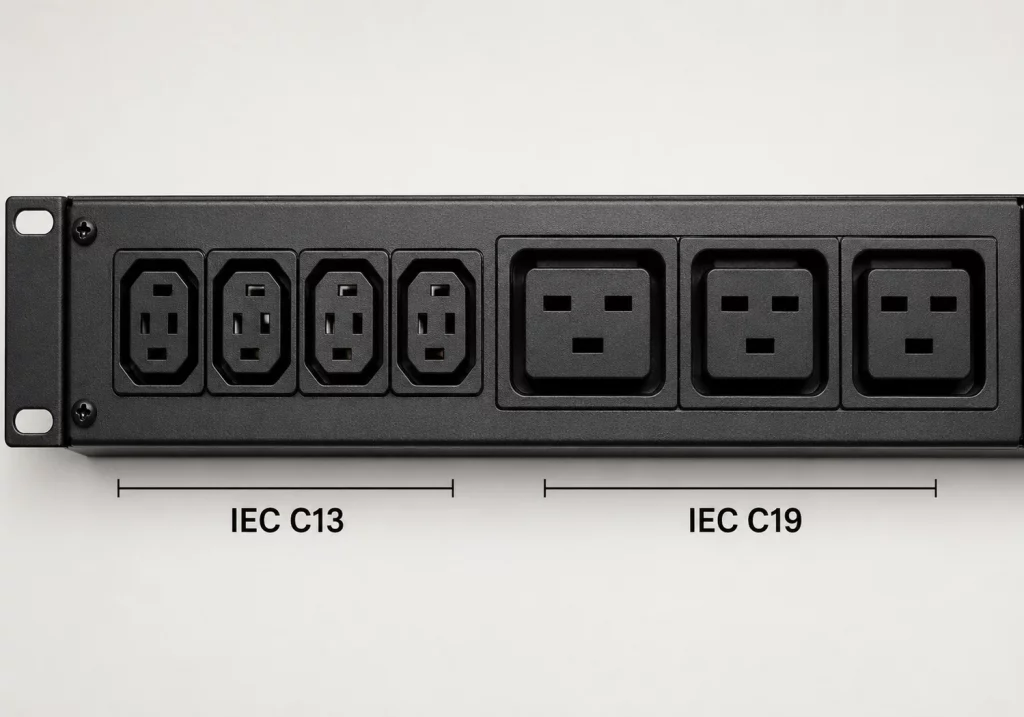
IEC C13. The female connector on a standard computer power cord, and the single most common connector in any rack. Small rectangle, two bevelled top corners. 10A internationally, 15A in North America, though most vendors derate their outlets to 10A or 12A. Plugs into the C14 inlet on servers, switches and PDUs.
IEC C19. Much larger and wider than a C13, closer to a letterbox slot. 16A internationally, 20A in North America. Plugs into the C20 inlets on blade chassis, storage arrays and large PDUs. Found on rack UPS from about 2 kVA up, usually one or two C19 outlets alongside a bank of C13s.
C15 and C21. Look almost identical to C13 and C19 but rated for higher temperatures. A C15 (notch in the bottom) fits a standard C14 inlet, so a C15 cord can replace a C13 cord. The reverse is not true. Common on Cisco gear and equipment that runs hot.
NEMA 5-15R and 5-20R. Standard North American outlets built into the chassis, on tower and 120V rack UPS. Watch for this: on consumer models, some outlets are battery-backed and some are surge-only. Plugging a server into the surge-only bank means no runtime at all during an outage. Check the labels before you cable.
Twist lock and hardwired outputs. On a UPS, locking outputs usually feed a rack PDU rather than individual devices. One locking output feeding a PDU with twenty C13 sockets is the standard rack design. Large UPS terminate into a distribution panel instead of sockets.
C13 vs C19, the simple test: a C13 is small and roughly square with angled top corners. A C19 is wide, flat and rounded. They do not interchange in either direction. If you are forcing it, it is the wrong one.
IEC C13 vs C19 size comparison
Part 3: International Plug Types
Outside North America, a UPS ships with a different cord for each region. The unit is often the same, only the cord changes.
| Standard / Region | Rating | Worth knowing |
|---|---|---|
| BS 1363 (UK, Ireland, Singapore, Hong Kong) | 13A, 230V | The plug contains a replaceable fuse. If a UK UPS suddenly has no power, check the plug fuse before assuming the unit failed. |
| Schuko CEE 7/7 (most of continental Europe) | 16A, 230V | Not polarised, so it inserts either way round. Fine for a UPS. |
| AS/NZS 3112 (Australia, New Zealand) | 10A standard, 15A/20A variants | A 10A plug fits a 15A socket, but a 15A plug will not fit a 10A socket. |
| IS 1293 (India) | 6A or 16A, 230V | Most Indian UPS above 1 kVA use the 16A version and need a matching socket. |
| GB 2099 (China) | 10A or 16A, 220V | Three flat pins, lower two angled inward. |
Part 4: Industrial and Three-Phase Connectors
Once a UPS passes roughly 5 kVA, standard plugs run out of headroom and industrial connectors take over. The main one is IEC 60309, also called CEE Form, Commando or pin and sleeve. Three things identify it: colour tells you the voltage band, pin count tells you the phase, and the keyway position physically prevents wrong connections.
| Colour | Voltage band | Typical use |
|---|---|---|
| Yellow | 100V to 130V | North American and Japanese industrial, site power |
| Blue | 200V to 250V | Single-phase 230V UPS and PDU feeds, most common in EMEA |
| Red | 380V to 480V | Three-phase 400V and 415V UPS input |
| Black | 500V to 690V | Heavy industrial, rare in IT |
| Violet | 20V to 25V | Extra-low voltage |
Pin count. 3-pin (2P+E) is single phase. 4-pin (3P+E) is three phase without neutral. 5-pin (3P+N+E) is three phase with neutral, the standard for three-phase UPS input. Common sizes are 16A, 32A, 63A and 125A. A blue 32A 2P+E is the most common single-phase UPS feed in Europe; a red 32A 3P+N+E is the most common three-phase feed.
Battery connectors. Between a UPS and its external battery cabinet you will find Anderson SB series connectors (SB50, SB120, SB175). The housing colours are keyed so a 24V pack cannot be connected to a 48V system. Never file down or force a mismatched colour, because that keying exists to prevent a battery fire. Very large battery cabinets skip connectors entirely and bolt to busbars with ring terminals, torqued to spec.
IEC 60309 industrial connectors
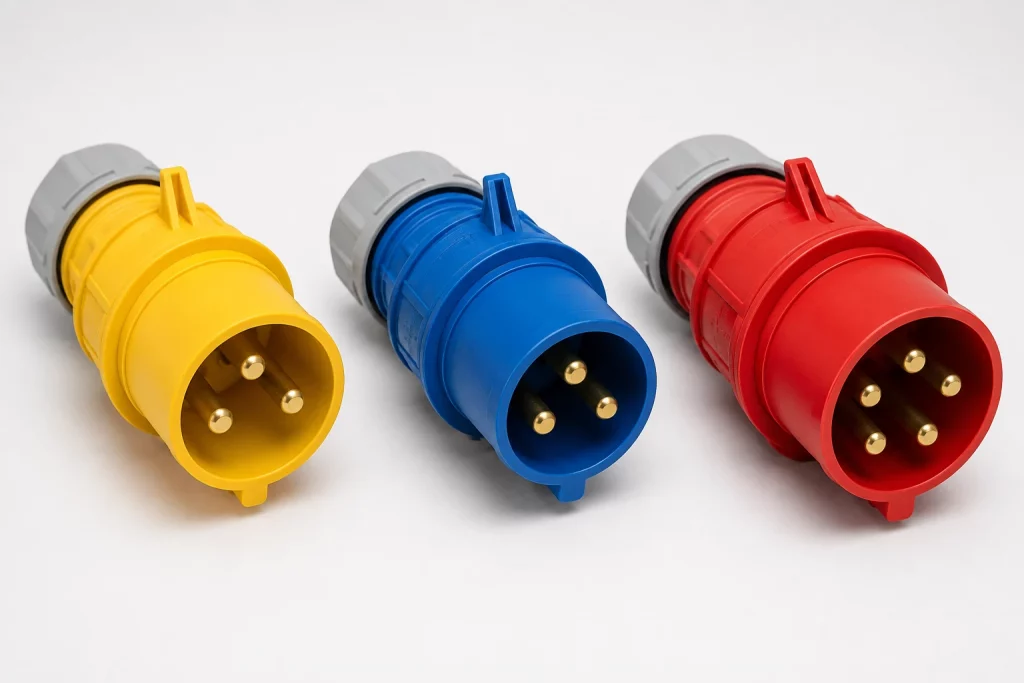
Colour tells you the voltage. Pin count tells you the phase. The keyway prevents mistakes.
Part 5: Data and Communication Ports
When people ask about UPS connection types, they sometimes mean these, not the power plugs. This is what turns a UPS from a battery into a managed device.
| Port | What it does |
|---|---|
| USB Type-B | Connects to one host computer for status monitoring and graceful shutdown. The most common option on small UPS. |
| RS-232 DB9 | Legacy monitoring and shutdown. Pinouts are often vendor-specific, so use the manufacturer cable, not a generic serial cable. |
| Network card slot | Accepts an SNMP or web management card with an RJ45 jack. Lets multiple servers shut down cleanly and lets the UPS report into monitoring. |
| Dry contact / relay | Simple open or closed signals for events like on-battery or fault. Used by building management systems. |
| EPO terminal | Emergency Power Off. Wired to a wall button so the room can be killed instantly. Required by code in many data centre and lab installs. |
| Environmental sensor | Connects a temperature and humidity probe, often with door or water sensor inputs. |
Buying tip: if a UPS will protect more than one server, budget for a network management card up front. A single USB cable can only shut down one machine cleanly.
UPS communication ports panel
The Comparison Charts
Bookmark this section. These are the charts people actually come back for when they are sizing a circuit or replacing a unit.
Table 1: UPS Input Plugs Compared
| Plug | Amps | Volts | Breaker | Max continuous VA | Typical UPS |
|---|---|---|---|---|---|
| NEMA 5-15P | 15A | 125V | 15A single pole | 1,440VA | 350 to 1500VA |
| NEMA 5-20P | 20A | 125V | 20A single pole | 1,920VA | 1500 to 2200VA |
| NEMA L5-30P | 30A | 125V | 30A single pole | 2,880VA | 2200 to 3000VA |
| NEMA L6-20P | 20A | 250V | 20A double pole | 3,328VA at 208V | 2000 to 3000VA |
| NEMA L6-30P | 30A | 250V | 30A double pole | 4,992VA at 208V | 3000 to 5000VA |
| NEMA L21-30P | 30A | 120/208V 3ph | 30A three pole | 8,646VA | 8 to 10 kVA |
| IEC C14 inlet | 10A / 15A | 250V | 15A | 1,440VA at 120V | Up to 1500VA |
| IEC C20 inlet | 16A / 20A | 250V | 20A | 3,328VA at 208V | 2000 to 3000VA |
| IEC 60309 blue 32A | 32A | 230V | 32A single pole | 5,888VA | 5 to 7 kVA |
| IEC 60309 red 32A | 32A | 400V 3ph | 32A three pole | 17,736VA | 15 to 20 kVA |
| Hardwire | Varies | Varies | Sized to load | No fixed limit | 6 kVA and up |
Table 2: The IEC 60320 Family at a Glance
| Pair | Amps (IEC / NA) | Temp rating | Where it is used |
|---|---|---|---|
| C13 / C14 | 10A / 15A | 70°C | Servers, switches, monitors, small UPS |
| C15 / C16 | 10A / 15A | 120°C | Cisco gear, hot-running equipment |
| C19 / C20 | 16A / 20A | 70°C | Blade chassis, large PDUs, mid-size UPS |
| C21 / C22 | 16A / 20A | 155°C | High-temperature industrial equipment |
| C5 / C6 and C7 / C8 | 2.5A | 70°C | Laptop bricks, projectors, small electronics |
Interchange rules worth memorising: C15 fits a C14 inlet, but C13 does not fit a C16 inlet. C13 and C19 never interchange. C21 fits a C20 inlet, but C19 does not fit a C22 inlet.
Table 3: Circuit to Maximum UPS Size
Use this to check whether the circuit you have can actually feed the UPS you want. The continuous figure already applies the 80 percent rule, which is what you should design to.
| Circuit | Peak VA | Safe continuous VA | Realistic UPS rating |
|---|---|---|---|
| 15A at 120V | 1,800 | 1,440 | 1000 to 1500VA |
| 20A at 120V | 2,400 | 1,920 | 1500 to 2200VA |
| 30A at 120V | 3,600 | 2,880 | 2200 to 3000VA |
| 20A at 208V | 4,160 | 3,328 | 2200 to 3000VA |
| 30A at 208V | 6,240 | 4,992 | 5000VA |
| 32A at 230V | 7,360 | 5,888 | 5000 to 6000VA |
| 30A at 208V three phase | 10,808 | 8,646 | 8 to 10 kVA |
| 32A at 400V three phase | 22,170 | 17,736 | 15 to 20 kVA |
Three-phase VA is volts × amps × 1.732. For 400V at 32A that is 400 × 32 × 1.732 = 22,170VA.
How to Pick the Right Connector
Work through these in order. Do not skip step one.
- Start with the circuit you actually have. Look at your breaker panel, not the wall. A 20A outlet fed by a 15A breaker is still a 15A circuit.
- Add up your real load in watts. Use nameplate watts, or better, measure with a clamp meter or metered PDU. Nameplate figures are usually generous.
- Add 25 percent headroom. Loads grow. A UPS running at 90 percent capacity has almost no runtime and no room for another server.
- Choose the voltage. Above about 2000VA, pick 208V or 230V if you can. More power per amp and slightly better efficiency.
- Match the input plug to the circuit. Use Table 3. If the UPS needs a circuit you do not have, the cost of that circuit is part of the UPS cost.
- Check the output sockets against your gear. Count your C13, C19 and NEMA needs. Short on outlets? Plan a rack PDU on the UPS output, not a power strip.
- Decide on monitoring before you order. More than one server means you want a network management card, and those often ship separately.
Cords, Adapters and What Is Safe
- Jumper cords are fine. A C14 to C13 jumper from a UPS or PDU to a server is standard and correct.
- Stepping down is usually acceptable. A C20 to C13 cord moves power from a higher-rated source to a lower-rated device. The device’s own protection handles the rest.
- Stepping up is not. An adapter that lets a 20A plug enter a 15A outlet defeats the physical keying that stops you overloading the circuit. Do not use these.
- Never remove a ground pin. Cutting or filing the ground pin removes the fault path that keeps the chassis from going live. There is no situation where this is acceptable.
- Never daisy chain power strips. A strip into a strip into the UPS is a fire code violation in most jurisdictions and a real fire risk. Install a rack PDU instead.
- Watch the cord gauge. For 15A use 14 AWG, for 20A use 12 AWG. A thin cord is a heating problem regardless of the plug rating.
- Locking IEC cords exist. C13 and C19 cords with a built-in latch prevent the most common outage cause of all, someone bumping a cord loose. They are cheap and worth it.
Common Mistakes
- Assuming VA equals watts. A 1500VA UPS typically delivers 900 to 1000 watts. Power factor is the difference. Size on watts.
- Plugging into the surge-only bank. On consumer UPS, half the outlets often have no battery backup. Read the labels.
- Ignoring the input plug when replacing a UPS. Two units with the same VA rating can have different input plugs. Check before the old one leaves the rack.
- Feeding a laser printer from a UPS. Printers draw huge surges when the fuser heats, trip overload protection and shorten battery life. Use a surge-only outlet.
- Forgetting the maintenance bypass. On a hardwired UPS, without a bypass panel you have to power down the entire load to service the unit. Design it in on day one.
- Overlooking the EPO wiring. In many data centre and lab installs an EPO circuit is required by code. Find out before the inspection, not after.
Correct UPS to PDU rack power chain
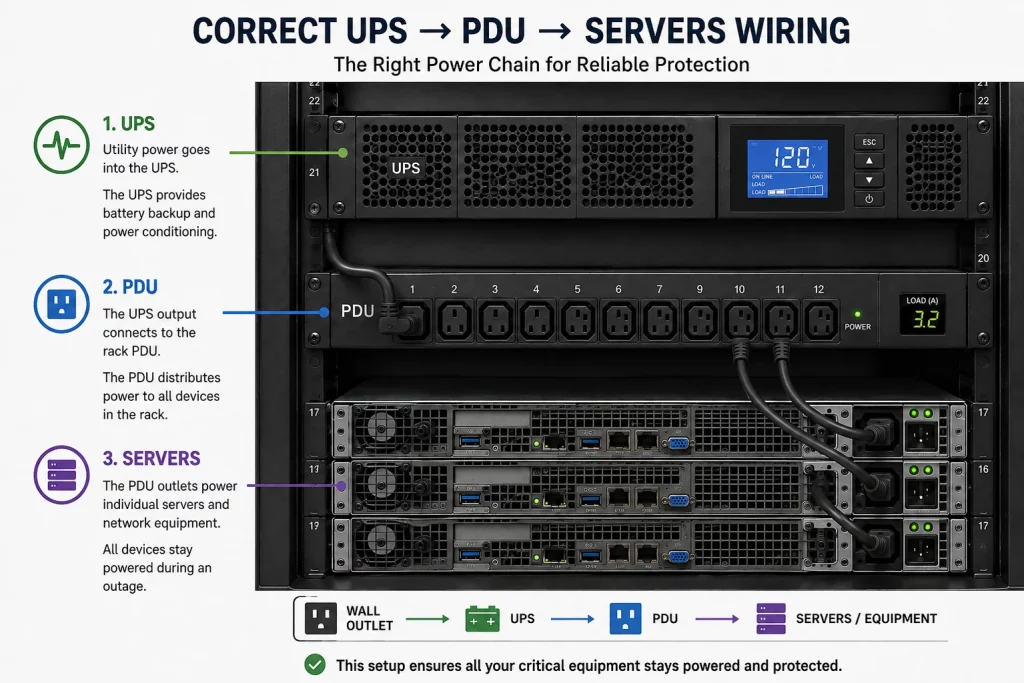
One feed from the UPS to a PDU, then individual cords to each device. Never chain power strips.
Planning Power for a Server Room or Rack?
Cablify handles the whole power and cabling chain for GTA server rooms and data centres, from the circuit and UPS input through PDUs, rack builds and structured cabling. If you are sizing a UPS or laying out a rack, we will make sure the circuit, the plug and the equipment all line up before anything is ordered.
See our server room and data centre cabling and structured cabling services, or call for a free site survey.
UPS Plug and Connector FAQ
What are the different types of UPS power plugs?
UPS power plugs fall into three groups. NEMA plugs are used in North America and include 5-15P, 5-20P, and twist lock types L5-30P and L6-30P. IEC 60320 connectors are the computer-style connectors used worldwide, mainly C13/C14 and C19/C20. IEC 60309 connectors are round industrial plugs used on large and three-phase UPS. Very large UPS units are hardwired instead of plugged in.
What is the difference between C13 and C19?
C13 is the small connector on a standard computer power cord, rated 10A internationally and 15A in North America. C19 is much larger and wider, rated 16A internationally and 20A in North America. They are physically different and do not interchange. C19 is used for higher-power equipment like blade chassis and large PDUs.
What plug does a 3000VA UPS use?
At 120V it usually uses a NEMA L5-30P twist lock. At 208V or 240V it usually uses a NEMA L6-20P or L6-30P, or an IEC C20 inlet. In Europe it will normally use a 16A Schuko plug or a blue 32A IEC 60309 connector.
Can I plug a 20A UPS into a 15A outlet?
No. A NEMA 5-20P plug physically will not enter a 15A outlet, and that is intentional. Do not use an adapter to force it. You need a 20A circuit with a 5-20R receptacle installed by an electrician.
Do I need a special outlet for a UPS?
Below about 1500VA, a standard 15A outlet is fine, though a dedicated circuit is better. Above that, you generally need a dedicated 20A or 30A circuit with a matching receptacle.
Why do server rooms use twist lock plugs?
Twist lock plugs cannot be pulled out accidentally. In a rack, cables get moved and bumped constantly, and a straight blade plug can be knocked loose. A quarter-turn locking plug removes that risk entirely.
What does the colour of an industrial plug mean?
On IEC 60309 connectors the colour identifies the voltage band. Yellow is 100V to 130V, blue is 200V to 250V, red is 380V to 480V, and black is 500V to 690V. The keyway position further prevents connecting incompatible voltages.
At what size does a UPS stop having a plug?
Generally around 6 kVA to 10 kVA. Above that, almost all UPS units are hardwired to a terminal block by an electrician, because no standard plug handles the current safely.
How do I connect a UPS to my server for automatic shutdown?
For a single machine, use the USB Type-B port and the manufacturer’s software. For multiple machines, install a network management card in the UPS expansion slot and configure shutdown agents on each server over the network.
What is the 80 percent rule?
Continuous loads, meaning anything running for three hours or more, should not exceed 80 percent of the circuit rating. A 20A circuit should carry no more than 16A continuously. Nearly all UPS loads count as continuous.
Last reviewed August 2026. Ratings follow NEMA, IEC 60320 and IEC 60309 standards. Always confirm against your equipment nameplate and local electrical code. Installation of new circuits and hardwired equipment should be carried out by a licensed electrician.