
How PoE Works: PSE, PD & Powered Pairs Explained
Power over Ethernet lets a single Cat5e/Cat6/Cat6A cable carry both network data and electrical power simultaneously — eliminating the separate power adapter at every networked device.
The system operates through two roles defined in the IEEE 802.3 standard family:
- PSE (Power Sourcing Equipment): The device that supplies power — a PoE-capable network switch or a standalone PoE injector. The PSE detects whether the connected device supports PoE before delivering any power.
- PD (Powered Device): The device that receives power — an IP camera, VoIP phone, wireless access point, access control reader, or any device built to consume PoE.
IEEE 802.3 requires every PSE to perform a detection and classification handshake before delivering power. The PSE sends a low-voltage probe; if no valid PD signature is detected, no power is delivered. Standard ethernet devices plugged into a PoE port receive data only — they cannot be damaged by a compliant PSE.
How Power Is Delivered: 2-Pair vs. 4-Pair
- Mode A: Power on data pairs (1/2 and 3/6). DC power is superimposed via centre-tap transformer. Used by 802.3af and 802.3at.
- Mode B: Power on spare pairs (4/5 and 7/8). Also used by 802.3af and 802.3at.
- 4-Pair (802.3bt): All four pairs carry power simultaneously, enabling 60W and 100W. This is why Cat6A is mandatory for PoE++ — the cable must handle power on all 4 pairs without thermal or signal degradation.
PD Classification: How the Switch Allocates Power per Port
| Class | Standard | Max PD Power | Max PSE Output | Typical Use |
|---|---|---|---|---|
| Class 0 | Default | 12.95W | 15.4W | Legacy / unclassified |
| Class 1 | 802.3af | 3.84W | 4W | Low-power sensors |
| Class 2 | 802.3af | 6.49W | 7W | IP phones, basic cameras |
| Class 3 | 802.3af | 12.95W | 15.4W | Most cameras, phones |
| Class 4 | 802.3at | 25.5W | 30W | WAPs, PTZ cameras |
| Class 5 | 802.3bt | 40W | 45W | Smart lighting, video conf |
| Class 6 | 802.3bt | 51W | 60W | High-power WAPs |
| Class 7 | 802.3bt | 62W | 75W | Displays, advanced APs |
| Class 8 | 802.3bt | 71.3W | 100W | LCD panels, workstations |
The 4 Standards at a Glance
| Specification | PoE | PoE+ | PoE++ Type 3 | PoE++ Type 4 |
|---|---|---|---|---|
| IEEE Standard | 802.3af | 802.3at | 802.3bt-2018 | 802.3bt-2018 |
| Year Ratified | 2003 | 2009 | 2018 | 2018 |
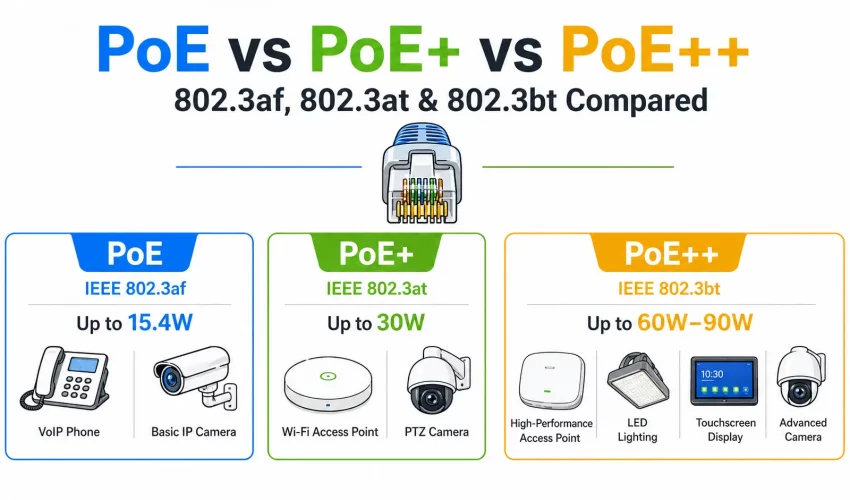
| Max PSE Output | 15.4W | 30W | 60W | 100W |
| Max PD Usable Power | 12.95W | 25.5W | 51W | 71.3W |
| Powered Pairs | 2 pairs | 2 pairs | 4 pairs | 4 pairs |
| Max Current per Pair | 350mA | 600mA | 600mA | 960mA |
| Min Cable Grade | Cat3 | Cat5e | Cat6 (Cat6A preferred) | Cat6A mandatory |
| Backward Compatible? | Baseline | Yes — with 802.3af PDs | Yes — all prior standards | Yes — all prior standards |
| Switch Budget Impact | Low | Moderate | High | Very High |
802.3af — PoE (15.4W): The Original Standard
Ratified by IEEE in 2003, 802.3af was the first standardized Power over Ethernet specification. It defined the fundamental framework all subsequent standards build upon — the detection handshake, the classification system, and the 2-pair power delivery model.
Despite being over 20 years old, 802.3af covers the majority of deployed PoE devices: basic IP cameras (5–12W), all standard VoIP phones (3–8W), access control readers (2–5W), and IoT sensors. Don’t over-specify — a 30W PoE+ port wasted on a 6W camera is unnecessary switch budget cost.
Real-World Power at 802.3af
- IP camera (fixed, 1080p): 5–9W
- IP camera (fixed, 4K): 10–13W
- VoIP phone (basic): 3–5W
- VoIP phone (color display): 6–9W
- Access control reader: 2–5W
- IoT/environmental sensor: 1–4W
- Basic WAP (single-band): 8–12W
802.3at — PoE+ (30W): The Commercial Sweet Spot
The 802.3at amendment, ratified in 2009, doubled the available power to 30W by increasing the current limit from 350mA to 600mA per pair. It maintains full backward compatibility with 802.3af — every PoE+ port can power any 802.3af device without reconfiguration.
PoE+ is the dominant standard in modern commercial deployments. It powers enterprise-grade wireless access points (15–25W), PTZ security cameras, video conferencing endpoints, and thin-client terminals. For any new office switch deployment today, PoE+ on all ports is the professional standard recommendation.
Many switches advertise “PoE+” but have a limited total PoE budget that can’t deliver 30W on all ports simultaneously. A 24-port PoE+ switch with a 185W budget can only sustain full 30W on about 6 ports at once. Always check the total switch PoE budget — not just the per-port maximum.
Real-World Power at 802.3at
- Dual-band enterprise WAP (802.11ac): 15–22W
- Tri-band enterprise WAP (Wi-Fi 6E): 20–25W
- PTZ IP camera (1080p): 18–24W
- Video conferencing endpoint (small): 18–25W
- Thin client terminal: 20–25W
- VoIP conference phone: 12–18W
802.3bt Type 3 — PoE++ (60W): High-Power Devices
Ratified in 2018, 802.3bt represents the most significant architectural change in PoE history. By utilizing all 4 cable pairs simultaneously for power delivery, it delivers up to 60W (Type 3) or 100W (Type 4) — enabling PoE for smart building infrastructure, LED lighting, and high-performance wireless equipment.
802.3bt Type 3 running at 60W on 4 pairs generates significant heat in cable bundles. Cat6A is the mandatory professional specification. Cat6A’s 23 AWG conductors produce less DC resistance and less heat per metre than Cat6’s 24 AWG. Using Cat6 is technically within spec at short, isolated runs — but thermal derating applies in any bundled pathway and will cause channel certification failures.
Real-World Power at 802.3bt Type 3
- Wi-Fi 6/6E enterprise AP (multi-radio): 30–50W
- IP PoE LED light fixture: 30–55W
- Cisco Catalyst video conferencing: 40–51W
- Industrial PoE display panel: 35–50W
- High-performance thin client: 30–45W
802.3bt Type 4 — PoE++ (100W): Maximum Power
At 71.3W usable at the device, Type 4 can power small laptops, large digital signage displays, and compact workstations entirely over ethernet — a single Cat6A cable carrying both 10Gbps data and full workstation power. The trade-off is infrastructure cost: Type 4 switches are significantly more expensive per port and require substantial PoE budgets. Currently deployed selectively for high-value endpoints.
Cable Requirements & Thermal Considerations
PoE introduces DC current through the same conductors carrying data. This current generates heat — and heat degrades both cable performance and longevity over time.
The TIA-568 Temperature Derating Rule
TIA-568-C.1 specifies cable performance at a maximum of 60°C (140°F). In a typical commercial building, ambient temperature in a cable pathway is 20–25°C. PoE current in a large bundle can add 5–15°C — pushing cables toward or past their thermal ceiling. For every 1°C above the rated baseline, the maximum supported cable length must decrease. This is why large PoE deployments mandate Cat6A — its lower DC resistance generates less heat per metre.
Which PoE Standard Do You Actually Need?
| Device | Typical Draw | Minimum Standard | Recommended | Cable |
|---|---|---|---|---|
| IP camera (fixed, up to 4K) | 5–13W | PoE 802.3af | PoE (802.3af) | Cat6 |
| VoIP phone | 3–8W | PoE 802.3af | PoE (802.3af) | Cat6 |
| Access control reader | 2–6W | PoE 802.3af | PoE (802.3af) | Cat5e/Cat6 |
| Enterprise WAP (Wi-Fi 6/6E dual/tri-band) | 15–25W | PoE+ 802.3at | PoE+ (802.3at) | Cat6 |
| PTZ security camera | 15–25W | PoE+ 802.3at | PoE+ (802.3at) | Cat6 |
| VoIP conference phone | 12–20W | PoE+ 802.3at | PoE+ (802.3at) | Cat6 |
| High-perf WAP (Wi-Fi 6E multi-radio) | 25–50W | PoE++ T3 | PoE++ Type 3 | Cat6A |
| PoE LED lighting system | 30–55W | PoE++ T3 | PoE++ Type 3 | Cat6A |
| Digital signage display | 35–65W | PoE++ T4 | PoE++ Type 4 | Cat6A |
| Laptop / thin workstation | 40–65W | PoE++ T4 | PoE++ Type 4 | Cat6A |
7 Common PoE Planning Mistakes
Mistake #1: Confusing Port Power with Switch Budget
A switch rated “30W PoE+ per port” with a 185W total budget cannot deliver 30W on all 24 ports simultaneously — only about 6. Always calculate your aggregate device load against the total switch PoE budget.
Mistake #2: Assuming All “PoE Switches” Are IEEE Compliant
Budget PoE switches often have inflated port-power ratings and no LLDP/CDP for proper classification. Cisco, Aruba, Netgear ProAV, and Ubiquiti use proper IEEE-compliant detection. Budget switches may not — causing intermittent device issues, brownouts, or phantom power under load.
Mistake #3: Running PoE++ on Cat6 in Bundled Pathways
It may work initially — but it will fail channel certification under thermal derating rules once the cable temperature rises. PoE++ on Cat6 in bundles is a latent compliance issue. Use Cat6A from day one.
Mistake #4: Ignoring Injector Standard Compatibility
A PoE injector must match the standard of the PD. Using an 802.3af injector for an 802.3at device will under-power it, causing crashes or brownouts. Always match injector output class to device requirement.
Mistake #5: Not Planning for Switch Budget Growth
You install 12 cameras today at 8W each = 96W on a 185W switch. Fine. Next year you add 6 enterprise WAPs at 22W each = 132W more. Budget exceeded. Always size switch PoE budgets to at least 150% of current load.
Mistake #6: Using PoE Splitters Instead of Native PoE Devices
PoE splitters introduce additional failure points, heat, and conversion losses. Where possible, spec native PoE devices rather than adding splitters to non-PoE equipment. The reliability difference is significant over a 5-year horizon.
Mistake #7: Forgetting Cable Distance and Voltage Drop
Longer runs mean higher resistance and greater voltage drop. A PoE++ device drawing maximum power at the end of a 90m run may brownout where the same device on a 30m run performs perfectly. For power-hungry devices on long runs, shorten cable runs or use switches with 57V output vs. 54V.
Frequently Asked Questions
Designing a PoE Infrastructure for Your Building?
Cablify designs and installs TIA-568 compliant PoE cabling systems across Toronto and the GTA. Cat6A structured cabling, certified channel testing, and full PoE budget planning — done right the first time.