
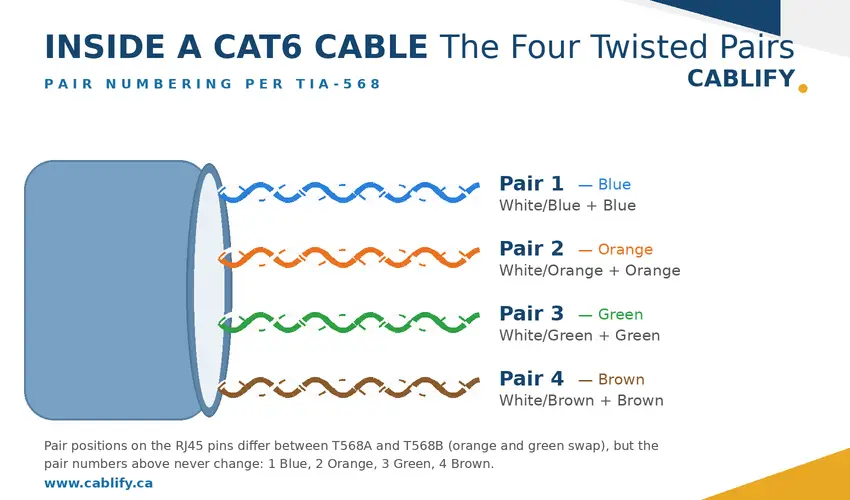
There are two separate color systems in Cat6 cabling, and mixing them up causes most of the confusion. The jacket color (blue, yellow, red, and so on) is an organizational convention under the TIA-606 standard: it tells you what a cable is for, and has zero effect on performance. The internal wire colors (the eight conductors inside) follow the T568A or T568B termination standards, and getting those wrong absolutely does break your network.
This guide covers both systems: what each jacket color typically means, the correct T568A and T568B pinouts, which one to use, and the termination mistakes that cause slow links and failed certifications.
Jacket Colors: The TIA-606 Convention
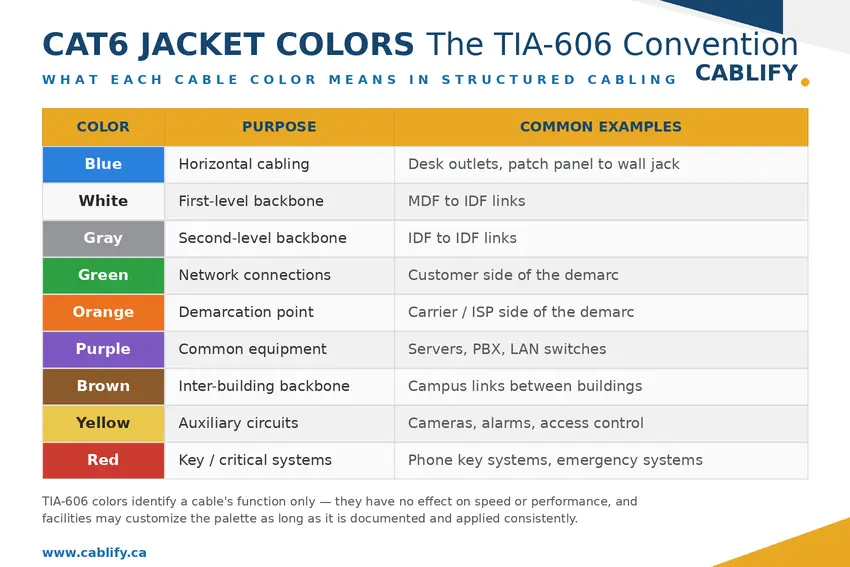
ANSI/TIA-606 is the administration standard for labeling and identifying structured cabling. Its color scheme is voluntary but widely followed because it makes a cable’s purpose obvious at a glance: in a patch panel with 200 terminations, knowing that blue means workstation and yellow means camera saves real troubleshooting time.
The important point: jacket color says nothing about the cable’s category or speed. A green Cat6 cable performs identically to a blue one. Here are the typical assignments:
| Jacket Color | Typical Function | Common Examples |
|---|---|---|
| Blue | Horizontal cabling (workstation runs) | Desk outlets, patch panel to wall jack |
| White | First-level backbone | MDF to IDF links |
| Gray | Second-level backbone | IDF to IDF links |
| Green | Network connections | Customer side of the demarcation point |
| Orange | Demarcation point | Carrier/ISP side of the demarc |
| Purple | Common equipment | Servers, PBX, LAN switches |
| Brown | Inter-building backbone | Campus links between buildings |
| Yellow | Auxiliary circuits | Security cameras, alarms, access control |
| Red | Key systems / critical circuits | Phone key systems, emergency systems |
Facilities can and do customize this palette. What matters is picking a scheme, documenting it, and applying it consistently across every floor and telecom room. In multi-tenant buildings, striped jackets (such as blue with a white stripe) add a second layer of identification.
Internal Wire Colors: T568A vs T568B
Inside every Cat6 cable are four twisted pairs, each with a solid-colored wire and a white-striped mate: blue (pair 1), orange (pair 2), green (pair 3), and brown (pair 4). The T568A and T568B standards define which wire lands on which pin of the RJ45 connector.
The only difference between the two is that the orange and green pairs swap positions. Electrically, they perform identically: neither is faster, and neither rejects interference better. The rule that matters is consistency: terminate both ends of a cable to the same standard, or the link fails.
T568A Pinout
| Pin | Wire Color | Pair | Role at 10/100 Mbps |
|---|---|---|---|
| 1 | White/Green | 3 | Transmit + |
| 2 | Green | 3 | Transmit − |
| 3 | White/Orange | 2 | Receive + |
| 4 | Blue | 1 | Not used at 10/100 |
| 5 | White/Blue | 1 | Not used at 10/100 |
| 6 | Orange | 2 | Receive − |
| 7 | White/Brown | 4 | Not used at 10/100 |
| 8 | Brown | 4 | Not used at 10/100 |
T568B Pinout
| Pin | Wire Color | Pair | Role at 10/100 Mbps |
|---|---|---|---|
| 1 | White/Orange | 2 | Transmit + |
| 2 | Orange | 2 | Transmit − |
| 3 | White/Green | 3 | Receive + |
| 4 | Blue | 1 | Not used at 10/100 |
| 5 | White/Blue | 1 | Not used at 10/100 |
| 6 | Green | 3 | Receive − |
| 7 | White/Brown | 4 | Not used at 10/100 |
| 8 | Brown | 4 | Not used at 10/100 |
Note the “not used” column applies only to 10 and 100 Mbps links. Gigabit Ethernet and faster use all four pairs in both directions simultaneously, which is why a cable with a damaged blue or brown pair may pass at 100 Mbps but refuse to negotiate gigabit. Modern PoE also delivers power across all four pairs (802.3bt), so every pair matters.
Which should you use?
Use T568B for new commercial installations in North America; it’s the de facto standard and what most installers expect to find. T568A appears in some government contracts and older buildings with legacy phone wiring. Either works: just never mix them within a system, and document your choice. Crossover cables (A on one end, B on the other) are essentially obsolete, since modern equipment auto-negotiates with Auto-MDIX.
Termination Mistakes That Break Networks
Wire color errors are among the most common causes of cabling faults, and they produce predictable symptoms.
Link runs at 100 Mbps instead of gigabit. Usually a split pair or a damaged conductor on the blue or brown pair. The link works because 10/100 only needs pins 1-2-3-6, but gigabit needs all eight. Re-terminate and retest.
No link at all. An open, short, or mismatched standards on the two ends (A on one, B on the other, creating an unintended crossover on equipment without Auto-MDIX). A basic cable tester finds this in seconds.
Split pairs. The sneakiest error: the wire map tester shows all eight pins connected correctly, but the electrical pairing is wrong because two wires from different twisted pairs were swapped (this happens when someone follows colors mechanically without keeping pairs together). The link works at low speed but fails certification from crosstalk. Only a tester that measures NEXT catches this.
Too much untwisting. Keep each pair twisted to within 13 mm (half an inch) of the termination point. Untwisting more than that degrades crosstalk performance, and it’s the most common reason a properly color-matched termination still fails a Cat6 certification test.
Installation Tips From the Field
Assign jacket colors during planning, not after pulling: it’s much cheaper to order the right colored cable than to re-label hundreds of runs. Label both ends of every cable and every patch panel port (TIA-606 covers labeling formats as well as colors). Maintain the minimum bend radius, which for Cat6 is four times the cable diameter, roughly 25 mm. For plenum air spaces, use CMP-rated cable as required by code; in riser shafts, CMR is the minimum. And certify the finished installation with a proper cable certifier rather than a $20 continuity tester: certification catches split pairs and crosstalk problems that a wire map alone will never see.
FAQs: Cat6 Color Code Questions Answered
Does the jacket color of a Cat6 cable affect its speed or performance?
No. Jacket color is purely for identification under TIA-606. A blue, yellow, or red Cat6 cable of the same specification performs identically. Only the category rating, construction quality, and installation determine performance.
What's the difference between T568A and T568B?
Only the positions of the orange and green pairs are swapped. Performance is identical. T568B is the most common choice in North American commercial installations; T568A appears in some government work and legacy phone-compatible wiring. Use one standard consistently on both ends of every cable.
Can I mix T568A and T568B in the same building?
Avoid it. A cable terminated A on one end and B on the other becomes a crossover cable, which can cause link failures on older equipment and makes troubleshooting confusing. Pick one standard for the entire facility and document it.
Which wires does Power over Ethernet use?
It depends on the PoE type. Older 802.3af/at equipment powers over two pairs (either pins 1-2/3-6 or 4-5/7-8). Modern 802.3bt (PoE++) uses all four pairs. This is one more reason every pair must be terminated correctly, even the ones that look unused.
Is Cat6 jacket color coding mandatory?
No, TIA-606 is a voluntary standard for commercial buildings, though some government and enterprise contracts require compliance. What’s effectively mandatory is fire rating: plenum spaces require CMP-rated cable and risers require CMR, regardless of color.
Why is blue the most common Cat6 cable color?
Under the TIA-606 convention, blue designates horizontal cabling, the runs from telecom rooms to workstation outlets, and those runs make up the majority of cables in a typical office building.
Wire Smart, Network Strong
Two color systems, two jobs: jacket colors keep your infrastructure organized and maintainable, and internal wire colors, terminated consistently to T568B (or A), keep it working. Get both right during installation and you’ll save hours of troubleshooting later; get them wrong and you’ll be chasing intermittent faults with a toner for years.
Planning a structured cabling project in the GTA? Cablify installs, labels, and certifies Cat6 to TIA standards, with documentation your IT team can actually use. Contact us for a free site assessment.
Maximum Data Distance Range of Network Cables: Cat5e, Cat6, Cat6a, Cat7, and Fiber Optics
When it comes to networking, understanding the capabilities and limitations of different cable types is vital. In this guide, we’ll be comparing the range, speed, and other characteristics of several types of Ethernet cables (Cat5e, Cat6, Cat6a, and Cat7) and fiber optic cables (single-mode and multi-mode). Network cabling serves as the lifeblood of any data […]