
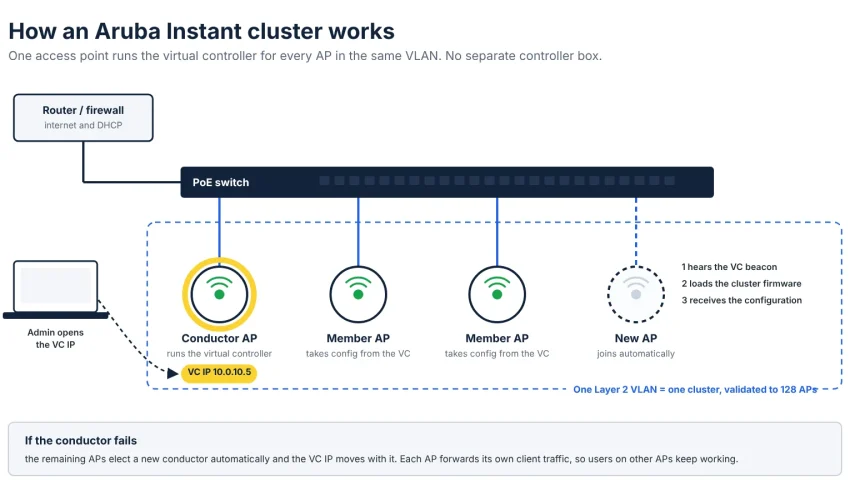
The Aruba virtual controller is controller software built into Aruba Instant access points. One AP in the group, called the conductor, runs it and manages every other AP on the same VLAN. A small or mid-size site gets centrally managed Wi-Fi without a controller appliance and without a licence.
A lot of what was written about it a few years ago is now out of date. Aruba is now HPE Aruba Networking, AOS 10 has no virtual controller at all, and HPE has since added the Wi-Fi 7 700 Series to Instant AOS 8.13.3, so the virtual controller is still a real option for new hardware. This guide covers how it works, how to add an access point, the size limits, licensing, and which current Aruba access points run it.
The Aruba virtual controller at a glance
| What it is | Controller software that runs on one AP in an Aruba Instant cluster |
|---|---|
| Extra hardware | None. The APs elect one of themselves as conductor |
| Licence | None for local management. Managing it from Aruba Central is a paid subscription |
| Size | Validated for 128 APs and 2,048 clients per cluster, not a hard cap |
| Network rule | Every AP in a cluster sits in the same Layer 2 VLAN |
| Current software | Instant AOS 8.13.3.x |
| Wi-Fi 7 | Supported on the 720, 730, 740, 750 and 760 Series from 8.13.3.0 |
| Not available on | AOS 10, which is managed from Central, and Aruba Instant On |
What the Aruba virtual controller does
Every Aruba access point running Instant AOS 8 has the controller software built in. When Instant APs power up on the same VLAN they find each other, form a cluster and elect one AP as the conductor. The conductor runs the virtual controller, or VC. The other APs, called members, take their settings from it. Older Aruba documents call these the master and slave APs. HPE now says conductor and member.
On a small network the virtual controller does the jobs a hardware controller would do:
- It holds the configuration, including SSIDs, security, VLANs, user roles and radio settings, and pushes it to every member.
- It keeps firmware consistent. A new AP loads the version the cluster runs before it joins.
- It runs the web interface and CLI you use to manage the whole cluster from one place.
- It handles the cluster’s connections to Aruba Central, AirWave and Activate, and can act as a RADIUS proxy or a DHCP server for guest networks.
In a typical setup, where client addresses come from your own DHCP server, each AP bridges its own clients’ traffic straight onto the wired network. The conductor manages the cluster. It is not a choke point that every packet passes through.
The virtual controller IP address
The conductor role can move from one AP to another, so give the cluster a virtual controller IP. It is a fixed address on the AP management VLAN that always answers from whichever AP is conductor. Set it in the System settings of the WebUI, or with virtual-controller-ip in the CLI.
Use the VC IP as the admin address, and as the single RADIUS client when dynamic RADIUS proxy is on, so the RADIUS server only needs one entry for the whole cluster. If you browse to any AP’s own address, it redirects you to the VC.
How the conductor is elected
The election runs by itself when the cluster boots and again whenever the conductor goes offline. HPE’s rules, in plain terms:
- A preferred conductor wins. You can mark one AP per cluster as preferred, with
iap-conductorin the CLI. Pick your newest, most capable AP, because the conductor does extra work in a large cluster. - At first setup, an AP with a 3G or 4G uplink is preferred, then an AP with a non-default IP address.
- Otherwise the APs compare priority, then uptime, then MAC address. The AP that has been up longest usually wins, which keeps the role stable.
Run show election statistics on any AP to see how the last election went. The conductor is marked with an asterisk in the WebUI’s access point list.
How to add an access point to an Aruba virtual controller
With Auto Join on, which is the default, adding an AP to an Instant cluster is mostly a cabling job.
- Check the model against the cluster’s firmware. Every AP model has a minimum Instant version, listed in the table below. If the cluster runs an older release than the new AP needs, upgrade the cluster first, or the AP fails its image sync and reboots instead of joining. The reverse matters too: a model whose support ended at an older release cannot stay in a cluster running a newer one.
- Patch it into the AP VLAN. Connect it to a switch port on the same VLAN as the existing APs, untagged, with DHCP available. Give it the PoE it needs. Wi-Fi 6E and Wi-Fi 7 models often need PoE+ or 802.3bt to run every radio at full power, and on less power they switch features off.
- Let it find the VC. The AP boots and hears the virtual controller’s beacon, which the VC sends every second. It loads the cluster’s firmware if its own version differs, reboots and pulls its configuration. Allow several minutes, longer if it needs a firmware download.
- Approve it if Auto Join is off. Add the AP’s MAC address to the allowed list, either from the New link in the WebUI’s access point list or with
allowed-ap <MAC>in the CLI. When you first turn Auto Join off, the APs already in the cluster are added to the list for you. - Confirm it. The AP appears in the access point list with its IP address. Rename it after its location, check that the switch shows the right link speed (2.5 or 5 Gbps for most current APs), and walk the area with a phone or survey tool.
Why an Aruba AP won’t join the virtual controller
| What you see | Likely cause | What to do |
|---|---|---|
| The AP broadcasts a SetMeUp-xx:xx:xx network | It has not found a cluster and has not been provisioned | Check that it is on the cluster’s VLAN. To set it up by hand, connect to that network and finish setup in a browser |
| It reboots over and over, or logs an image sync failure | The cluster’s firmware is older than this model supports | Upgrade the cluster to at least the model’s minimum version |
| Logs show “AP not allowed” | Auto Join is off | Add its MAC address to the allowed list |
| It becomes a second virtual controller | It is on a different VLAN, or broadcasts between APs are blocked | Move it to the cluster VLAN. Check the switch port VLAN, port isolation and broadcast filtering |
| It drops out of the cluster after an upgrade | The new firmware is past that model’s last supported release | Replace the AP, or run it as a separate cluster on its own VLAN |
| It looks for a controller instead | A provisioning rule in Activate, DHCP option 43 or an aruba-master DNS entry points it at a Mobility Controller | Remove the rule or option for this VLAN |
| A Wi-Fi 7 AP stays on AOS 10 | Its AOS 10 release is older than 10.8.1.0, or there is no Instant cluster on its VLAN | Upgrade it to 10.8.1.0, then switch it as described below |
| The AP is up but radios are off or slow | Not enough PoE for the model | Use a PoE+ or 802.3bt port, or a suitable injector |
How many access points can an Aruba virtual controller manage?
HPE’s validated size for one Instant cluster is 128 access points and 2,048 clients. It is not a hard limit, and the software will let you add more. Past that point you are outside what HPE tested, and the conductor carries the management load for every AP and client in the cluster.
HPE’s own design guidance is to plan at 80 to 90 percent of the validated size, about 110 APs, to leave room for growth. Many engineers plan well below that on busy sites. A large cluster also shares one broadcast domain, so keep the AP VLAN for access points and switch management only.
When a site outgrows one cluster there are three ways forward:
- Split it. Give each building or floor its own VLAN and cluster. Instant supports Layer 3 roaming between clusters, so users can move between them.
- Move to AOS 10 with Aruba Central. There is no virtual controller and no 128-AP cluster limit, but every AP needs a Central subscription.
- Use Mobility Controllers on AOS 8. This suits large campuses that already run controllers.
For how many APs a building needs in the first place, see our access point density and coverage guide.
Is the Aruba virtual controller free? Licensing explained
Yes. Running APs under a virtual controller and managing them from its own web interface needs no licence. You pay for the access points, and for HPE support if you want it.
| How the APs are managed | What you pay for |
|---|---|
| Instant AOS 8, local WebUI | The APs only. No licence for the VC or the APs |
| Instant AOS 8, managed in Aruba Central | A Central subscription for each AP. The VC still runs on site |
| AOS 10 | A Central subscription for each AP. It is required, because there is no local controller |
| AOS 8 with a Mobility Controller | The controller, AP capacity licences, and optional PEF and RFProtect licences |
This is the main reason small and mid-size businesses still choose Instant: once the APs are bought, there is no recurring software cost. The trade-off is that each site is managed on its own, without Central’s cloud monitoring and reporting.
One detail catches people out with Wi-Fi 7. The 700 Series ships running AOS 10, which needs Central. Switching those APs to Instant is how you run them without a subscription.
Aruba access points that run the virtual controller in 2026
These are the access point families HPE lists for Instant AOS 8. “Instant from” is the oldest release that supports the model. Every model in this table runs the current 8.13.3.x release, so they can all share a cluster.
| Series | Models | Where it fits | Instant from |
|---|---|---|---|
| Wi-Fi 7 | |||
| 720 Series | AP-725 | Entry indoor, tri-radio 2×2 | 8.13.3.0 |
| 730 Series | AP-734, AP-735 | Mid-range indoor. AP-734 has external antenna connectors | 8.13.3.0 |
| 740 Series | AP-745 | Indoor, tri-radio 4×4/2×2, internal antennas | 8.13.3.0 |
| 750 Series | AP-754, AP-755 | Flagship indoor for dense spaces. AP-754 has external antenna connectors | 8.13.3.0 |
| 760 Series | AP-763, AP-764, AP-765, AP-765EX | Hardened models for industrial, outdoor and hazardous (EX) locations | 8.13.3.0 |
| Wi-Fi 6E | |||
| 610 Series | AP-615 | Compact entry indoor | 8.11.0 |
| 630 Series | AP-634, AP-635 | Mid-range indoor | 8.9.0 (AP-635), 8.11.2 (AP-634) |
| 650 Series | AP-654, AP-655 | High-performance indoor | 8.10.0 (AP-655), 8.11.2 (AP-654) |
| 670 Series | AP-674, AP-675, AP-677, AP-679 and EX models | Outdoor and hazardous locations | 8.12.0 (AP-674: 8.13.3.0) |
| 600H Series | AP-605H | Wall-plate AP for hotel rooms, dorms and clinics | 8.12.0 |
| Wi-Fi 6 | |||
| 500 Series | AP-503, AP-504, AP-505 | Entry indoor | 8.6.0 (AP-504, AP-505), 8.11.1 (AP-503) |
| 500H Series | AP-503H, AP-505H | Wall-plate hospitality APs | 8.7.0 (AP-505H), 8.7.1 (AP-503H) |
| 510 Series | AP-514, AP-515, AP-518 | Mid-range indoor. AP-518 is ruggedized | 8.4.0 (AP-514, AP-515), 8.7.0 (AP-518) |
| 530 Series | AP-534, AP-535 | High-performance indoor | 8.5.0 |
| 550 Series | AP-555 | Flagship for very dense spaces | 8.5.0 |
| 560 Series | AP-565, AP-567 | Compact outdoor | 8.7.1 |
| 570 Series | AP-574, AP-575, AP-577 | Outdoor | 8.7.0 |
| 580 Series | AP-584, AP-585, AP-587 and EX models | High-performance outdoor and hazardous locations | 8.10.0 |
Older Aruba APs and their last Instant release
| Series | Wi-Fi | Last Instant release |
|---|---|---|
| 300, 310, 360 and 370 Series (AP-303 family, AP-314, AP-315, AP-318, AP-365, AP-367, AP-374, AP-375, AP-377 and EX models) | Wi-Fi 5 | Still supported on 8.13.3.x |
| 320, 330 and 340 Series, and AP-387 | Wi-Fi 5 | 8.10.0.x |
| AP-207, AP-203H, AP-203R, AP-203RP | Wi-Fi 5 | 8.10.0.x |
| 210, 220 and 270 Series | Wi-Fi 5 | 8.6.0.x |
The oldest AP sets the ceiling. A cluster runs one firmware version. A site full of AP-325s is held at 8.10 and cannot take Wi-Fi 7 APs, which need 8.13.3.0. Replace the older APs first, or run the new ones as a separate cluster on their own VLAN.
8.10 is a long-supported release, but its support runs out in April 2027, so plan replacements for those models now.
Wi-Fi 7 Aruba access points and the virtual controller
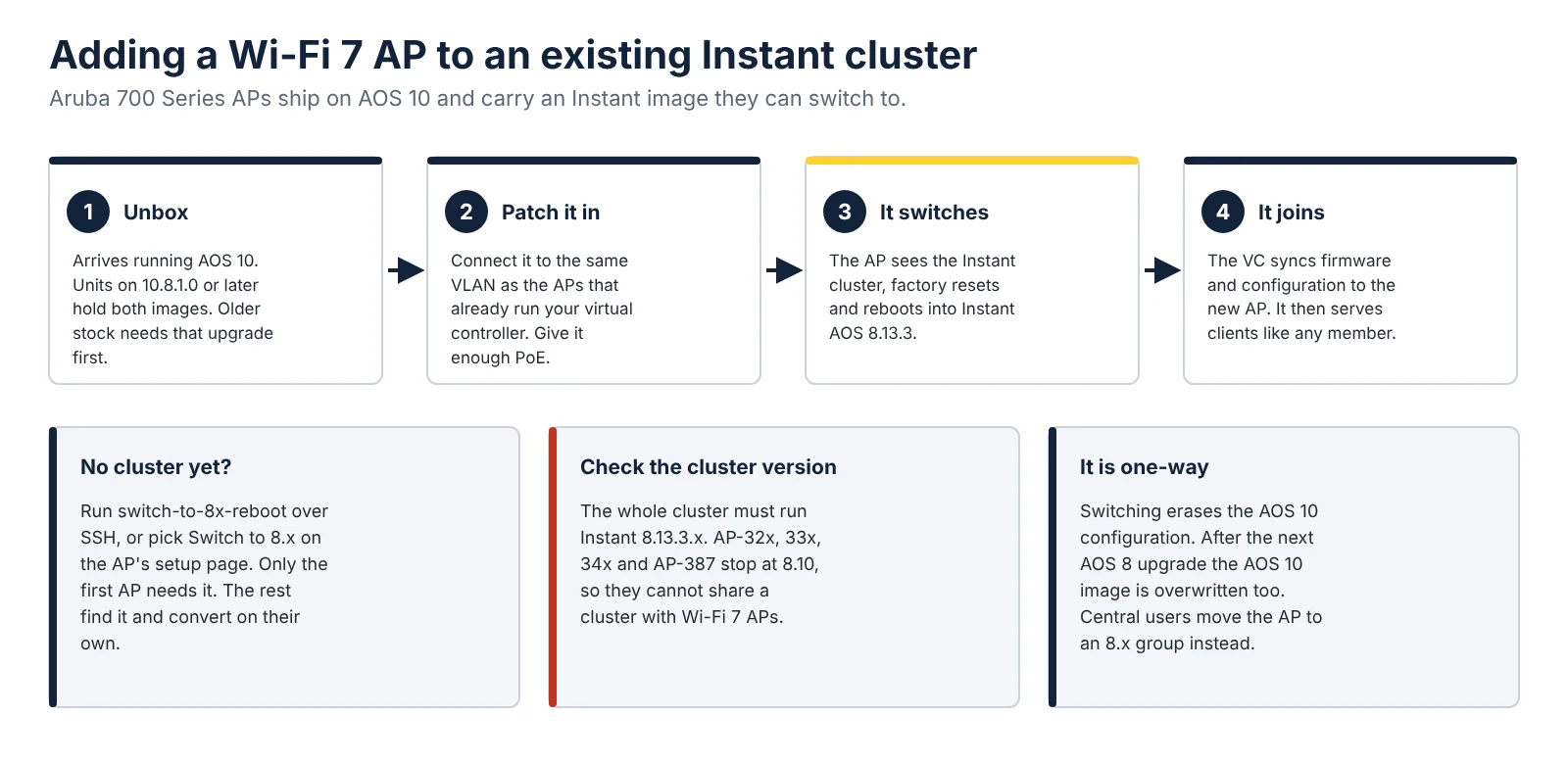
When HPE launched the 730 Series in 2024, its Wi-Fi 7 APs were managed through Central on AOS 10, and that looked like the end of the road for the virtual controller. Instant AOS 8.13.3.0 changed that by adding every 700 Series model to Instant. Here is how the switch works, according to HPE’s release notes:
- New 700 Series APs ship with AOS 10. Units on AOS 10.8.1.0 or later carry a dual image that includes Instant.
- Plug one into a VLAN that already has an Instant cluster and it detects the virtual controller, factory resets and reboots into Instant AOS 8. You do not need to do anything else.
- If there is no cluster yet, SSH to the first AP and run
switch-to-8x-reboot, or use the Switch to 8.x option on its local setup page. Only that first AP needs it. The rest find it and convert on their own. - Older stock on an earlier AOS 10 release has to be upgraded to 10.8.1.0 first, through Activate (the AP must reach it on ports 80 and 443) or with the
upgrade-imagecommand. - If you manage APs in Central, add the device, then move it into an AOS 8 group with firmware compliance set to 8.13.3.0.
- The switch is one-way. It erases the AOS 10 configuration, and later AOS 8 upgrades overwrite the AOS 10 image.
HPE describes Wi-Fi 7 support in Instant as basic EHT (Wi-Fi 7) support, with a per-SSID setting to turn Wi-Fi 7 off if older clients misbehave. AOS 10 remains HPE’s main platform for new features, so if you are buying Wi-Fi 7 for a specific capability such as multi-link operation, confirm it is in the Instant release notes before you commit. Instant APs also do not support IPv6, which rules Instant out for networks that need it.
Virtual controller vs AOS 10 vs a Mobility Controller
| Instant AOS 8 (virtual controller) | AOS 10 with Aruba Central | AOS 8 with a Mobility Controller | |
|---|---|---|---|
| Where control runs | On one AP at the site | In Central, in the cloud | On a hardware or virtual controller |
| Licence | None for local management | Central subscription for each AP | Controller AP licences |
| Size | 128 APs and 2,048 clients per cluster, validated | No per-cluster AP limit | Thousands of APs across a controller cluster |
| Client traffic | Bridged at each AP | Bridged at the AP or tunnelled to a gateway | Usually tunnelled to the controller |
| Wi-Fi 7 | 700 Series from 8.13.3.0 | Yes, the main platform | Check your controller release |
| Best fit | One building, up to about 100 APs, no subscription | Several sites, cloud management, newest features | Large campuses already on controllers |
For a single office, school, clinic or warehouse with fewer than about 100 APs, Instant is usually the simplest and cheapest choice. Once you have several sites to manage, want one dashboard for all of them, or need more than one cluster can handle, AOS 10 with Central is the better fit.
Is Aruba Instant end of life?
No. Instant AOS 8 is still maintained, and the 8.13.3 releases added the Wi-Fi 7 700 Series and the AP-674 outdoor Wi-Fi 6E AP. What has ended is new firmware for older hardware, as the table above shows. If your cluster is held at 8.10 or 8.6 by older APs, that is the part to plan around.
The brand has changed too. Aruba is sold as HPE Aruba Networking, part of HPE Networking since HPE completed its purchase of Juniper Networks in July 2025. HPE is running Aruba Central and Juniper Mist side by side, and Instant AOS 8 continues alongside both.
Aruba Instant vs Aruba Instant On
The names are close, but the products are not. Aruba Instant is the enterprise AP software this page describes. Aruba Instant On is a separate small-business line with its own access points, such as the AP11, AP12, AP15, AP22, AP25 and AP32, and its own switches, set up and managed from the Instant On app or web portal.
- Instant On has no virtual controller. Each site is managed from the Instant On cloud portal.
- Instant On APs cannot join an Instant cluster, and Instant APs cannot be added to an Instant On site.
- As a condition of buying Juniper, HPE agreed with the US Department of Justice to sell the Instant On business. If you are buying Instant On equipment now, ask your supplier who will support it after the sale.
Cabling and power for Aruba access points
The virtual controller cannot make up for a weak cable plant. Before you add or upgrade Aruba APs, check these:
- Cable. Use Cat6A for Wi-Fi 6E and Wi-Fi 7 APs. 2.5 and 5 Gbps uplinks work on Cat6, but 10 Gbps on Cat6 is limited to about 55 m, and Cat6A copes better with the heat of high-power PoE in large bundles. See Cat6 vs Cat6A and multi-gigabit Ethernet explained.
- Power. Check each model’s PoE class against the switch’s per-port and total budget. Flagship and outdoor Wi-Fi 7 models often need 802.3bt. Our PoE power calculator and PoE vs PoE+ vs PoE++ guide cover the numbers.
- Switch ports. Without multi-gigabit switch ports, a 2.5 or 5 Gbps AP uplink runs at 1 Gbps.
- Two cables where the AP has two ports. Run a second cable to AP locations where the model has two Ethernet ports, so you can add redundancy later.
- Placement. Survey before you mount. Most slow-Wi-Fi complaints come down to AP placement, channel planning or cabling. See access point placement best practices and why office Wi-Fi is slow.
Cablify plans access point locations, runs and certifies the cabling, mounts the APs and brings the wireless network online for offices, warehouses and industrial sites across the GTA. The work is done by our own employed, background-checked technicians. Every job is Fluke tested, with certification reports available on request, and our workmanship carries a lifetime warranty. Most Cat6 drops cost $150 to $250 each. Cat6A and high-ceiling work cost more.
Adding or upgrading Aruba Wi-Fi?
Book a free site assessment, usually within 1 to 2 business days. We check AP locations, cabling and switch power, then give you a written quote.
Get a quoteWi-Fi and access point installationCall 1-647-846-1925Questions
What is an Aruba virtual controller?
It is controller software built into Aruba Instant access points. One AP in each cluster, the conductor, runs it and manages configuration and firmware for every AP on the same VLAN, so you do not need a hardware controller.
How do I find the Aruba virtual controller IP address?
Open any Instant AP’s IP address in a browser and it redirects you to the virtual controller. The VC IP is also shown on the WebUI dashboard and set in the system settings. If no VC IP was ever set, the cluster answers on the conductor AP’s own address, which changes whenever a different AP becomes conductor.
What is the default login for an Aruba Instant AP?
The username is admin. Since Instant 8.5.0.0 the default password is the AP’s serial number in capital letters, and in a cluster the serial number of any member AP works. Releases before 8.5 used admin as the password.
How many access points can one Aruba virtual controller manage?
HPE validates one Instant cluster at 128 access points and 2,048 clients. That is not a hard cap, but it is the tested limit, and HPE suggests designing to about 110 APs to leave room for growth.
Does the Aruba virtual controller need a licence?
No. Running and managing an Instant cluster through its own web interface needs no licence. Managing it from Aruba Central needs a Central subscription for each AP, and AOS 10 always needs one.
Do Aruba Wi-Fi 7 access points support the virtual controller?
Yes. Instant AOS 8.13.3.0 added the whole 700 Series: AP-725, AP-734, AP-735, AP-745, AP-754, AP-755 and the 760 Series hardened models. They ship on AOS 10 and switch to Instant when they find an Instant cluster on their VLAN, or when you trigger the switch by hand.
Does AOS 10 have a virtual controller?
No. AOS 10 access points are configured and monitored from Aruba Central, and the cluster functions run as services in Central and on optional gateways. If you want a virtual controller, the APs must run Instant AOS 8.
Can I mix different Aruba AP models in one Instant cluster?
Yes, as long as every model supports the firmware version the cluster runs. The cluster can only go as high as its oldest model allows, which is why AP-325 or AP-345 units hold a cluster at 8.10 and keep Wi-Fi 7 APs out.
What happens if the virtual controller AP fails?
The remaining APs elect a new conductor and the VC IP moves to it. Clients on the other APs keep their connections because each AP forwards its own traffic. Clients on the failed AP reconnect to the nearest working AP.
Can Aruba Instant On access points join an Aruba Instant cluster?
No. Instant On is a separate small-business product line managed from the Instant On app and portal. It has no virtual controller, and its APs cannot join an Instant cluster.
Is Aruba Instant end of life?
No. Instant AOS 8 is still maintained, and 8.13.3 added the Wi-Fi 7 700 Series. What has ended is new firmware for older models: the 320, 330 and 340 Series and AP-387 stop at 8.10, and the 210, 220 and 270 Series stop at 8.6.
Related guides
- Wi-Fi and access point installation
- How many access points a building needs
- Access point placement best practices
- Network cabling and Wi-Fi planner
- Cabling for Wi-Fi 7 and 10G
- Fixing warehouse Wi-Fi dead zones
- Wi-Fi heatmapping for warehouses
- Choosing PoE switches
Aruba, Aruba Instant and Instant On are trademarks of Hewlett Packard Enterprise. Model support on this page is taken from HPE’s Instant AOS 8.13 release notes. Check the current notes before you buy or upgrade.