
Most commercial access control systems in Canada share the same problem: they were designed twenty years ago, they need a dedicated server and a specialist to change anything, and the annual licensing fees never stop. When a business outgrows keys and wants card or phone-based entry, the traditional quote often lands somewhere between surprising and absurd.
UniFi Access, built by Ubiquiti, took a different approach. No per-door licensing. No mandatory cloud subscription. Hardware that runs on standard network cabling and manages everything through the same interface many businesses already use for their WiFi and cameras. For small and mid-sized commercial buildings, it has become one of the most cost-effective ways to deploy professional door access control in Canada.
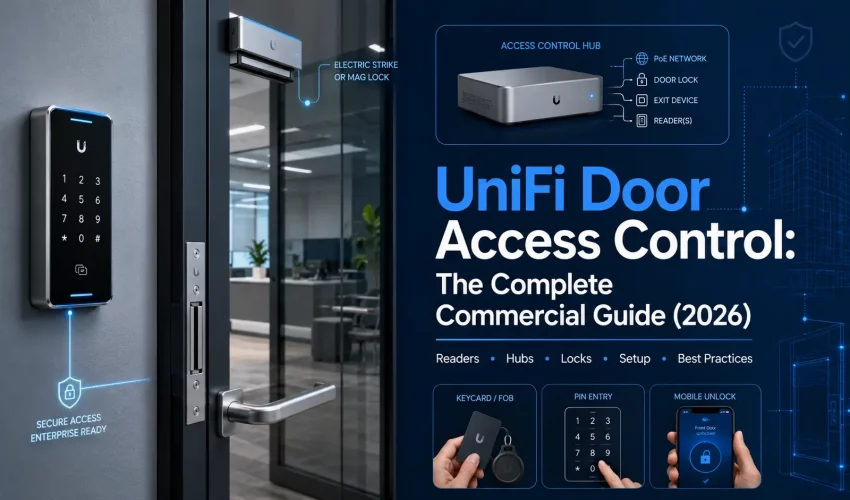
This guide covers the full UniFi Access ecosystem: every hardware category, what each device does, how the pieces connect, what a typical deployment looks like for different building types, and what it costs in Canadian dollars. It is written by the team at Cablify, a UniFi reseller and access control installer serving the GTA. If you are evaluating access control for an office, warehouse, multi-tenant building, or retail space, this is the one page to read before you talk to anyone.
How UniFi Access Works: The System in Plain Language
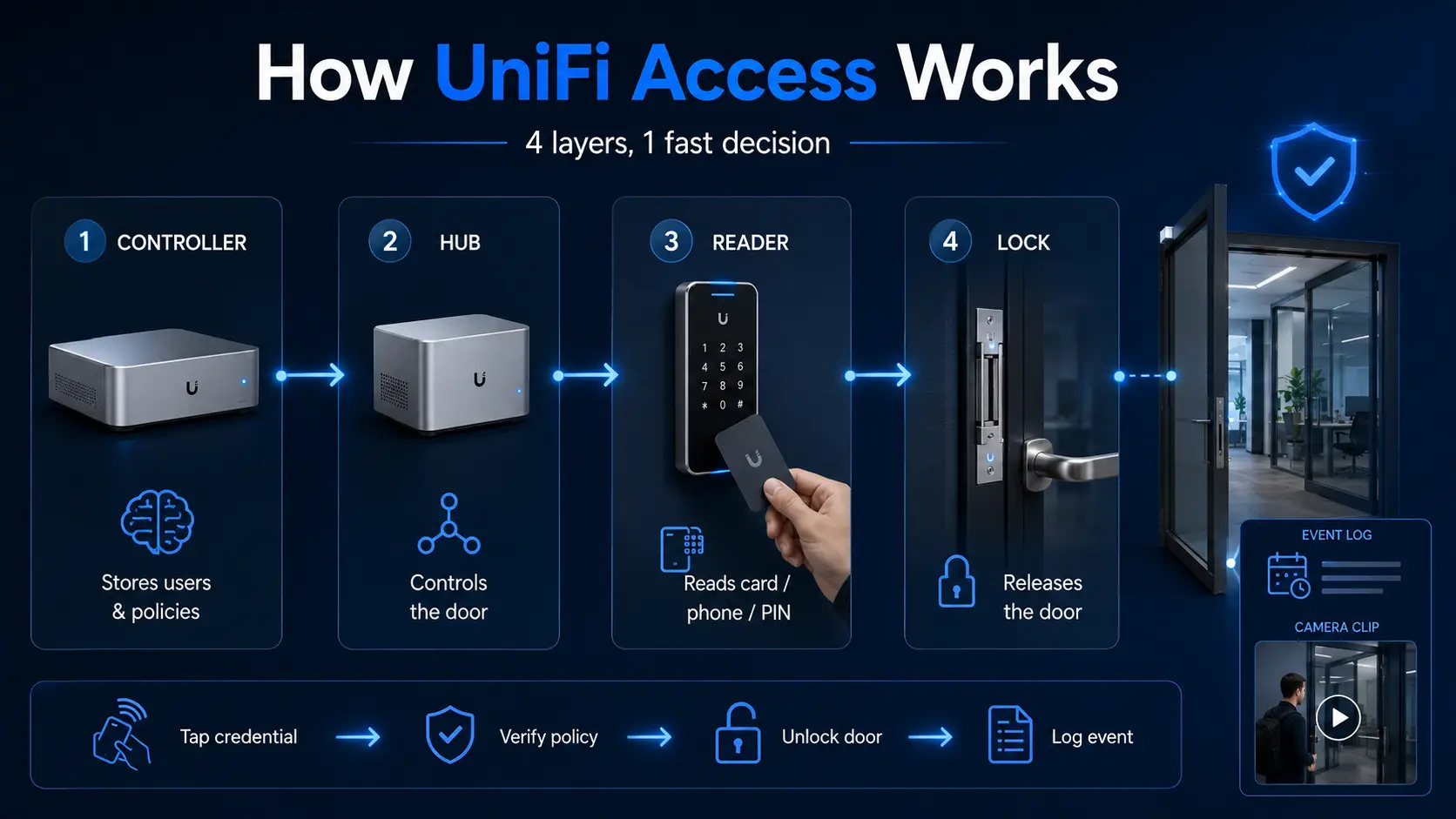
A UniFi Access deployment has four layers, and understanding them makes every product decision easier.
The controller is the brain. It runs the UniFi Access application, stores user credentials and access policies, and logs every door event. The controller lives on a UniFi console: a Cloud Gateway, a Dream Machine, or an NVR from the UNVR family. If your business already runs UniFi networking or Protect cameras, you likely already own the controller.
The hub is the door controller. It mounts near the door (usually above the ceiling tile or in a secure closet), connects to your network over a single Ethernet cable, and physically switches the lock. The hub is what actually releases the door when a valid credential is presented.
The reader is what users interact with. It mounts at the door, reads NFC cards, fobs, PIN codes, or a phone via Touch Pass, and passes the credential to the hub for verification. Readers connect to the hub, not directly to your network.
The lock hardware is the physical mechanism: a magnetic lock, electric strike, or electric bolt that holds the door secure until the hub releases it. UniFi sells its own lock line, and the hubs also work with most third-party 12V lock hardware.
The flow at the moment of entry: someone taps a card or phone on the reader, the reader passes the credential to the hub, the hub checks it against the policy on the controller, and if it passes, the hub cuts or applies power to the lock and the door opens. The event is logged with a timestamp, the user’s name, and, if a camera is nearby, a video clip. The entire round trip takes a fraction of a second.
Touch Pass: Why Phones Are Replacing Cards
Touch Pass is Ubiquiti’s mobile credential system, and it is the feature that changes how businesses think about access control. Instead of issuing physical cards or fobs, an administrator sends an invitation from the UniFi console. The employee adds the credential to Apple Wallet or Google Wallet, and their phone becomes the key. Tap the phone on any Touch Pass reader and the door opens, the same way tap-to-pay works at a checkout.
The practical advantages for a commercial operation are significant. No card inventory to manage. No cost per replacement when someone loses a fob. Instant issuance for new hires and instant revocation for departures, all done remotely from the console. And because the credential lives in the phone’s secure element, it is meaningfully harder to clone than the 125 kHz proximity cards still common in older Canadian office buildings.
Most current UniFi readers support Touch Pass alongside NFC cards and fobs, so a business can run both at once: phones for staff, cards for contractors or visitors who prefer them.
The Hardware, Category by Category
Readers: What Goes at the Door
The reader is the visible part of the system, and UniFi offers a range that runs from a compact tap target to a full video intercom. All prices below are Canadian dollars from the official UniFi Canada store and current at the time of writing.
| Reader | Credentials Supported | Best For | Price (CAD) |
|---|---|---|---|
| Access Reader | Touch Pass, NFC, hand-wave unlock | Standard office doors. Compact, doubles as a request-to-exit device on the inside of the door. | From $220 |
| G3 Reader Flex | Touch Pass, NFC, keypad PIN | Doors where PIN entry is needed as a backup or for visitors. Rated for exposed outdoor mounting. | $279 |
| Reader Pro | Touch Pass, NFC, PIN, two-way audio, camera | Main entrances. Combines reader, intercom, and camera in one device for visitor screening. | From $520 |
| G6 Entry | Touch Pass, doorbell, AI detection, two-way audio | All-weather doorbell with reader built in. Works with both Protect (cameras) and Access. | From $545 |
| Intercom | Touch Pass, keypad, two-way audio, directory | Multi-tenant buildings. Visitors dial a unit or name, tenants unlock remotely from their phone. | From $685 |
| Retrofit Reader | Touch Pass, NFC, OSDP | Upgrading an existing access system. Works over existing cabling with the Retrofit Hub. | $229 |
Hubs: The Door Controllers
Every controlled door needs a hub (with one exception covered below). The hub choice comes down to how many doors you are controlling and whether you are building new or retrofitting an existing system.
| Hub | Doors | Key Details | Price (CAD) |
|---|---|---|---|
| Access Ultra | 1 | Reader and hub combined in one device. The lowest-cost way to control a single door. NFC, outdoor rated, one lock terminal. | $175 |
| Door Hub Mini | 1 | Compact single-door hub. One lock terminal, two PoE ports for readers. | $179 |
| Door Hub | 1 | Full entry and exit control with two lock terminals, four PoE ports, and four additional inputs for sensors and exit buttons. | $285 |
| Gate Hub | 1 gate | Purpose-built for vehicle gates. Works with the Intercom and supports licence plate unlock when paired with a Protect AI camera. | $400 |
| Retrofit Hub | 2 | DC-powered hub that accepts Wiegand and OSDP readers. Lets you move an existing third-party access system onto UniFi without recabling. | $329 |
| Enterprise Access Hub | 8 | Eight doors from one unit with battery backup support, eight lock terminals, eight PoE ports, and sixteen additional inputs. The efficient choice past four doors. | $1,379 |
Starter Kits: The Fastest Way In
UniFi bundles the common configurations into kits, and for most first deployments the kit pricing beats buying the parts separately.
| Kit | What It Covers | Price (CAD) |
|---|---|---|
| Door Starter Kit | One door with one reader. Everything needed for a basic controlled entrance. | From $409 |
| Door Starter Kit Pro | One door with two readers (entry and exit). The configuration most commercial installations actually need. | From $819 |
| Gate Starter Kit | Vehicle gate control with Intercom. Supports licence plate unlock with a compatible Protect AI camera. | From $1,109 |
| Elevator Starter Kit | Floor-by-floor elevator access control for up to 18 floors, with digital inputs for car status and emergency states. | $1,335 |
Locks and Door Hardware
The lock is the part that physically secures the door, and choosing between the two main types matters more than most buyers realise.
Fail-safe locks release when power is cut. Magnetic locks are fail-safe by nature: no power, no hold. This is required for most fire-code-compliant egress paths, because a power failure must never trap anyone inside. The trade-off is that a power outage also unlocks the door from outside unless you have battery backup.
Fail-secure locks stay locked when power is cut. Electric strikes and bolts are commonly configured fail-secure. The door stays locked in an outage, and people inside can still exit using the mechanical handle. This is the typical choice for perimeter doors, with the fire-egress side handled by the mechanical hardware.
Which one your building needs per door is a code and life-safety question, and it is one of the areas where a professional installation matters. The Ontario Building Code and local fire authority requirements govern egress door behaviour, and getting it wrong is not a small mistake.
| Hardware | Purpose | Price (CAD) |
|---|---|---|
| Magnetic Lock | Fail-safe holding force for inswing and outswing doors | From $199 |
| Electric Locks (strike and bolt) | Fail-safe or fail-secure operation depending on model and wiring | From $129 |
| Panic Bar | Code-compliant emergency egress for exit doors | $570 |
| Door Closer | Controlled closure so the door actually relocks behind people | $185 |
| Access Button | Push-to-exit button for the inside of controlled doors | $49 |
| Rescue KeySwitch | Keyed emergency override for the Access Hub | $115 |
Credentials
Touch Pass phone credentials are issued from the console at no per-credential hardware cost. For physical credentials, UniFi sells NFC Access Cards from $43 per pack and a ten-pack of Pocket Keyfobs for $135. Both use secured NFC rather than the easily cloned 125 kHz proximity technology found in many legacy systems.
The Controller Question: What Runs the System
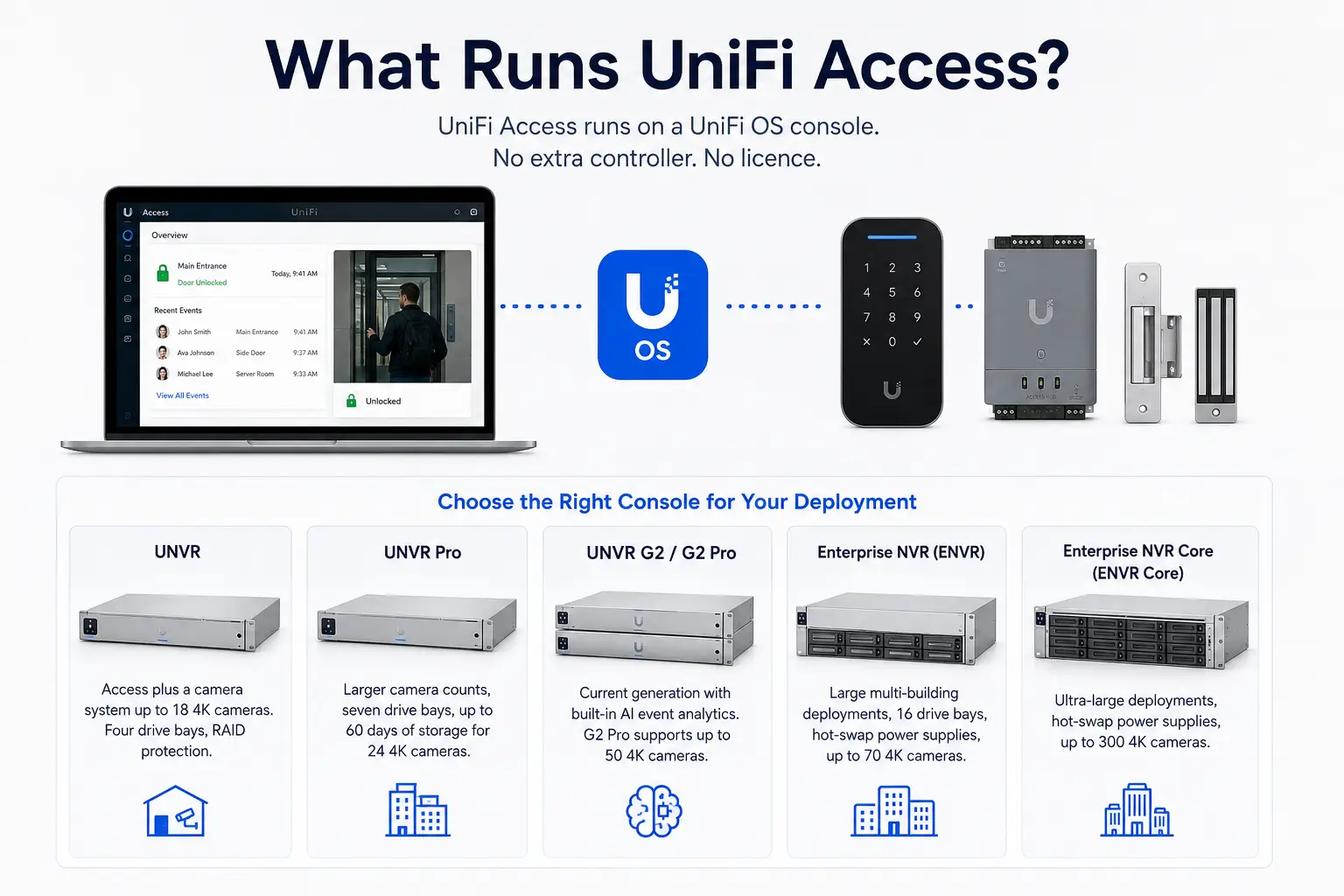
UniFi Access needs a UniFi OS console to run on. If your business already has a UniFi Dream Machine, Cloud Gateway, or UNVR for cameras, Access installs as an application on the console you own. There is no additional controller purchase and no software licence.
If you are starting fresh, the practical options for a commercial deployment are:
| Console | When It Makes Sense | Price (CAD) |
|---|---|---|
| UNVR | Access plus a camera system up to 18 4K cameras. Four drive bays, RAID protection. | $399 |
| UNVR Pro | Larger camera counts, seven drive bays, up to 60 days of storage for 24 4K cameras. | $669 |
| UNVR G2 / G2 Pro | Current generation with built-in AI event analytics. G2 Pro supports up to 50 4K cameras. | $1,005 / $1,435 |
| Enterprise NVR | Large multi-building deployments, 16 drive bays, hot-swap power supplies, up to 70 4K cameras (ENVR) or 300 (ENVR Core). | $2,679 / $7,170 |
This is where the UniFi ecosystem advantage becomes concrete. One console runs the network, the WiFi, the cameras, and the door access. One interface, one login, one vendor. When a door opens, the event log can show the badge event and the camera clip side by side. For businesses pairing Access with UniFi Protect, Cablify handles commercial CCTV installation as part of the same project.
Deployment Blueprints: What Different Businesses Actually Install
Small Office: One or Two Doors
A professional services office with a main entrance and a server room door. The main entrance gets a Door Starter Kit Pro (hub plus entry and exit readers), the server room gets an Access Ultra since it is a single low-traffic interior door. Add an electric strike for each door, a door closer on the main entrance, and NFC cards for staff who prefer them over Touch Pass. Total hardware lands around $1,400 to $1,800 before installation, assuming an existing UniFi console.
Warehouse and Distribution
A GTA warehouse with a staff entrance, an office door, two dock-adjacent personnel doors, and a vehicle gate. Four doors run from a single Enterprise Access Hub, which also provides battery backup so the doors keep working through a power interruption. The gate runs a Gate Hub with the Intercom for driver check-in, and licence plate unlock handles the regular carrier fleet automatically when paired with a Protect AI camera. G3 Reader Flex units at the exterior doors give PIN backup for temp workers who have not been issued credentials. This is also the deployment where Access and Protect together earn their keep: every door event pairs with camera footage in one timeline. See our CCTV installation services for the camera side of a combined deployment.
Multi-Tenant Commercial Building
A building with a shared main entrance and eight tenant suites. The Intercom at the main entrance gives visitors a directory to dial any tenant, and tenants answer and unlock from their phones. Each suite door gets its own hub and reader, with access policies keeping each tenant’s credentials scoped to their own suite plus common areas. The Enterprise Access Hub handles suite doors efficiently in groups of eight. Property managers administer everything centrally and issue or revoke tenant credentials without ever cutting a key.
Retrofit: Replacing a Legacy System
A business with an existing card access system that wants modern management without ripping out the wiring. The Retrofit Hub accepts the existing Wiegand or OSDP wiring and brings the doors onto the UniFi console. Retrofit Readers replace the old readers over existing cabling, and the PoE Over 2-Wire Extender solves runs where only legacy two-conductor cable exists. This path preserves most of the original installation investment while eliminating the old system’s licensing fees.
UniFi Access vs. Traditional Access Control: The Honest Comparison
| Factor | UniFi Access | Traditional Systems |
|---|---|---|
| Licensing | None. No per-door or per-user fees. | Annual licensing per door or per user is standard, often hundreds to thousands per year. |
| Mobile credentials | Touch Pass included, Apple and Google Wallet. | Often an add-on subscription per credential. |
| Camera integration | Native with UniFi Protect on the same console. | Usually a separate VMS with paid integration modules. |
| Administration | Web and mobile app, manageable by in-house staff. | Frequently requires the integrator for changes. |
| Where it fits best | Small to mid-sized commercial, up to dozens of doors. | Very large enterprise campuses with complex compliance mandates still favour the incumbents. |
| Honest limitation | Ties you to the UniFi ecosystem, and some enterprise features (complex anti-passback schemes, certain compliance reporting) are lighter than the legacy platforms. | Deeper enterprise feature sets, at several times the lifetime cost. |
Frequently Asked Questions
Does UniFi Access have monthly fees?
No. There are no per-door licences, no per-user fees, and no mandatory cloud subscription. You buy the hardware once and the software runs on your own UniFi console. This is the single biggest cost difference against traditional access control platforms, where annual licensing typically continues for the life of the system.
What do I need to run UniFi Access?
A UniFi OS console (a Dream Machine, Cloud Gateway, or UNVR), a hub for each controlled door, a reader at each door, lock hardware, and PoE network connectivity to each hub. If your business already runs UniFi networking or cameras, the console requirement is already met.
Can employees use their phones instead of cards?
Yes. Touch Pass puts the credential in Apple Wallet or Google Wallet, and employees tap their phone on the reader the same way they would tap a card. Credentials are issued and revoked remotely from the console, which means no card inventory and no replacement cost when someone loses a fob. Cards and fobs remain available for anyone who prefers physical credentials.
Can UniFi Access work with my existing door wiring?
In many cases, yes. The Retrofit Hub accepts Wiegand and OSDP connections from existing installations, the Retrofit Reader works over existing reader cabling, and the PoE Over 2-Wire Extender carries power and data over legacy two-conductor or coaxial runs. A site assessment determines what can be reused, but full recabling is often unnecessary when replacing an older card access system.
How many doors can one system handle?
The system scales from a single door on an Access Ultra to dozens of doors across multiple Enterprise Access Hubs, each of which controls eight doors with battery backup. Elevator floor control extends the system vertically for up to 18 floors per Elevator Starter Kit. For small and mid-sized commercial buildings in Canada, door count is rarely the limiting factor.
Does the system keep working if the internet goes down?
Yes. Access policies are held locally on the console and hubs, so credential checks and door unlocks continue working without internet. Remote management and mobile notifications resume when connectivity returns. With the Enterprise Access Hub’s battery backup support, doors also remain operational through short power interruptions.
Is professional installation required?
The network side of UniFi Access is approachable, but the door side involves lock hardware, egress code compliance, fire safety requirements, and low-voltage wiring at each door. In Ontario, egress door behaviour is governed by the Building Code and the local fire authority. For commercial installations, professional design and installation is strongly recommended, and for certain configurations it is effectively required to pass inspection. Cablify provides access control installation across Toronto and the GTA.
UniFi Door Access Installation in the GTA
Cablify is a UniFi reseller in Canada and a commercial installer serving clients across the Greater Toronto Area. We design, supply, and install complete UniFi Access deployments: readers, hubs, lock hardware, intercoms, gate control, and the network and cabling infrastructure underneath it all. Our access control installation services cover everything from single-door offices to multi-building deployments.
Because we handle structured cabling, network builds, and CCTV installation as well as access control, a single Cablify project can cover the entire stack: the cable runs to each door, the PoE switching, the console, the cameras, and the access hardware, all installed and configured to work as one system. That includes retrofit projects where an existing card access system is moved onto UniFi using the wiring already in your walls.
If you are planning door access for an office, warehouse, retail space, or multi-tenant building anywhere in the GTA, contact us for a site assessment and a straight answer on what your building needs and what it will cost. Need UniFi hardware supplied as part of the project? As a Ubiquiti equipment reseller, we source everything in this guide at competitive Canadian pricing.
Contact Cablify: +1-647-846-1925 | info@cablify.ca | Serving Toronto, Mississauga, Vaughan, Brampton, and the GTA
Prices shown are in Canadian dollars from the official UniFi Canada store and are subject to change. Confirm current pricing before purchasing.