
Business owners and IT managers ask us this question more than almost any other: should we run Cat6 or Cat6a for our new network cabling? The short answer: if your runs are under 55 metres and you don’t expect to need 10 Gbps everywhere, Cat6 will serve you well and cost less. If you want guaranteed 10 Gbps on every run up to 100 metres, or your building has heavy electrical interference, spend the extra on Cat6a cabling.
That’s the summary. The rest of this guide explains the differences in plain terms so you can make the call for your own building, budget, and timeline.
Cat6 vs Cat6a: Quick Comparison
| Specification | Cat6 | Cat6a |
|---|---|---|
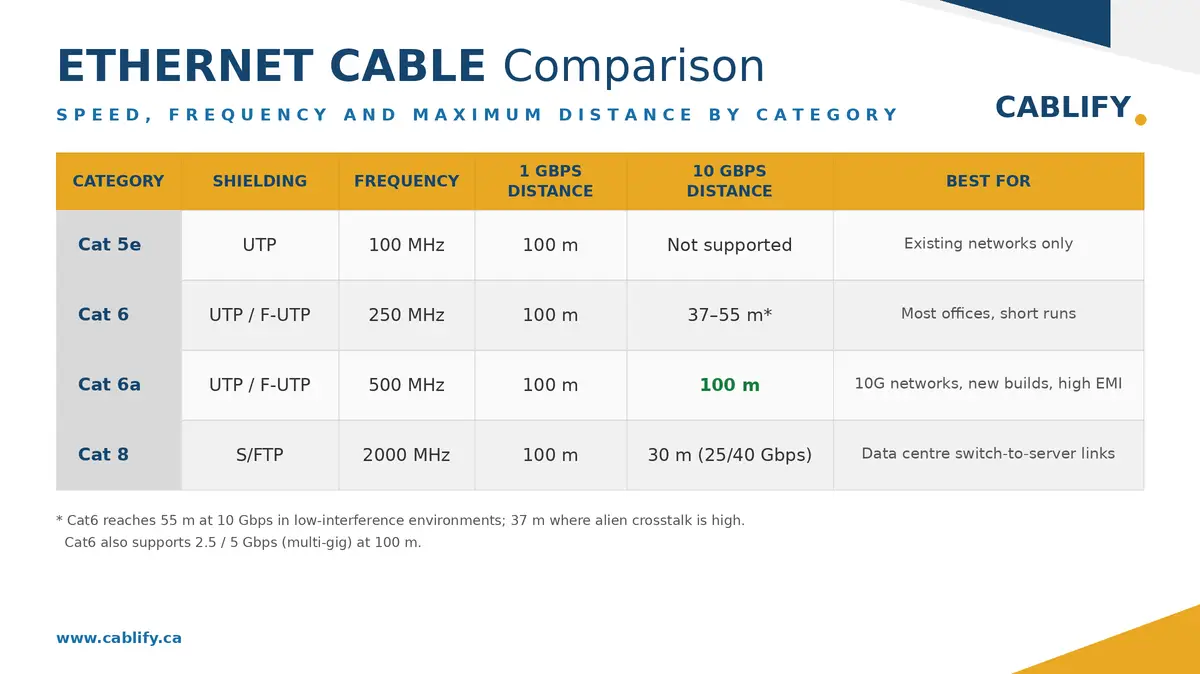
| Maximum frequency | 250 MHz | 500 MHz |
| 1 Gbps distance | 100 m | 100 m |
| 10 Gbps distance | 37–55 m | 100 m |
| Alien crosstalk protection | Limited | Strong (tighter twists, often shielded) |
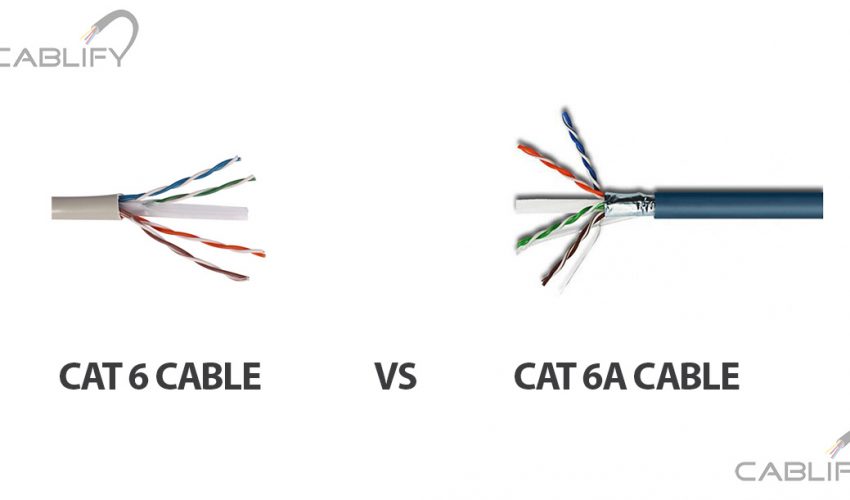
| Cable diameter | Thinner, more flexible | Thicker, more rigid |
| Relative cost installed | Lower | Roughly 30–50% more per drop |
| PoE performance | Good | Better heat dissipation on high-wattage PoE |
What Is Cat6 Cable?
Category 6 is the workhorse of modern office cabling. It’s rated to 250 MHz and delivers 1 Gbps at the full 100-metre channel length, which covers the vast majority of desk, phone, printer, and access point connections in a typical office.
Cat6 can also carry 10 Gbps, but only over shorter runs: 55 metres in a low-interference environment, and as little as 37 metres where cables are bundled tightly or run near sources of electrical noise. If a run exceeds that, the link will still work, but it negotiates down to 1 Gbps.
Because Cat6 is thinner and more flexible, it’s easier to pull through conduit, tight ceiling spaces, and crowded cable trays. Installation is faster and material costs are lower, which is why it remains the default choice for most small and mid-size offices.
What Is Cat6a Cable?
Category 6a (the “a” stands for augmented) doubles the rated frequency to 500 MHz and carries 10 Gbps over the full 100-metre channel. It achieves this through tighter pair twists, a larger conductor separation, and, in shielded variants (F/UTP), a foil layer around the pairs.
Those design changes give Cat6a much better protection against alien crosstalk, which is interference from neighbouring cables in the same bundle, and against electromagnetic interference (EMI) from fluorescent lighting, motors, elevators, and industrial equipment.
The trade-off is bulk. Cat6a is noticeably thicker and stiffer, needs larger conduit and pathways, has a wider bend radius, and takes longer to terminate. Expect a professionally installed Cat6a drop to cost roughly 30 to 50 percent more than the same Cat6 drop, sometimes more when shielded hardware and bonding are involved.
The Five Differences That Actually Matter
1. Speed over distance
Both cables are “10 Gbps capable,” which is where most of the confusion starts. The real difference is distance. Cat6a holds 10 Gbps to 100 metres. Cat6 holds it to 55 metres at best, and closer to 37 metres in noisy or densely bundled installations. For 1 Gbps, both go the full 100 metres, and so does the older Cat5e.
2. Interference and crosstalk
Cat6a was engineered specifically to control alien crosstalk at high frequencies. If your cabling shares pathways with power lines, runs through a manufacturing floor, or sits above banks of fluorescent fixtures, Cat6a gives you far more headroom. In a quiet office ceiling, Cat6’s protection is usually sufficient.
3. Installation effort
Cat6a’s thickness affects everything downstream: conduit fill, tray capacity, patch panel density, and termination time. A pathway sized for 100 Cat6 cables may only hold 60 to 70 Cat6a cables. This matters most in retrofit projects where pathways already exist.
4. Cost
The cable itself can cost close to double, but the installed price gap is usually smaller once labour, jacks, and panels are included. Budget roughly 30 to 50 percent more per drop for Cat6a. On a 100-drop office, that difference is real money, so it should buy you something you’ll actually use.
5. Power over Ethernet
Both handle PoE, but Cat6a’s larger conductors and construction dissipate heat better in large bundles. If you’re powering many high-wattage devices such as PTZ cameras, Wi-Fi 6E/7 access points, or LED lighting over PoE++, Cat6a is the safer specification.
When Cat6 Is the Right Choice
Choose Cat6 when most of your runs are under 55 metres, your day-to-day needs are 1 Gbps to the desktop, and the environment is a normal office without major EMI sources. It’s also the practical choice when existing conduit and pathways are too tight for thicker cable, or when budget is the deciding factor on a large drop count. A typical office floor plan rarely has runs beyond 50 metres, so Cat6 delivers 10 Gbps capability where it’s most likely to be needed anyway.
When Cat6a Is Worth the Extra Cost
Choose Cat6a when you need dependable 10 Gbps on runs beyond 55 metres, when the environment is electrically noisy (industrial floors, hospitals, labs, mechanical rooms), or when the cabling has to last 15 to 20 years without another pull. It’s also the better backbone for Wi-Fi 6E and Wi-Fi 7 access points, which can genuinely exceed 1 Gbps of traffic, and for buildings standardizing on high-power PoE. New construction is the ideal time to install Cat6a, since pathways can be sized for it from the start.
What About Cat5e?
For reference, Cat5e still handles 1 Gbps up to 100 metres and remains fine for existing networks that meet current needs. We don’t recommend it for new installations: the cost savings over Cat6 are minimal, and it has no meaningful 10 Gbps capability.
Frequently Asked Questions
Is Cat6a worth it for a home or small office?
Usually not. Runs are short, so Cat6 already gives you 10 Gbps capability at lower cost with easier installation. Cat6a makes sense at home only if you’re wiring during construction and want maximum future-proofing.
Can I mix Cat6 and Cat6a in the same building?
Yes. A common approach is Cat6a for backbone links, access points, and long runs, with Cat6 for standard desk drops. The connectors are compatible (both use RJ45), though each channel performs to its lowest-rated component.
Does Cat6a require shielded connectors and grounding?
Only shielded (F/UTP) Cat6a does. Unshielded Cat6a exists and still meets the 500 MHz / 100 m spec. If you install shielded cable, the whole channel, including jacks and patch panels, must be shielded and properly bonded to ground, which adds cost and requires experienced installers.
Will Cat6 become obsolete?
Not soon. Gigabit remains sufficient for most desktop users, and Cat6 supports 2.5 and 5 Gbps (multi-gig) at 100 metres, which covers the next wave of access point and workstation upgrades.
Our Recommendation
For most Toronto and GTA offices we cable, Cat6 remains the best value: nearly every run is short enough for 10 Gbps when needed, and the savings fund better switches and access points. We steer clients to Cat6a for new construction, long runs, industrial environments, healthcare, and anywhere the network must carry 10 Gbps reliably for the next two decades.
Not sure which applies to your building? Contact Cablify for a free site assessment, or learn more about our Cat6a installation services. We’ll measure your actual run lengths and recommend the option that fits, not the one that costs more.