
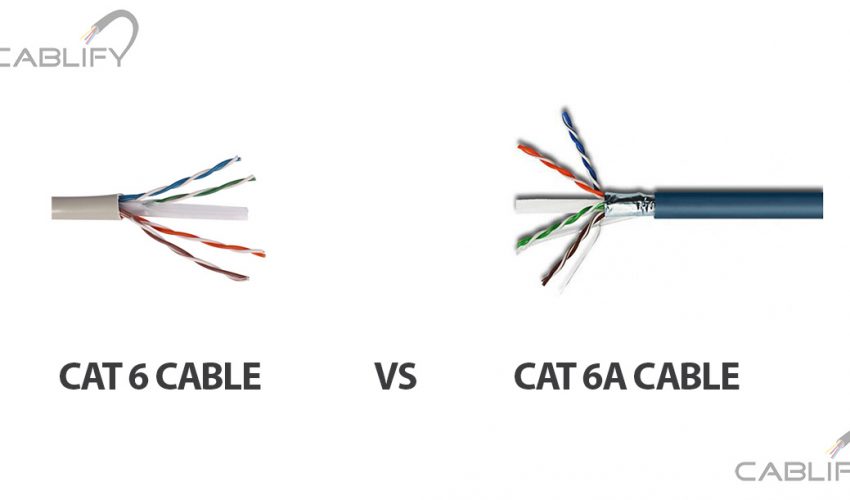
Cat6 and Cat6A both carry 1, 2.5 and 5 Gbps over the full 100 metres. The real difference is 10 Gbps. Cat6A carries it the whole 100 m, while Cat6 is only expected to carry it to about 37 m, and maybe 55 m after testing. Cat6A is also thicker, handles PoE heat better and costs more to install.
For most office desk drops, Cat6 is the better buy. For Wi-Fi access points, long runs, high-power PoE and new construction that has to last, Cat6A is worth the extra money. Plenty of buildings end up with both.
Cat6 vs Cat6A at a glance
| Cat6 | Cat6A | |
|---|---|---|
| Standard | TIA Category 6 (ISO Class E) | TIA Category 6A (ISO Class EA) |
| Bandwidth | 250 MHz | 500 MHz |
| 1 Gbps | 100 m | 100 m |
| 2.5 and 5 Gbps | 100 m | 100 m |
| 10 Gbps | Expected to 37 m, possibly 55 m after testing | 100 m |
| Alien crosstalk | Not specified | Specified and tested |
| Typical diameter | About 0.24 in (6 mm) | About 0.30 in (7.6 mm), 0.24 to 0.35 in by brand |
| Cables per 1-inch EMT at 40% fill | 7 | 4 at 0.30 in, 3 at 0.35 in |
| PoE | Supports all types up to 90 W | Same, and runs cooler in large bundles |
| Installed cost | Lower | Roughly 30 to 50% more per drop |
| Best for | Desks, phones, printers, short runs | Access points, long runs, 10G, high-power PoE, new builds |
Which one do I need?
Answer five quick questions about your runs and get a recommendation, with the reasons behind it.
Speed and distance: where the real difference is
Both cables get sold as “10 Gbps capable”, which is where most of the confusion starts. What actually differs is how far 10 Gbps goes.
Cat6A was designed for 10 Gbps Ethernet (10GBASE-T) and carries it over the full 100 m channel. Cat6 is only specified to 250 MHz, and 10 Gbps needs 500 MHz. TIA’s guidance for running 10 Gbps on Cat6 (TSB-155) says it should work up to 37 m, may work from 37 to 55 m depending on alien crosstalk, which is interference from neighbouring cables in the same bundle, and needs mitigation beyond that.
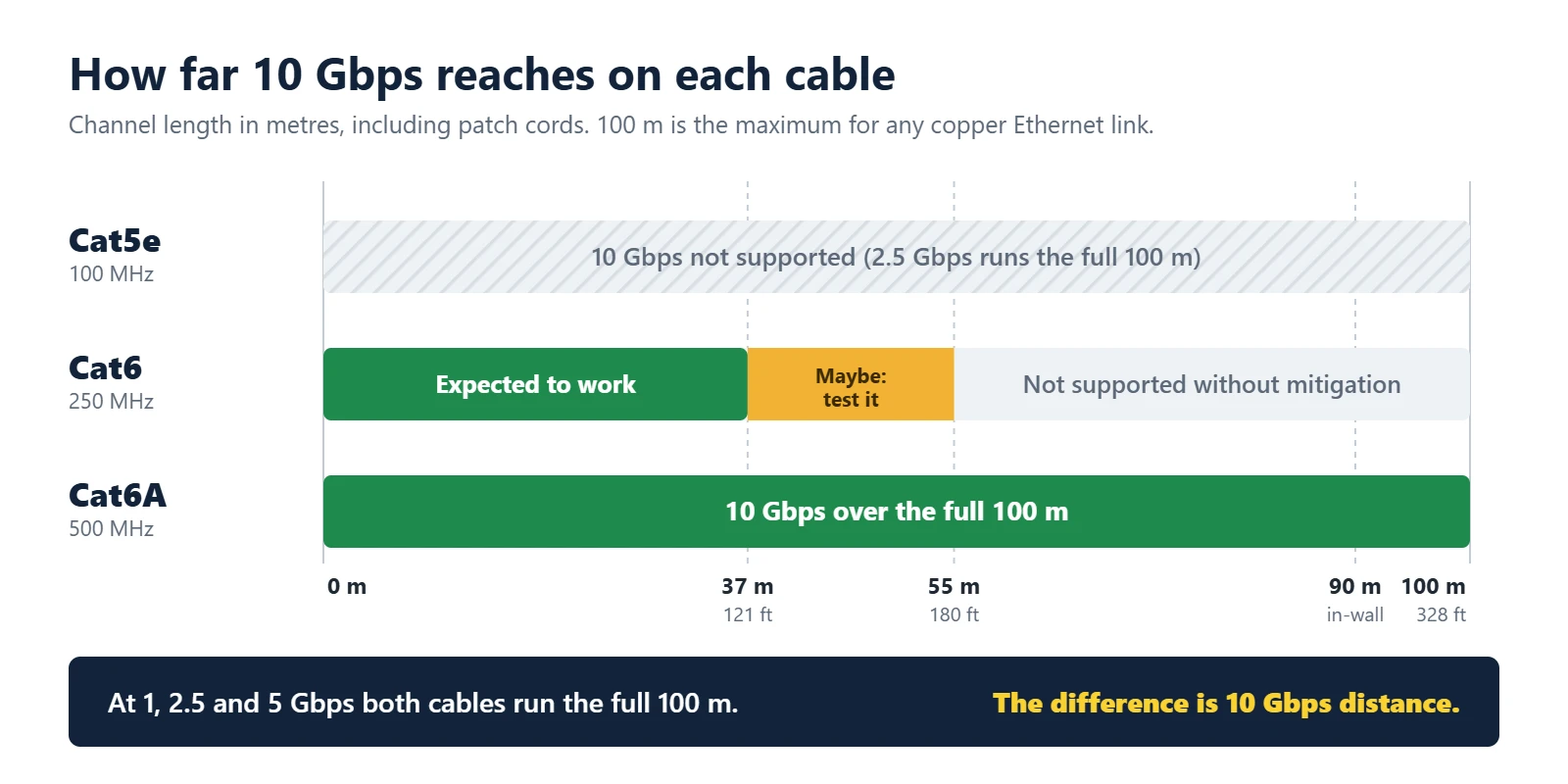
Below 10 Gbps, length stops mattering. Gigabit runs 100 m on Cat5e, Cat6 and Cat6A. Multi-gig Ethernet (IEEE 802.3bz) runs 2.5 Gbps over 100 m of Cat5e and 5 Gbps over 100 m of Cat6, which covers most of today’s access points and workstations. Our multi-gig Ethernet guide explains those speeds, and our cable speed comparison lines up Cat5e through Cat8.
Size, weight and pathway space
Cat6A gets part of its performance from size. Most unshielded Cat6A is around 0.30 in across, against about 0.24 in for Cat6, and it is heavier and stiffer. That changes the whole installation:
- Conduit and tray fill. At the 40% fill limit, a 1-inch EMT conduit takes 7 Cat6 cables but only 4 typical Cat6A cables, or 3 of the larger 0.35 in designs.
- Bend radius. The installed minimum for unshielded cable is four times its diameter, so about 1 in for Cat6 and 1.2 in for Cat6A. Shielded cable often needs more, so check the datasheet.
- Racks and patch panels. Thicker cable takes more room behind the panel and in vertical cable managers, so dense racks need more planning.
- Labour. Cat6A takes longer to pull, dress and terminate.
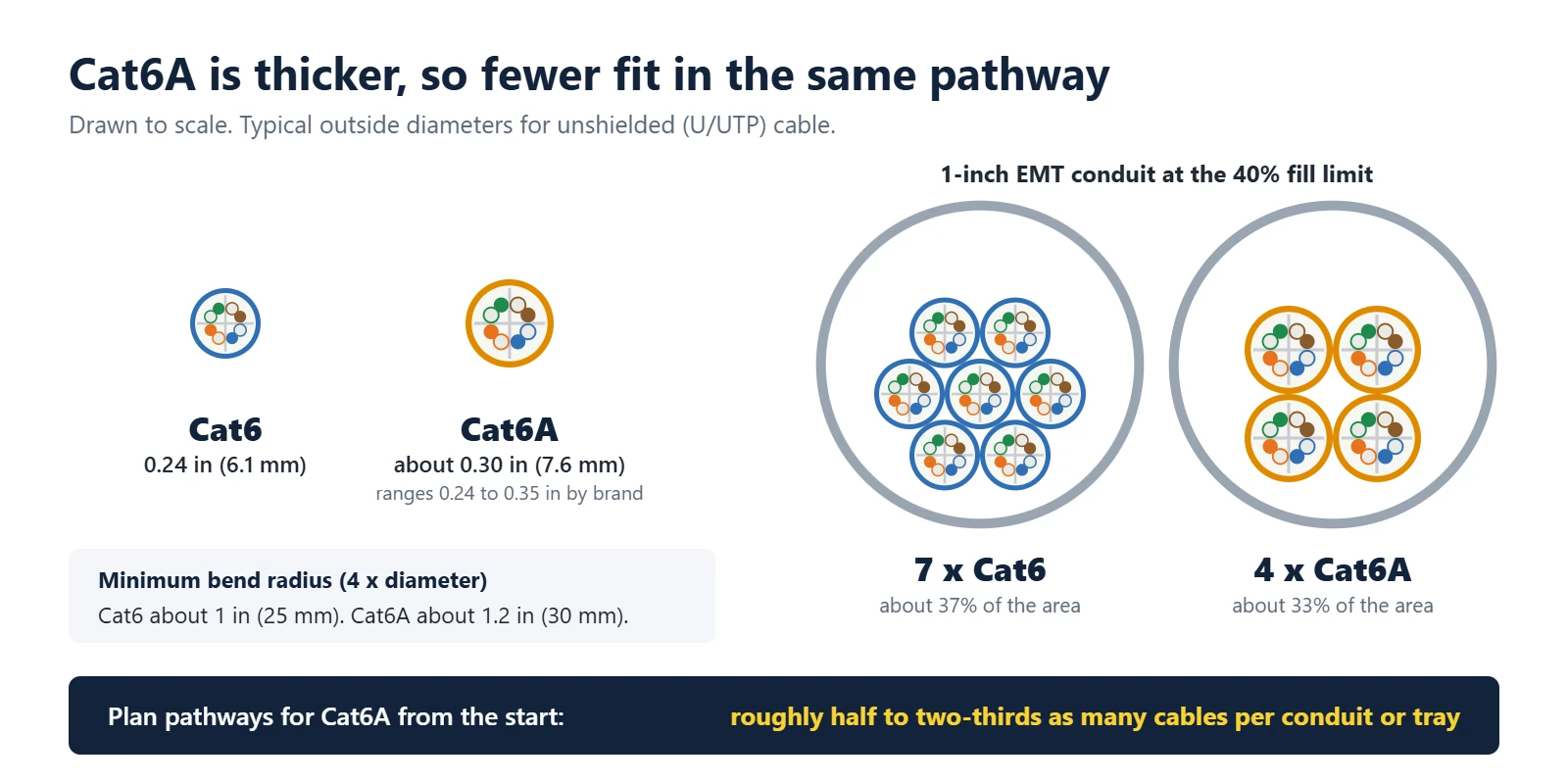
Reduced-diameter Cat6A designs come close to Cat6 in size, while older Cat6A can reach 0.35 in. Put the diameter from your cable datasheet into our data cable conduit fill calculator, or read the conduit fill guide for data cables.
PoE and heat
Every PoE device turns a little of the power in its cable into heat. One cable barely warms up. A bundle of a hundred carrying high-power PoE can get warm enough to lose performance and, in the worst case, exceed the cable’s temperature rating.
The latest PoE standard, IEEE 802.3bt, delivers 60 W (Type 3) or 90 W (Type 4) per port. It powers PTZ cameras, cameras with heaters, many Wi-Fi 7 access points, displays and PoE lighting. TIA’s PoE guidance (TSB-184-A) recommends Cat6A or better for new installations that deliver power, and recommends keeping bundles to 24 cables where currents are high.
Both cables support every PoE type. Cat6A simply has more margin, because its larger construction sheds heat better. If your building will have dozens of high-power PoE devices on shared pathways, that margin is worth paying for.
Wi-Fi 6E and Wi-Fi 7 access points
Access points are where Cat6A pays off most. A Wi-Fi 6E or Wi-Fi 7 access point can move more than 1 Gbps of real traffic, and many have 2.5, 5 or 10 Gbps ports. They are PoE powered and mounted in the ceiling, often at the far end of long runs.
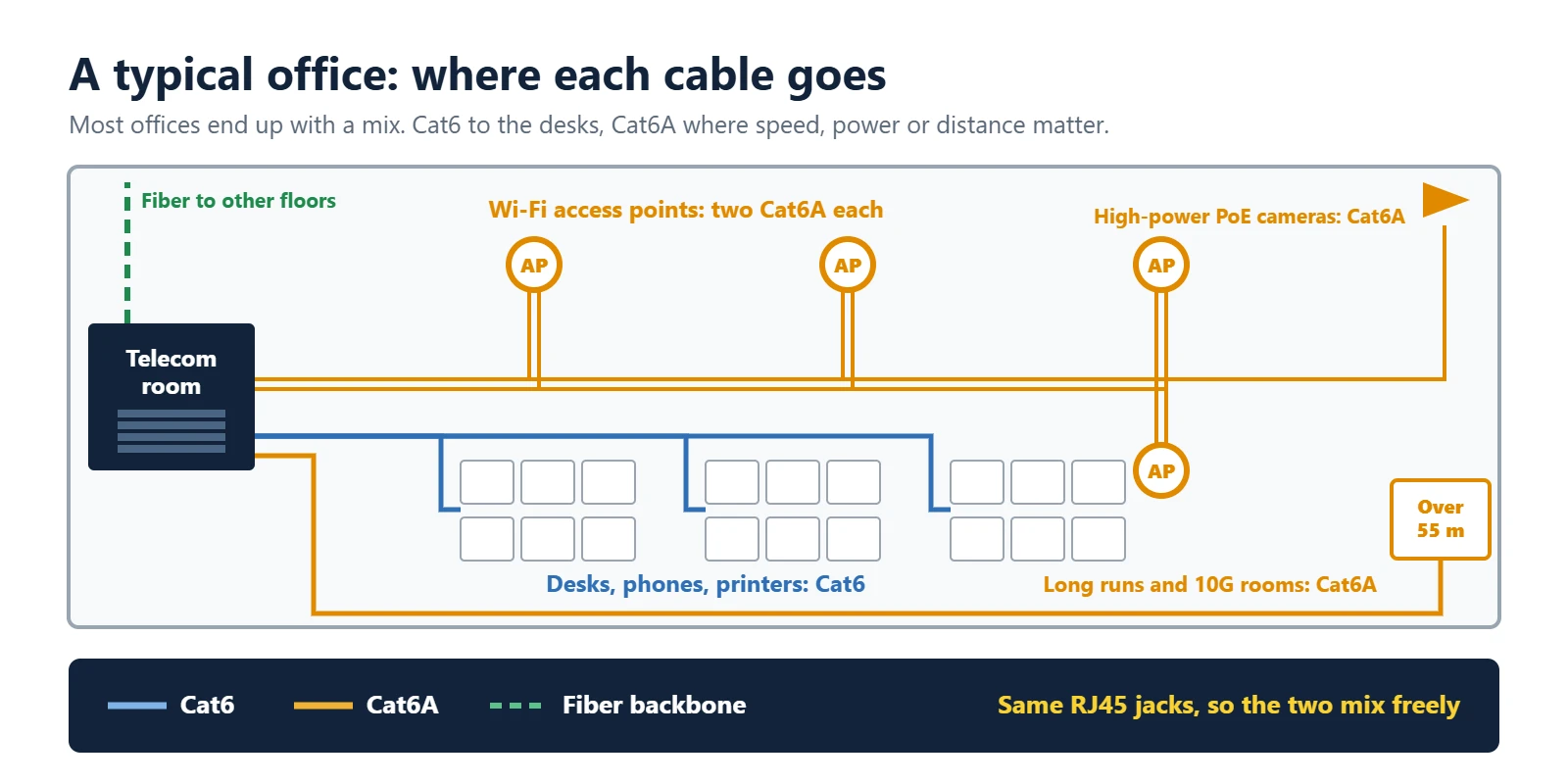
TIA’s cabling guidelines for wireless access points (TSB-162-A) recommend Cat6A, with two cable runs to each access point location. Two runs give you a spare if one fails and room to combine links on future access points.
Cat6 still carries 2.5 and 5 Gbps to 100 m, so existing Cat6 can serve many current access points. For new installations, run Cat6A to the ceiling. Our guide to slow office Wi-Fi covers the cabling problems behind poor wireless.
Shielded or unshielded Cat6A
Cat6A comes unshielded (U/UTP) or shielded (F/UTP, with foil around all four pairs). Both meet the same 500 MHz, 100 m specification.
- Unshielded Cat6A is what most offices use. It is easier to install and needs no grounding.
- Shielded Cat6A helps in electrically noisy places such as plant floors, mechanical rooms and imaging suites, and it is often a little thinner. The whole channel must be shielded, including jacks, panels and patch cords, and bonded to the building’s telecom ground. A shield that is not bonded properly can make things worse.
Connectors, jacks and patch cords
Cat6 and Cat6A both use the RJ45 connector, so any device plugs into either. A link is only as good as its weakest part, though. A Cat6 jack on Cat6A cable gives you a Cat6 link. For Cat6A performance, the cable, jacks, patch panel and patch cords all need to be Cat6A rated, ideally from one manufacturer’s system.
Use the jacks and plugs the cable maker specifies. Cat6A cable often will not fit plugs and jacks made for Cat6.
Fire ratings in Canada: FT4 and FT6
In Canada, network cable carries a CSA flame rating printed on the jacket. The building code decides which one you need, and it can move the budget as much as Cat6 versus Cat6A.
- FT6 (plenum, also marked CMP) is required where the ceiling space is used as a return-air plenum.
- FT4 (also marked CMR or CMG) covers most other spaces in commercial buildings.
Many commercial buildings use the space above the ceiling as a return-air plenum, so FT6 is common, and FT6 Cat6A is the most expensive combination. Confirm the ceiling type before you price a job. Our riser vs plenum guide explains the ratings.
Cost: what the extra money buys
As a rough guide, a Cat6A drop costs 30 to 50 percent more installed than the same Cat6 drop, and more with shielded cable or FT6 jackets. The cable costs more per box, but most of the gap comes from slower pulls, longer terminations, Cat6A jacks and panels, and bigger pathways.
On a 100-drop office that gap is real money, so it should buy something you will use. Ways to keep it down:
- Run Cat6A only where it matters: access points, long runs, 10G rooms and high-power PoE.
- Size conduits and trays for Cat6A in new construction, even where you run Cat6 today.
- Choose unshielded Cat6A unless the space is genuinely noisy.
When to choose each
Cat6 is the right choice when
- Most runs are under 55 m and devices need 1 to 5 Gbps
- You are adding drops to an existing Cat6 network
- Conduits and trays are already tight
- The space is a normal office with no unusual interference
- Budget decides it on a large drop count
Cat6A is worth it when
- Runs go past 55 m and may need 10 Gbps
- You are cabling Wi-Fi 6E or Wi-Fi 7 access points
- Dozens of high-power PoE devices share pathways
- The space is electrically noisy
- It is new construction expected to last 15 years or more
Testing a Cat6 or Cat6A installation
Certification testing proves each run meets its category. A Cat6A link is tested to 500 MHz. Cat6 that you want to use for 10 Gbps needs testing to 500 MHz plus alien crosstalk, as TSB-155 describes, because the Cat6 standard itself stops at 250 MHz.
Cablify Fluke tests every run we install, and full certification reports are available on request.
Cat6 vs Cat6A at home
For most homes, Cat6 is plenty. Home runs are usually short, most home devices connect at 1 Gbps, and Cat6 carries 10 Gbps on short runs anyway. Cat6A makes sense at home if the walls are open during a build or renovation and you want the most headroom for the price of slightly thicker cable.
A new cable will not speed up your internet by itself. If a wired speed test comes in low, the cause is usually somewhere else. See why 1 Gbps internet can test at only 200 to 300 Mbps.
Is there a Cat6e?
No. Cat6e is not a standard. TIA and ISO define Cat6 and Cat6A, and nothing in between. “Cat6e” is a label some sellers put on Cat6 cable with extra headroom, and no test can certify a cable as Cat6e. If you need more than Cat6, specify Cat6A.
Questions
Is Cat6A worth it over Cat6?
It depends on the run. Cat6A is worth it for Wi-Fi access points, runs over 55 m that may need 10 Gbps, large bundles of high-power PoE and new construction meant to last. For ordinary desk drops under 55 m, Cat6 does the job for less.
Is Cat6A overkill for home use?
Usually. Home runs are short and most home devices connect at 1 Gbps, so Cat6 is plenty. Cat6A makes sense if the walls are open during a build or renovation and you want the most headroom.
What are the disadvantages of Cat6A?
It is thicker, stiffer and heavier, needs a larger bend radius and more conduit and tray space, takes longer to terminate, and costs roughly 30 to 50 percent more per drop to install. Shielded Cat6A also has to be bonded to ground.
Do Cat6 and Cat6A use the same connector?
Yes. Both use RJ45, so they work with the same switches and devices. For Cat6A performance, the jacks, patch panels and patch cords must be Cat6A rated as well.
Can Cat6 run 10 Gbps?
On short runs. TIA guidance expects 10 Gbps on Cat6 up to 37 m, and possibly up to 55 m depending on interference from neighbouring cables. Past that, use Cat6A.
Can I mix Cat6 and Cat6A in the same building?
Yes. A common design is Cat6 to desks and Cat6A to access points, long runs and 10G rooms. Each link performs to its lowest-rated component, so keep every part of a Cat6A link at Cat6A.
Is Cat6A the same as T568A?
No. Cat6A is a cable category, and the A stands for augmented. T568A and T568B are the two colour orders for wiring a jack, and either can be used with any category.
Is Cat6e better than Cat6A?
No. Cat6e is not a recognized standard. It is a label some sellers put on Cat6 cable. Cat6A is the standardized step up from Cat6.
Should I skip to Cat7 or Cat8?
Not for building cabling. Cat7 is not a TIA standard and its official connectors are not RJ45. Cat8 is designed for short data centre links up to 30 m. For horizontal cabling to desks and access points, Cat6A is the top choice.
Does Cat6A need shielded jacks and grounding?
Only shielded (F/UTP) Cat6A does. Unshielded Cat6A meets the same 500 MHz, 100 m specification without any grounding.
Will Cat6 become obsolete?
Not soon. Cat6 carries 5 Gbps to 100 m, which covers most desktops and many access points for years. Cat6A is the safer choice for new access point and high-power PoE runs.
Planning new cabling in the GTA?
Cablify installs Cat6 and Cat6A for offices, warehouses and new builds across Toronto and the GTA. We measure your actual run lengths, check your ceiling type and recommend Cat6, Cat6A or a mix. Every run is Fluke tested, and as a Hubbell Certified Installer we can register Hubbell’s 25-year warranty on qualifying systems.
Ask for a free site assessment