

The short answer
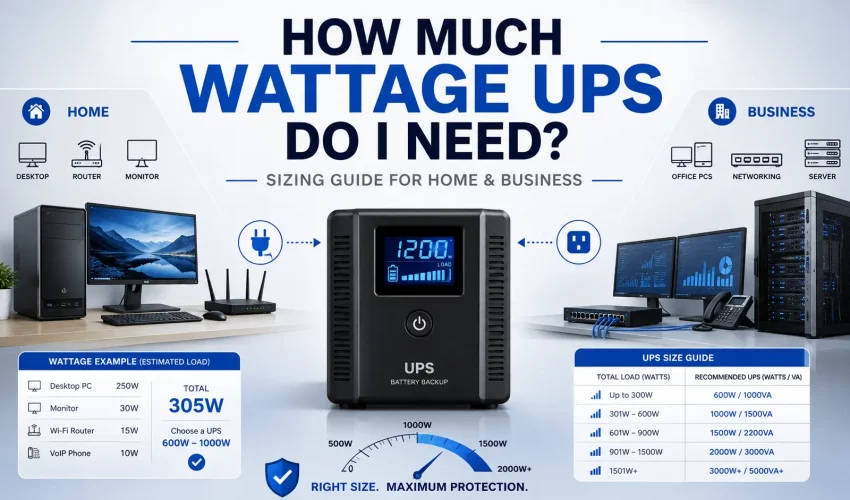
Add up the real wattage of everything you want to keep running, add about 25% headroom, then buy a UPS whose watt rating (not just its VA rating) is above that number. For a typical home PC, a 600–900VA unit is plenty. A gaming PC usually wants 1000–1500VA with a pure sine wave output. A business network rack with a 48-port PoE+ switch and NVR often needs a 1500–3000VA rack UPS, sized around the PoE budget you’re actually using.
What this guide covers
- VA vs watts (what everyone gets wrong)
- The 3-step sizing formula
- Load worksheet & device wattage table
- How long will it actually run?
- What size UPS for a PC or gaming PC
- Common sizes: 600VA = how many watts?
- How to find your real wattage
- Standby vs line-interactive vs online
- When you need a pure sine wave UPS
- Business networks: switches, PoE, NVRs
- Complex & redundant setups
- Common sizing mistakes
- Home vs business: what changes
- Cabling & power planning together
- FAQ
A UPS (uninterruptible power supply) does two jobs. It keeps your equipment running through a blackout long enough to save work or shut down cleanly, and it smooths out the small sags, surges, and brownouts that quietly shorten the life of electronics. The hard part isn’t understanding what a UPS does. It’s picking the right size. Buy too small and it trips offline the moment the power drops. Buy too big and you’ve spent double for runtime you’ll never use.
This guide walks through the actual numbers, from a single desktop up to a full business network with managed switches, Power over Ethernet, and video recorders. Every section includes the math so you can size your own setup with confidence.
VA vs Watts: the part everyone gets wrong
UPS units are advertised with two numbers, and they are not the same thing. Getting this wrong is the single most common reason people undersize a UPS.
VA (volt-amps) is the apparent power, roughly the raw electrical load the UPS can handle. Watts (W) is the real power, the actual work delivered to your equipment. The ratio between them is the power factor:
Example: 1000 VA × 0.9 = 900 wattsExample: 1000 VA × 0.6 = 600 watts
Cheaper consumer UPS units often run a power factor of 0.6, so a “600VA” model may only deliver around 360 watts of real power. Better line-interactive and online units sit at 0.9 to 1.0. Modern IT gear like servers and PC power supplies runs at a power factor of 0.9 or higher, so you want a UPS whose watt rating comfortably clears your real load. Always size to the watt number, not the VA number.
| UPS VA rating | Watts @ 0.6 PF | Watts @ 0.9 PF | Watts @ 1.0 PF |
|---|---|---|---|
| 600 VA | 360 W | 540 W | 600 W |
| 900 VA | 540 W | 810 W | 900 W |
| 1000 VA | 600 W | 900 W | 1000 W |
| 1500 VA | 900 W | 1350 W | 1500 W |
| 2200 VA | 1320 W | 1980 W | 2200 W |
| 3000 VA | 1800 W | 2700 W | 3000 W |
Rule of thumb
If a spec sheet only lists VA and you can’t find the watt rating, assume 0.6 PF for a cheap consumer unit and 0.9 for a business-grade one. When in doubt, size down your assumption so you don’t undersize the UPS.
The 3-step UPS sizing formula
Forget complicated calculators for a moment. Every correct UPS choice comes down to three steps.
- Add up your real load in watts. List every device you want the UPS to protect and add up their actual running wattage. Use the device table below, or read the wattage off each unit’s power label or spec sheet. This is your base load.
- Add headroom. Multiply your base load by 1.25. That 25% buffer covers startup spikes, future additions, and keeps the UPS off its performance cliff. Running a UPS near 100% shortens both battery life and runtime dramatically.
- Match to a UPS watt rating and choose runtime. Pick a UPS whose watt rating exceeds your headroom number. Then decide how many minutes of runtime you need, which sets the battery size (VA class). More runtime means a bigger unit or an external battery pack.
Then: choose runtime → sets the VA / battery size
That’s the whole method. Steps 1 and 2 tell you the minimum UPS capacity. Step 3 tells you how long it lasts. People confuse these constantly: a bigger VA number does not always mean more runtime if the load is also bigger.
Load worksheet and device wattage reference
Here are realistic running wattages for the equipment most home and business setups protect. Use these to build your base load. Actual draw varies by model, so treat these as planning figures and confirm against your own labels for anything large.
| Device | Typical draw | Notes |
|---|---|---|
| Office / home desktop PC | 60–150 W | Idle to light load |
| Gaming PC (under load) | 300–600 W | GPU-dependent; spikes higher |
| Monitor (24–27″) | 20–50 W | Per monitor |
| Laptop | 30–90 W | Has its own battery already |
| Wi-Fi router / gateway | 10–30 W | Keep online during outages |
| Firewall / small appliance | 15–40 W | Business edge devices |
| Unmanaged / small switch (8–24 port, no PoE) | 10–30 W | Low, steady draw |
| Managed switch chassis (48 port, PoE off) | 40–60 W | Before any PoE load |
| PoE budget in use (per switch) | up to 370–740 W | Depends on connected devices |
| IP camera (fixed) | 4–12 W | Usually powered by PoE switch |
| PTZ camera | up to 25–50 W | Motorized, higher draw |
| Wireless access point | 10–25 W | Usually PoE |
| NVR (recorder only) | 10–40 W | Add drives below |
| Hard drive (per drive in NVR/NAS) | 6–10 W | Multiply by drive count |
| Small business server / NAS | 80–300 W | Configuration-dependent |
| VoIP phone | 3–8 W | Often PoE |
Watch the PoE trap
A 48-port PoE+ switch’s power budget can be anywhere from about 370W to 740W. But the number that matters for your UPS is what you’re actually delivering, not the switch’s maximum. Twelve cameras at 8W is 96W of PoE, not 740W. Count your connected devices, don’t size to the label.
How long will it actually run?
Runtime is the question everyone really cares about, and it’s non-linear. The lighter your load relative to the UPS, the longer it lasts, and not by a little. A UPS running at 30% load can last several times longer than the same unit at 90%.
The rough physics: a UPS battery stores a fixed amount of energy in watt-hours (Wh). Runtime in hours is approximately the battery’s usable watt-hours divided by your load in watts, minus inverter losses.
Example: 400 Wh battery, 200 W load → ~1.8 hoursExample: 400 Wh battery, 400 W load → ~0.9 hours
Most standalone UPS units are designed for minutes, not hours, enough to ride out a brief outage or shut down safely. The table below shows the ballpark you can expect. Manufacturer runtime charts are the final word, but this gives you the shape of it.
| UPS class | Load ~30% | Load ~50% | Load ~90% |
|---|---|---|---|
| 600–700 VA | 20–35 min | 8–12 min | 2–4 min |
| 900–1000 VA | 25–45 min | 10–16 min | 3–5 min |
| 1500 VA | 30–55 min | 12–20 min | 4–7 min |
| 2200–3000 VA | 25–50 min | 10–22 min | 4–8 min |
If you need hours instead of minutes, for example to keep a security system or network alive through a long outage, you don’t buy a bigger UPS. You buy a UPS that accepts external battery packs and add as many as the runtime demands. That’s the correct way to scale runtime without oversizing the inverter.
What size UPS do I need for a PC or gaming PC?
This is the most searched version of the question, so let’s be specific.
Standard home or office PC
A basic desktop plus one monitor draws roughly 100–200W in normal use. Add 25% headroom and you’re at 125–250W. A 600–900VA UPS (around 360–540W usable) covers this comfortably and gives you several minutes to save and shut down. This is the sweet spot for most home offices and reception desks.
Gaming PC
Gaming rigs are a different animal. Under load a mid-to-high-end build pulls 300–600W, and the GPU can spike briefly well above its average. If your power supply is rated 750W or 850W, don’t size to the PSU rating, size to real draw, but leave generous headroom for spikes.
| Setup | Real load | With 25% headroom | Suggested UPS |
|---|---|---|---|
| Office PC + 1 monitor | ~150 W | ~190 W | 600–900 VA |
| Dual-monitor workstation | ~250 W | ~310 W | 900–1000 VA |
| Mid gaming PC + monitor | ~400 W | ~500 W | 1000–1500 VA (sine wave) |
| High-end gaming / creator PC | ~600 W | ~750 W | 1500 VA+ (sine wave) |
Gaming PCs almost always want a pure sine wave UPS
Modern PC power supplies use active power factor correction (active PFC). These don’t play nicely with the cheap “stepped” or “simulated” sine wave found in budget UPS units. More on why below, but for a gaming or workstation build, treat pure sine wave as a requirement, not an upgrade.
Common UPS sizes: “600VA UPS, how many watts?”
People search this constantly because the box rarely makes it obvious. Here’s a quick reference for the popular sizes, using a typical consumer power factor of about 0.6 and a business-grade 0.9 so you can see both ends.
| Size | Consumer (~0.6 PF) | Business (~0.9 PF) | Best suited to |
|---|---|---|---|
| 600 VA | ~360 W | ~540 W | Single PC, router, small NVR |
| 800 VA | ~480 W | ~720 W | PC + peripherals, small AV |
| 1000 VA | ~600 W | ~900 W | Workstation, gaming PC |
| 1500 VA | ~900 W | ~1350 W | Gaming PC, small network rack |
| 2200 VA | ~1320 W | ~1980 W | Network rack, PoE switch + NVR |
| 3000 VA | ~1800 W | ~2700 W | Full rack, servers, dense PoE |
How to find your equipment’s real wattage
Planning estimates get you close, but for anything expensive it’s worth pinning down the real number. There are three reliable ways, in order of accuracy.
Read the label or spec sheet. Most equipment lists power on a sticker or in the manual. Be careful: a figure like “input 100–240V, 3A” is the maximum the device could draw, not what it actually pulls day to day. A PC power supply rated 750W rarely draws anywhere near 750W in normal use. Use rated figures as a ceiling, not your working number.
Measure with a plug-in power meter. A cheap wattmeter that sits between the wall and the device shows exactly what it draws in real time. This is the gold standard for a single PC or a small stack of gear. Measure under a realistic load, for example while gaming or with cameras recording, not at idle.
Read it from managed hardware. Managed switches, servers, and NVRs often report their own power draw and, for switches, the live PoE consumption, in their web interface or management console. For a network rack, this is the fastest way to get an accurate total because it captures the PoE load you’re actually delivering rather than the theoretical budget.
The quick sanity check
Add your measured or labelled figures, apply the 25% headroom, and compare to the watt rating of the UPS you’re considering. If your number is above roughly 80% of the UPS watt rating, size up. Living at the top of a UPS’s capacity kills runtime and battery life.
Standby vs line-interactive vs online UPS
Beyond size, UPS units come in three topologies. The right one depends on how critical your load is and how clean your incoming power is. This choice affects price, efficiency, and how well the UPS protects sensitive gear.
| Type | How it works | Transfer time | Best for |
|---|---|---|---|
| Standby (offline) | Runs on mains, flips to battery when power fails | Longer (a few ms) | Home PCs, low-cost basic protection |
| Line-interactive | Regulates voltage (AVR) and switches to battery on outage | Short (few ms) | Workstations, small business networks, most racks |
| Online (double conversion) | Continuously rebuilds the output waveform from DC | Zero | Servers, server rooms, critical infrastructure, dirty power |
For most home and small-business use, a line-interactive unit with pure sine wave output is the sweet spot: it corrects minor voltage sags and swells with its automatic voltage regulation (AVR) without draining the battery, and switches over fast enough for PCs and network gear. Step up to online double-conversion when you’re protecting servers, running a proper server room, or dealing with unreliable mains where the power quality itself is the problem. The extra cost buys you zero transfer time and a completely reconstructed, clean waveform at all times.
When you need a pure sine wave UPS
UPS units come in two output flavours when running on battery: pure (true) sine wave and simulated (stepped) sine wave. On normal mains power both pass the wall current straight through. The difference only shows up in the moment the UPS switches to battery, and for some equipment that moment matters a great deal.
Any power supply with active PFC, which includes virtually all modern gaming PCs, workstations, and many servers, expects a clean sinusoidal waveform. When a stepped-wave UPS kicks in, the blocky waveform can look like an unstable input. The PSU’s protection circuitry may interpret it as a fault and shut down or restart the machine, sometimes under load, which is exactly the failure a UPS is supposed to prevent. Over time, the mismatch can also make the PSU run hotter.
| Equipment | Pure sine wave? | Why |
|---|---|---|
| Gaming PC / workstation (active PFC PSU) | Yes, required | Stepped wave can trigger shutdown/restart |
| Servers & enterprise IT | Yes | Active PFC + sensitive to power quality |
| Network switches, PoE, NVR, cameras | Strongly recommended | 24/7 gear; clean power extends life |
| Medical / lab equipment | Yes | Sensitive electronics, safety-critical |
| Basic office PC, LED lamp, phone charger | Optional | Tolerant of stepped wave |
For any business network, or any PC you care about, buy pure sine wave. The premium is small next to the cost of an unexpected hard shutdown on a server or recorder.
Business & network setups: switches, PoE, and NVRs
This is where sizing gets interesting, and where most guides go quiet. A business closet or rack isn’t one device, it’s a stack of gear that all needs to stay up together: the internet handoff, firewall, switches, wireless, cameras, and the recorder storing the footage. Lose power to the switch and every PoE camera and access point downstream goes dark too.
Let’s size a realistic small-business setup step by step.
Worked example: small office with cameras
Say you have a firewall, one 24-port PoE+ switch feeding 8 cameras and 4 access points, an NVR with four drives, and a modem.
| Item | Qty | Watts each | Subtotal |
|---|---|---|---|
| Modem / ONT | 1 | 10 | 10 W |
| Firewall appliance | 1 | 30 | 30 W |
| 24-port PoE+ switch (chassis) | 1 | 40 | 40 W |
| IP cameras (PoE) | 8 | 8 | 64 W |
| Access points (PoE) | 4 | 15 | 60 W |
| NVR recorder | 1 | 30 | 30 W |
| NVR hard drives | 4 | 8 | 32 W |
| Base load | 266 W | ||
| + 25% headroom | ~333 W | ||
At ~333W of required capacity, a 1000–1500VA pure sine wave UPS handles this with room to grow, and gives useful runtime because the load sits well under the unit’s ceiling. If you need the cameras recording through longer outages, choose a model that takes external battery packs.
Worked example: larger network with a 48-port PoE+ switch
Now scale up: 4 to 5 switches, one of them a 48-port PoE+ feeding a heavy camera and AP load, plus an NVR and a small server.
| Item | Qty | Watts each | Subtotal |
|---|---|---|---|
| Firewall / edge router | 1 | 40 | 40 W |
| 48-port PoE+ switch (chassis) | 1 | 55 | 55 W |
| Additional switches (24-port) | 3 | 25 | 75 W |
| PoE load in use (cameras + APs + phones) | — | — | ~320 W |
| NVR + 6 drives | 1 | 80 | 80 W |
| Small business server / NAS | 1 | 180 | 180 W |
| Base load | 750 W | ||
| + 25% headroom | ~940 W | ||
At roughly 940W of real load, you’re looking at a 2200–3000VA rack-mount pure sine wave UPS (about 1980–2700W usable at 0.9 PF). That leaves headroom for growth and keeps runtime sensible. Notice the PoE line: we counted the power actually delivered to devices (~320W), not the switch’s full 740W budget. Sizing to the budget here would have pushed you into a much larger, more expensive UPS for capacity you’d never use.
Split the load, don’t pile it on one UPS
In larger racks it’s often smarter to run two UPS units, for example one for the core network and one for surveillance, than a single oversized unit. You get redundancy, cleaner runtime math, and if one battery fails you don’t lose everything at once.
Complex and redundant setups
Once you move past a single rack, a few extra considerations come into play. These are the questions that separate a setup that survives a real outage from one that only looks protected on paper.
Line-interactive vs online (double conversion)
Most home and small-office UPS units are line-interactive: they run off mains and switch to battery in a few milliseconds when power drops. That’s fine for PCs and most network gear. For critical infrastructure, servers, or sites with dirty power, an online (double-conversion) UPS continuously rebuilds the waveform, so there’s zero transfer time and the cleanest possible output. It costs more and runs a little less efficiently, but for a server room it’s often the right call.
Redundancy (N+1)
Critical sites don’t rely on a single UPS. An N+1 design means you have one more UPS than the load strictly requires, so any single unit can fail or go offline for maintenance without dropping the load. Pair this with dual-PSU servers fed from separate UPS units and you’ve removed the UPS as a single point of failure.
Runtime vs generator handoff
If your site has a backup generator, the UPS only needs to bridge the 10–60 seconds it takes the generator to start and stabilize, so you size for short runtime and reliability. With no generator, the UPS is your backup, and you size the battery for however long you need to keep running or shut down gracefully.
Rack, mounting, and cooling
Rack UPS units are heavy and generate heat. They belong low in the rack for stability, need airflow, and their weight and cabling should be planned into the rack layout from the start, not squeezed in afterward. This is exactly the kind of detail that’s cheap to get right during installation and expensive to fix later.
Common UPS sizing mistakes
- Sizing to VA instead of watts. The number that limits your real equipment is watts. Always check it.
- Sizing a PoE switch to its full power budget. Count the devices you’re actually powering, not the switch’s maximum.
- Ignoring startup surge. Motors, some PSUs, and drive arrays draw more at power-on. The 25% headroom rule covers most of it.
- Buying stepped-wave for active-PFC gear. A false economy that can cause the exact shutdowns you were trying to prevent.
- Confusing capacity with runtime. A bigger VA number doesn’t guarantee longer runtime if your load grew too. Check the manufacturer’s runtime chart.
- Forgetting the network path. Protecting the server but not the switch feeding it means the server stays up while the network around it goes dark.
- Never replacing the battery. UPS batteries degrade in 3–5 years. An untested UPS with a dead battery is just an expensive power strip.
Home vs business: what actually changes
The sizing math is identical at home and at the office. What changes is what’s at stake and how you plan for it. Understanding the difference stops you from either over-buying for a home PC or under-protecting a business that can’t afford downtime.
At home, a UPS is usually about convenience and safety: don’t lose the document you’re editing, don’t corrupt a drive on a hard shutdown, keep the router alive so a brief flicker doesn’t drop your call. One right-sized line-interactive unit per desk or per rack shelf is plenty. Runtime of a few minutes is fine because your goal is a clean save or shutdown, not staying online for hours.
In a business, the UPS protects revenue, data, and often physical security. A power blip that drops a switch can take down phones, Wi-Fi, point-of-sale, door access, and cameras all at once. The recorder writing your security footage should never take a hard shutdown. That raises the bar: pure sine wave becomes standard, you plan for longer runtime or a generator handoff, you often split the load across multiple units for redundancy, and you factor in growth so next year’s cameras and access points don’t push you over capacity.
| Consideration | Home | Business |
|---|---|---|
| Primary goal | Save work, ride out flickers | Uptime, data integrity, security continuity |
| Typical size | 600–1500 VA | 1500–3000 VA per rack (often multiple) |
| Waveform | Sine wave for gaming/creator PCs | Pure sine wave, standard |
| Runtime target | A few minutes | Minutes to hours, or generator bridge |
| Redundancy | Rarely needed | N+1 for critical loads |
| Monitoring | Optional | Network card + alerts, managed shutdown |
One business detail worth calling out: network monitoring. Business-grade UPS units accept a management card that reports status over the network and can trigger a graceful shutdown of servers before the battery runs out. For any rack that matters, that capability is worth having so an overnight outage ends in a clean shutdown rather than a corrupted server.
Power planning and cabling go hand in hand
A UPS only protects what’s wired into it, and in a business network that means your power planning and your structured cabling need to be designed together. Where the rack sits, how PoE runs reach cameras and access points, how the switch layout maps to your circuits, and where the UPS lives in the rack all affect whether your backup power actually does its job when the lights go out.
At Cablify, we design and install network infrastructure across the Greater Toronto Area with power and cabling planned as one project. That includes structured cabling, server room and rack builds, PoE runs for cameras and access points, and clean, standards-based installs that make UPS integration straightforward instead of an afterthought. If you’re specifying a UPS for a new fit-out or upgrading an existing rack, getting the cabling and power layout right from day one saves real money and downtime later.
Frequently asked questions
How much wattage UPS do I need for a normal home PC?
A desktop and one monitor typically draw 100–200W. With 25% headroom that’s around 125–250W, so a 600–900VA UPS is the right size. It gives you several minutes to save your work and shut down cleanly during an outage.
What size UPS do I need for my gaming PC?
Most gaming builds draw 300–600W under load. Add headroom for GPU spikes and you’ll want a 1000–1500VA UPS, ideally 1500VA for high-end rigs. Because gaming PSUs use active PFC, choose a pure sine wave model.
600VA UPS is how many watts?
It depends on the power factor. A consumer unit at 0.6 PF delivers about 360W. A business-grade unit at 0.9 PF delivers about 540W. Always check the watt rating on the spec sheet rather than assuming.
How do I calculate the UPS capacity I need?
Add up the real wattage of everything you want to protect, multiply by 1.25 for headroom, and pick a UPS whose watt rating exceeds that number. Then choose your runtime, which sets the battery (VA) size.
Do I need a UPS for my network switch and PoE devices?
Yes, if you want cameras, access points, phones, or anything downstream to stay online during an outage. Losing power to a PoE switch takes down every device it powers. Size the UPS to the PoE load you’re actually delivering, plus the other rack gear.
What size UPS do I need for an NVR and cameras?
An NVR with drives draws roughly 40–80W, and PoE cameras are usually powered through the switch, not the NVR directly. For a small system, a 600–1000VA pure sine wave UPS is enough. For longer recording through outages, pick a UPS that accepts external battery packs.
Should I get one big UPS or several smaller ones?
For larger networks, splitting the load, for example one UPS for core networking and another for surveillance, gives you redundancy and cleaner runtime. A single oversized unit is a single point of failure. For a single PC or small closet, one right-sized unit is simpler.
How often should I replace the UPS battery?
Most sealed lead-acid UPS batteries last 3–5 years. Test your UPS periodically and replace the battery on schedule. A UPS with a worn-out battery may provide almost no runtime when you actually need it.