
When a facilities manager sits down with a commercial contractor to plan a new office, network closets almost always come up late in the conversation. By that point, the floor plan is finalised, the ceiling height is locked in, and the janitor’s closet is already allocated to something else. The network room gets whatever space is left over.
That decision — made without much thought, because nobody in the room fully understood what an MDF or IDF actually does — becomes the thing that limits the office network for the next ten years.
This guide explains both terms in plain language, tells you how to determine whether your office needs one or both, and gives you the practical details you need before the contractor pours concrete or the cabling crew shows up.
What Is an MDF?
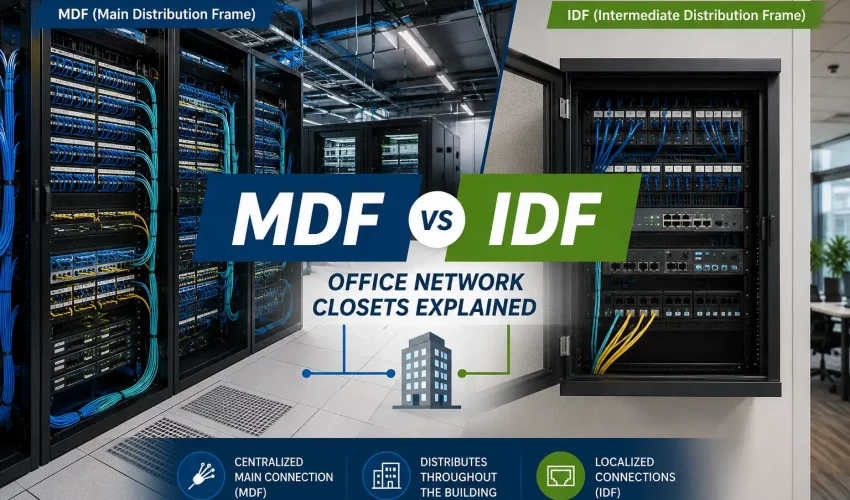
MDF stands for Main Distribution Frame. In practical terms, it is the primary network room in a building — the place where your internet service provider’s connection enters the building, where your main router and firewall live, and where the core of your network infrastructure is housed.
Think of the MDF as the front door and the heart of the building’s network, combined. Everything connects back to it, either directly or through a chain of secondary closets. Every building that has a structured cabling system has exactly one MDF.
In a small single-floor office, the MDF is often the only network room you have. It might be a proper server room with a 12U rack, a dedicated air conditioning unit, and a UPS, or it might be a locked storage closet with a wall-mount bracket, a small switch, and a cable modem bolted to the wall. The scale varies widely. The function is always the same: this is where the network starts.
Typical equipment found in an MDF:
- ISP demarcation point (where the telco hand-off terminates)
- Main router and firewall
- Core or distribution switch (the highest-capacity switch in the building)
- Patch panels connecting to all horizontal cable runs on the same floor
- Fiber termination panel for backbone connections to IDFs on other floors
- UPS (uninterruptible power supply)
- Servers, NAS, or NVR — depending on the setup
- Phone system equipment if the office runs a traditional PBX or IP PBX
What Is an IDF?
IDF stands for Intermediate Distribution Frame. It is a secondary network closet that extends the building’s cabling infrastructure to a specific floor, wing, or zone that is too far from the MDF to be served directly by copper cable.
Structured cabling has a hard physical limit: copper cable runs — from the patch panel in a network closet to the wall plate at a workstation — cannot exceed 90 metres under the ANSI/TIA-568 standard. Beyond that distance, signal quality degrades enough to cause connection problems. In a building where any part of the floor is more than 90 metres from the MDF, or where the MDF is on one floor and devices need to be connected on another, you need an IDF.
The IDF does not house the main network equipment. It is a relay point. The MDF sends data over fiber backbone cable to the IDF, and the IDF distributes that connectivity over copper to all the devices in its zone — workstations, phones, access points, cameras, whatever is on that floor.
Typical equipment found in an IDF:
- Access switch (connects end devices on that floor)
- Patch panel (terminates all horizontal cable runs from that floor’s devices)
- Fiber termination panel (terminates the backbone connection back to the MDF)
- Small UPS (optional but recommended)
An IDF closet is simpler and smaller than an MDF room. It does not need to house servers or a firewall. Its job is distribution, not processing.
How the MDF and IDF Work Together
The connection between an MDF and its IDFs is called the backbone or vertical cabling. Almost universally in modern commercial buildings, that backbone is fiber optic cable. Fiber can carry data over much longer distances than copper, is immune to interference, and supports much higher bandwidth — which matters because the MDF-to-IDF link carries aggregated traffic from every device on that floor.
A typical flow looks like this: internet enters the building and terminates at the MDF. The router and firewall process and protect that connection. The core switch distributes it to local devices on the MDF’s own floor via copper patch cables, and sends it over fiber to each IDF. At the IDF, the fiber terminates at a patch panel, connects into an access switch, and that switch fans out to all the copper runs on that floor — one cable per device, running to wall plates throughout the office.
The structured cabling standard refers to this as a three-tier model: the main cross-connect (MDF), the horizontal cross-connect (IDF), and the horizontal runs to workstations. You do not need all three tiers in a small office. But understanding the model tells you exactly when you do.
Does Your Office Need an MDF, an IDF, or Both?
The answer depends on two things: floor area and number of floors.
| Office Type | What You Typically Need | Notes |
|---|---|---|
| Single floor, under 5,000 sq ft | MDF only | All cable runs stay well within 90 metres. One closet handles everything. |
| Single floor, 5,000 to 15,000 sq ft | MDF, possibly 1 IDF | Depends on floor shape. Long, narrow floors may need a remote IDF even at 5,000 sq ft. |
| Single floor, over 15,000 sq ft | MDF plus 1 or more IDFs | At this size, parts of the floor almost certainly exceed the 90-metre copper limit. |
| Multi-floor, any size | MDF on one floor, IDF on each additional floor | Copper cannot run vertically between floors in a standard structured cabling design. Fiber connects floors; copper connects devices. |
| Multi-building campus | MDF in one building, IDFs in each other building | Underground fiber connects buildings. Each building needs at least one closet. |
📌 The 90-metre rule applies to the horizontal run — from patch panel to wall plate. It does not include patch cables at either end, which add up to 10 metres of additional channel budget. If your floor is shaped so that any desk is more than 70 metres from the nearest closet, plan for an IDF.
Physical Requirements: What the Closet Actually Needs
This is where most small office plans fall short. The MDF and IDF are not just cable storage rooms. They are mechanical spaces with specific environmental and physical requirements that, if ignored at the build-out stage, become expensive to retrofit later.
Space
A minimum of 10 feet by 10 feet is the practical standard for a functional MDF room in a small to mid-sized office. Many installations work in less space, but anything under 6 feet in either dimension starts to create problems for equipment access and cable management. For an IDF closet, 5 feet by 5 feet can work for smaller deployments, but 6 by 8 feet gives you the room to actually work inside without removing equipment first.
Temperature and Airflow
Network equipment runs hot. Switches, patch panels, and UPS units all generate heat, and they need that heat removed to operate reliably. The target operating temperature for most network hardware is 18 to 25 degrees Celsius. In an interior closet with no airflow, a fully loaded rack can easily push the ambient temperature past 40 degrees, which shortens equipment lifespan and causes thermal shutdowns.
At minimum, the closet needs a dedicated air supply. For most small office MDFs, a wall-mounted mini-split unit is the practical solution. In a pinch, a well-positioned supply air grille from the building’s HVAC system can work if airflow is sufficient. What does not work is a passive louvered door and hope.
Power
The MDF room needs dedicated electrical circuits, separate from the general office circuit. A minimum of two 20-amp dedicated circuits is the standard starting point for a small office MDF — one for the UPS and active equipment, one as a spare or for lighting and outlet use. Larger deployments with higher-wattage equipment need more.
Do not plug network equipment into the same circuit as office equipment. Power quality issues from printers, coffee machines, and other office loads cause more unexplained network instability than most IT managers ever trace back to the source.
Security
The MDF room should be keyed separately from the rest of the office, with access limited to whoever is responsible for the network. The IDF closets should also be locked. This is not just a security best practice — it is important for troubleshooting. If anyone can walk into the MDF and unplug something, diagnosing a network fault becomes significantly harder.
What to Avoid
Never co-locate a network closet with a janitorial room, a kitchen, a bathroom, or any mechanical equipment. Water, cleaning chemicals, heat from dishwashers or refrigerators, and vibration from HVAC equipment are all damaging to network hardware. If the only available space shares a wall with a washroom, at minimum verify that there are no drain lines in the shared wall and that there is a drip pan above any ceiling-mounted plumbing.
Four Mistakes Small Offices Make with MDF and IDF Planning
1. Choosing the Location Before Checking Cable Distances
The MDF and IDF locations should be chosen based on where they minimise cable run lengths, not based on which room is most convenient to convert. Start with a floor plan, identify the centre of each cable zone, and work outward. A closet placed at one end of a rectangular office floor will almost certainly create cable runs that exceed 90 metres at the far end.
2. Not Planning for Growth
The closet that barely fits your 30-person office today will not fit your 60-person office in three years. Rack space, power capacity, and physical floor space are all easier to plan for than to retrofit. When in doubt, specify more rack units than you currently need, run more circuits than you currently use, and choose a room with enough floor space to add a second rack.
3. Skipping Dedicated Cooling
This is the most common mistake and the one with the highest failure rate. Building HVAC systems are designed for human comfort, not equipment rooms. They cycle off at night and on weekends. Passive ventilation through a louvered door works until the closet has a full switch, a UPS, and a firewall running simultaneously. Then it does not. A dedicated mini-split pays for itself in avoided equipment replacements within a few years.
4. Treating the MDF as an Afterthought in the Build-Out Timeline
Electrical work, conduit installation, and structural changes to accommodate the closet all need to happen before cabling begins. If the MDF room is not defined before the general contractor frames the walls, the cabling crew will show up to a space that cannot support the installation. In a GTA commercial build-out, the network room design should be locked in during the space planning phase — not handed to the IT contractor as a problem to solve after possession.
MDF and IDF Planning Checklist for Office Build-Outs and Moves
Use this before finalising your floor plan with the landlord or contractor.
| Item to Confirm | Done? | Notes |
|---|---|---|
| Floor plan shows MDF location with cable distance check | ☐ | No desk should be more than 70m from the nearest closet |
| IDF locations confirmed for each additional floor or zone | ☐ | One IDF per floor minimum for multi-storey offices |
| MDF room minimum 10×10 ft confirmed | ☐ | Larger is better; plan for future rack addition |
| Dedicated cooling confirmed for MDF room | ☐ | Mini-split preferred; HVAC supply with verified CFM as minimum |
| Minimum 2 x 20A dedicated circuits in MDF room | ☐ | Separate from general office circuits |
| MDF and IDF rooms away from water sources | ☐ | No shared wall with washroom; no overhead plumbing without drip pan |
| Keyed locks specified for MDF and all IDF closets | ☐ | Separate key from general office master |
| Conduit pathway confirmed from MDF to each IDF | ☐ | Fiber backbone route needs to be clear before walls close |
| UPS capacity sized for all active equipment | ☐ | Minimum 10-minute runtime at full load for graceful shutdown |
Frequently Asked Questions
What is the difference between an MDF and an IDF?
The MDF is the main network room in a building — it is where the internet connection enters, where the core router and firewall live, and where the network originates. An IDF is a secondary closet that extends the network to a floor or zone that is too far from the MDF to be reached by copper cable directly. Every building has one MDF. Large or multi-floor buildings also have one or more IDFs.
How big does an MDF room need to be?
The practical minimum for a small office MDF is 10 feet by 10 feet. This gives you enough room for a standard 2-post or 4-post rack, cable management on the walls, and space to stand in front of the equipment and work. Smaller spaces can technically work for very limited deployments, but anything under 6 feet in either dimension creates access problems as the installation grows. Size it for where you plan to be in five years, not where you are today.
Do I need an IDF if my office is on a single floor?
Not necessarily. If your office is single-floor and no workstation is more than 90 metres of cable run from the MDF closet, you can serve the entire office from the MDF. Once any part of the floor exceeds that distance, or once the number of devices outgrows what a single patch panel can manage practically, an IDF makes sense. Large open-plan offices on a single floor often need one IDF, even if there is only one floor.
What connects an MDF to an IDF?
Fiber optic cable. Specifically, multi-mode or single-mode fiber depending on the distance and bandwidth requirements. For most commercial office buildings in the GTA, OM4 multi-mode fiber is the standard choice for MDF-to-IDF backbone runs. It supports 40 Gbps and 100 Gbps at distances up to 150 metres and 100 metres respectively, which covers the vast majority of inter-floor and inter-zone runs in a mid-sized building.
Can a server room serve as an MDF?
Yes — and in many small to mid-sized offices, the server room and the MDF are the same room. If the space meets the physical requirements (size, cooling, power, security), combining the server room and MDF is efficient and practical. The main consideration is capacity: servers generate heat and draw significant power, so the shared room needs adequate cooling and electrical capacity to handle both the network equipment and the servers simultaneously.
What should I never put near an MDF or IDF closet?
Anything involving water. Bathrooms, kitchens, janitor closets with floor drains, mechanical rooms with HVAC equipment that could condensate, and any space with overhead plumbing that is not protected by a drip pan. Water and network equipment do not mix, and a water leak that takes out your MDF during a weekend when nobody is in the office is the kind of outage that takes days to recover from.
Planning a GTA Office Build-Out or Move?
Getting the MDF and IDF design right is not complicated, but it does need to happen before the walls go up — not after. The decisions made at the planning stage determine how the network performs for the next decade, how easy it is to troubleshoot, and how much it costs to expand when the office grows.
Cablify designs and installs structured cabling systems for commercial offices, warehouses, and multi-floor buildings across the Greater Toronto Area. We work with facility managers, IT directors, and commercial contractors to get the network room design right at the build-out stage — not as a retrofit after the fact.
If you are planning an office move or build-out and want to talk through MDF and IDF placement before the floor plan is locked, contact us for a free consultation. Getting this right at the start costs nothing extra. Getting it wrong costs significantly more to fix.
Contact Cablify: +1-647-846-1925 | info@cablify.ca | Serving Toronto, Mississauga, Vaughan, and the GTA