


What Exactly Is a Network Drop?
A network drop — also called a data drop, ethernet outlet, or telecom outlet — is a single RJ-45 port installed in a wall plate at an end-user location, connected by a structured cable run back to a central patch panel in your telecommunications room (TR), main distribution frame (MDF), or intermediate distribution frame (IDF).
Each drop represents a dedicated, full-duplex link between a user’s workspace and your network switch. Unlike Wi-Fi — which is shared bandwidth over a shared medium — a wired drop delivers dedicated bandwidth from that specific switch port. It is the foundation of every reliable enterprise network.
Wireless access points (WAPs) supplement but do not replace wired drops in commercial environments. Every WAP also requires its own dedicated wired uplink drop — typically one to two Cat6A runs per AP location, depending on whether multi-gig backhaul or PoE redundancy is required.
Drop vs. Outlet vs. Port — What’s the Difference?
These terms are used interchangeably in the field, but there is a technical distinction worth knowing: a network drop is the complete cable run from patch panel to wall plate. A network outlet is the physical keystone jack installed in that wall plate. A port is the specific RJ-45 socket — in most configurations, one outlet = one port = one drop.
When a cabling contractor quotes “24 drops,” they mean 24 complete cable runs — each terminated with a keystone jack at the wall and a patch panel port in the TR. Labor accounts for roughly 60–70% of that cost.
The TIA-568 Standard: What the Code Actually Says
The authoritative standard governing commercial network cabling in North America is ANSI/TIA-568-C.1, published by the Telecommunications Industry Association. In Canada, this standard is harmonized with CSA T528 and referenced by most provincial building codes for commercial construction.
ANSI/TIA-568-C.1 specifies the minimum cabling requirements for commercial buildings. The TIA-569 standard covers pathways and spaces — conduit, cable tray, and TR room sizing. Together, these two standards define the baseline for any code-compliant commercial installation in Canada and the US.
The Minimum Requirement: 2 Outlets Per Work Area
TIA-568-C.1 mandates a minimum of two telecommunications outlets per work area. Historically, this meant one voice (telephone) and one data (ethernet) outlet. As VoIP displaced analog telephony, both ports are now typically wired as Cat6 or Cat6A data drops — giving each workstation a dedicated VoIP and a dedicated data connection on the same cable plant.
Critically, the standard defines a “work area” as approximately 10 square metres (100 sq ft) of usable floor space. A 1,000 sq ft open-plan office should be designed for a minimum of 10 work areas, meaning at least 20 outlets — before adding WAPs, cameras, or shared devices.
The 90-Metre Horizontal Cable Limit
TIA-568 imposes a strict 90-metre (295-foot) maximum on horizontal cable runs — measured from the patch panel port in the TR to the keystone jack at the wall outlet. This leaves a total channel budget of 100 metres when patch cables at each end are added. In a large building, this rule drives your IDF room placement strategy. If any cable run would exceed 90m from the nearest TR, you need an additional IDF room on that floor or zone.
Cable runs exceeding 90m will degrade signal integrity, cause packet loss, and fail channel certification testing. Worse, they may appear to work at gigabit speeds initially, then produce intermittent errors under load — one of the most difficult network faults to diagnose. Do not exceed this limit, ever.
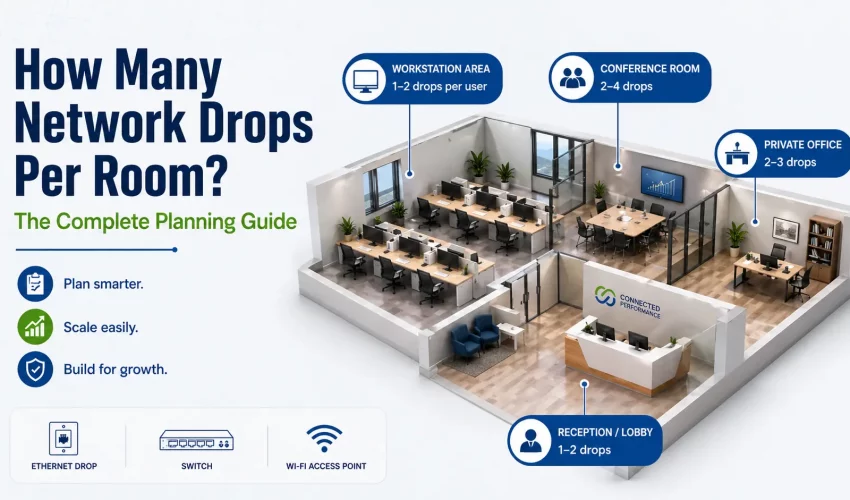
Recommended Drops by Room Type
The following counts represent industry best practice — not bare minimums. These figures assume Cat6 or Cat6A structured cabling throughout, PoE capability on the switch side, and a 10-year planning horizon.
Master Reference Table — All Room Types
Use this table as your planning baseline. Adjust for your specific building density, technology stack, and growth projections. The “Enterprise” column assumes dual-redundant uplinks, dedicated VoIP runs, and full PoE budgets for all active devices.
| Room Type | TIA Min | Industry Standard | Enterprise | Cable Grade | Notes |
|---|---|---|---|---|---|
| Private Office (1 person) | 2 | 4–6 | 6–8 | Cat6A | Desk + door + AP + spare |
| Open-Plan Workstation | 2 | 3–4/desk | 4–6/desk | Cat6 | Floor boxes preferred |
| Conference Room (4–6 seats) | 2 | 6–8 | 10–12 | Cat6A | Add 2 for video codec |
| Board Room (10–20 seats) | 4 | 10–16 | 16–24 | Cat6A | Floor boxes + AP ceiling |
| Reception / Lobby | 2 | 4–8 | 8–12 | Cat6 | Cameras + access control |
| Break Room / Kitchen | 2 | 2–4 | 4–6 | Cat6 | AP + camera + IoT |
| Print / Copy Station | 1 | 2–3 | 3–4 | Cat6 | 1 per MFP, 1 spare |
| Healthcare Exam Room | 4 | 6–10 | 10–14 | Cat6A | Clinical + IoT + camera |
| Classroom / Training Room | 2/desk | 2/desk+6 teacher | 4/desk+8 | Cat6A | High AP density needed |
| Server Room / MDF | 12/rack | 24/rack | 48+/rack | Cat6A/Fiber | 120% panel headroom |
| IDF / Comms Closet | — | 24–48 ports | 48–96 | Cat6A+Fiber | Size for floor zone |
| Warehouse / Stockroom Zone | 1/zone | 2–4/zone | 4–8/zone | Cat6A conduit | Industrial-rated required |
| Hallway / Corridor (per 100ft) | — | 1–2 | 2–3 | Plenum Cat6 | AP + camera positions |
| Mechanical / Electrical Room | — | 2–4 | 4–6 | Cat6 conduit | BMS + sensors |
| Parking / Exterior | — | 1–2/camera | 2/camera | Cat6A outdoor | Weatherproof, PoE |
| Retail / POS Zone | 2 | 4–6 | 6–10 | Cat6 | POS + camera + AP |
Critical Planning Factors Before You Pull Cable
The drop counts above are starting points. Before finalizing your cable plan, you must answer these questions — each one can materially change your drop count and cable grade requirements.
1. What Is Your 5-Year Technology Roadmap?
Structured cabling is a 15–25 year infrastructure investment. The devices you deploy in year one rarely resemble what you’ll run in year five. In 2015, nobody was planning for PoE++ smart lighting or the density of IoT devices in a modern office. Plan for what’s coming: higher PoE budgets, denser Wi-Fi, video conferencing at every desk, and building automation converging onto IP networks.
Whatever drop count you calculate today, add 25–30% before finalizing. Labor is the single largest cost in any cabling project. Running one additional drop while the walls are open costs roughly $80–$150 CAD. Retrofitting that same drop after drywall is installed costs $350–$800+. The math is obvious.
2. Open Plan vs. Closed Office — It Changes Everything
Open-plan floors require floor boxes or under-floor raceway systems — perimeter raceway, raised floor, or furniture-fed systems. Wall plates are often impractical for interior workstations far from perimeter walls. Floor boxes allow drops to be positioned precisely at workstation clusters, with flexibility to reposition if the layout ever changes.
3. PoE vs. Passive Power: Your Cable Grade Decision
| PoE Standard | IEEE Spec | Max Power | Typical Devices | Cable Requirement |
|---|---|---|---|---|
| PoE | 802.3af | 15.4W | IP phones, basic cameras | Cat5e minimum |
| PoE+ | 802.3at | 30W | WAPs, PTZ cameras, thin clients | Cat6 recommended |
| PoE++ Type 3 | 802.3bt | 60W | Smart lighting, video conferencing | Cat6A mandatory |
| PoE++ Type 4 | 802.3bt | 100W | LCD panels, small appliances | Cat6A mandatory |
4. WAP Placement: The Hidden Drop Multiplier
Every wireless access point needs its own wired uplink drop — and enterprise-grade WAPs from Cisco, Aruba, and Ubiquiti increasingly require two drops per AP for multi-gig backhaul and PoE redundancy. A rough guideline: one WAP per 2,500–4,000 sq ft in a low-density open office; one WAP per 1,000–2,000 sq ft in a conference or classroom environment. Each AP position = 1–2 dedicated ceiling cable drops not shared with any user device.
5. Security Camera Coverage and Drop Placement
IP camera drops are among the most frequently under-planned elements in commercial cabling. Every camera requires its own dedicated PoE drop — no sharing. Cameras must be positioned based on a formal coverage design. Common positions requiring ceiling or high-wall drops include: all entry/exit doors, all corridors, parking, server room, and reception. These positions are almost always inaccessible once ceilings are finished.
PoE & Structured Cabling: What Most Contractors Get Wrong
Power over Ethernet changes the physics of your cabling plant in ways many commercial contractors underestimate. When current flows through a cable, the cable generates heat. In a bundled pathway — a conduit or cable tray carrying dozens of runs — this heat accumulates and can drive cable temperature above its rated operating threshold.
Temperature Rise and the 60°C Rule
TIA-568-C.1 rates Cat6 and Cat6A performance at a cable temperature of up to 60°C (140°F). In a typical office, ambient temperature in a cable pathway runs 20–25°C. PoE current in a bundle of 24 Cat6 cables can add 5–15°C of additional heat — still within margin. But in a bundle of 48+ cables in a warm ceiling plenum running 60W PoE++ simultaneously, you may exceed the thermal threshold, degrading performance and accelerating cable aging.
If you are deploying PoE++ (802.3bt) on more than 25% of drops in a bundle, specify Cat6A throughout. Cat6A has a larger 23 AWG conductor diameter (vs. 24 AWG for Cat6), lower DC resistance, and better thermal performance under sustained PoE load. This is not optional — it is the correct engineering choice for any modern commercial installation.
The 7 Most Expensive Under-Cabling Mistakes
In 20+ years of commercial cabling work across the GTA and Ontario, these are the planning failures we are called in to fix most often. Every one of them was preventable.
Mistake #1: Planning for Today, Not Three Years from Now
The most common and costliest mistake. A 50-person office installs 2 drops per desk, runs out of ports within 18 months as devices multiply, and pays $40,000 to retrofit cable through finished ceilings. The original upgrade would have cost $8,000. Plan with a 5-year device density projection — always.
Mistake #2: Forgetting WAP Drops Entirely
We regularly see cable plans that include zero drops for wireless access points — the assumption being that Wi-Fi is “wireless.” Every WAP needs a wired drop. A 5,000 sq ft office floor needs 3–5 WAP positions; nobody planned for those drops. Result: visible surface-mount conduit runs after the fact, or weak coverage from a single WAP at the nearest wall outlet.
Mistake #3: Sharing Drops Between Devices
Using unmanaged desktop switches to share a single drop across multiple devices is a Band-Aid, not a solution. They add latency, create single points of failure, complicate network management, and often violate enterprise security policy. Every device that needs network connectivity should have its own dedicated drop.
Mistake #4: Installing Cat5e in a New Building
Cat5e is end-of-life as a specification for new commercial installation. Cat6 is the absolute minimum for any project started today; Cat6A is the professional recommendation for anything with a 10+ year lifespan. Installing Cat5e in 2025 is the equivalent of putting a 100MB hard drive in a new server — technically it works, but you will regret it within years.
Mistake #5: No Slack Loops at the Patch Panel
Cable runs terminated with no slack at the patch panel cannot be re-terminated if a connector fails or if the panel needs to move even a few inches. Professional installations include a minimum 3-foot service loop behind the patch panel for every cable run, stored on a spool or D-ring in the TR.
Mistake #6: Undersizing the Patch Panel
A 24-drop installation does not need a 24-port patch panel. It needs at least a 48-port panel — 24 for current drops, 24 spare for future runs. Patch panel real estate in a rack is cheap. Adding a second panel later when the rack is full of active equipment is expensive and disruptive.
Mistake #7: No Documentation or Labeling
An unlabeled, undocumented cable plant is a ticking clock. When the contractor who installed it moves on, nobody knows which patch panel port connects to which wall jack. Troubleshooting any connectivity issue becomes a 2-hour detective exercise. Demand a complete as-built documentation package — port-level labeling, floor plan with drop locations, and a cable schedule — as part of every installation contract.
Pre-Installation Planning Checklist
Use this before finalizing any commercial cabling plan. REQUIRED items are non-negotiable for TIA-568 compliance. BEST PRACTICE items represent professional-grade installation standards.
- All horizontal cable runs confirmed < 90 metres from TR to outlet REQUIRED
- Telecommunications room(s) meet TIA-569 minimum dimensions and dedicated-use requirements REQUIRED
- Minimum 2 outlets per TIA-defined work area (~100 sq ft) REQUIRED
- Cable grade selected: Cat6 minimum, Cat6A for PoE or 10GBase-T REQUIRED
- Plenum-rated (CMP) cable specified for any run through air-handling ceiling without conduit REQUIRED
- WAP locations determined by RF coverage design, dedicated ceiling drops allocated BEST PRACTICE
- IP camera coverage plan finalized, drop positions confirmed before ceiling closure BEST PRACTICE
- Access control / card reader positions confirmed with security integrator BEST PRACTICE
- PoE budget calculated per switch port; Cat6A specified for PoE++ runs BEST PRACTICE
- 20–25% spare drops added to every zone for future density growth BEST PRACTICE
- Patch panel sized to 120% of installed drops, headroom ports documented BEST PRACTICE
- 3-foot service loops specified for every run at patch panel termination BEST PRACTICE
- Complete as-built documentation and port-level labeling in scope of work BEST PRACTICE
- Cable test report (channel certification Cat6/6A) required at project close BEST PRACTICE
- IDF/MDF room sized for 5-year equipment growth with adequate power and cooling BEST PRACTICE
Frequently Asked Questions
Expand your knowledge with these related guides from the Cablify technical library:
- Cat5e vs Cat6 vs Cat6A vs Cat7 vs Cat8 — Speeds Compared
- Conduit Fill Guide for Data Cables
- MDF vs. IDF Rooms: Key Differences in Network Design
- EMT vs. Rigid vs. IMC Conduit for Commercial Buildings
- Straight-Through vs. Crossover Cables Explained
Ready to Plan Your Commercial Cabling Project?
Cablify provides free site assessments and detailed drop-count planning for commercial properties across Toronto, Mississauga, Brampton, and the GTA. We design, supply, and install TIA-568 compliant structured cabling systems — done right the first time.