



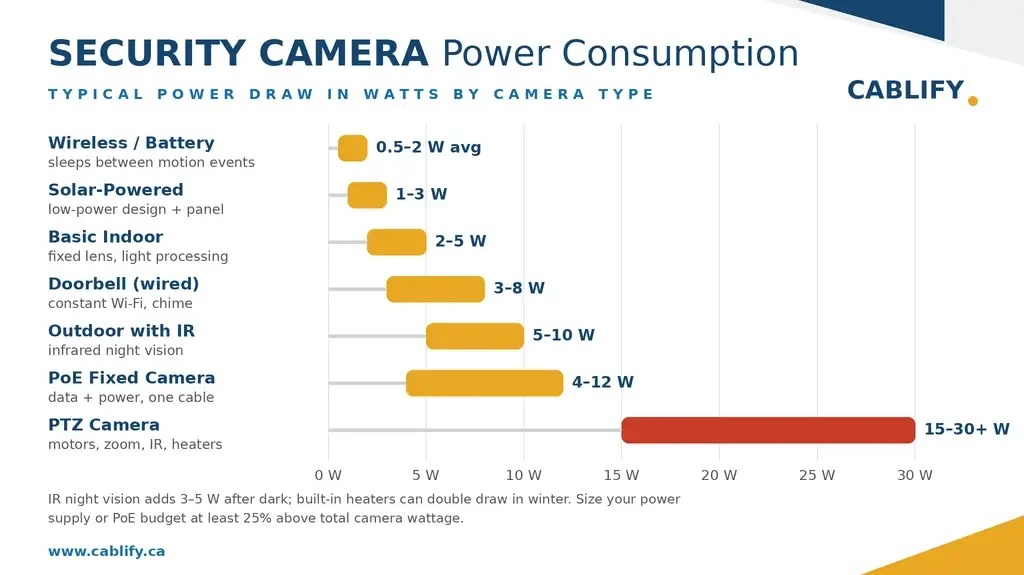
Most security cameras use between 2 and 15 watts, about the same as a single LED light bulb. Even a full security camera system with four cameras and a recorder typically adds only $3 to $5 a month to an Ontario hydro bill. The wattage matters less for your electricity cost and more for sizing your power supply correctly: an undersized PoE switch or adapter is the most common cause of cameras that reboot, drop offline at night, or fail in cold weather.
This guide covers how much power each camera type draws, what that costs to run, how power is delivered, and how to size a power supply so your system stays reliable.
How Much Power Do Security Cameras Use?
| Camera Type | Typical Power Draw | What Drives the Power Use |
|---|---|---|
| Basic indoor camera | 2–5 W | Fixed lens, light processing load |
| Outdoor camera with IR night vision | 5–10 W | Infrared LEDs, weatherproof housing |
| PoE fixed camera | 4–12 W | Resolution, IR strength, onboard analytics |
| PTZ (pan-tilt-zoom) camera | 15–30 W | Motors, powerful zoom, long-range IR, heaters |
| Video doorbell (wired) | 3–8 W | Constant Wi-Fi, chime circuit |
| Battery/wireless camera | 0.5–2 W average | Sleeps between motion events; needs recharging |
| Solar-powered camera | 1–3 W | Low-power design paired with a panel |
Two features push consumption up more than anything else: infrared night vision, which can add 3 to 5 watts when the LEDs switch on after dark, and built-in heaters, which outdoor cameras in Canadian winters rely on and which can double a camera’s draw in cold snaps. This is why a camera that runs fine all summer can start rebooting in January if the power supply has no headroom.
What Does That Cost on Your Hydro Bill?
Cameras run 24/7, so the math is simple: watts × 24 hours × 365 days ÷ 1,000 = kilowatt-hours per year. At a typical Ontario rate of about 12 cents per kWh, here’s what running one camera for a full year costs:
| Device | Power Draw | Energy per Year | Approx. Annual Cost |
|---|---|---|---|
| Indoor camera | 5 W | 44 kWh | $5 |
| Outdoor IR camera | 8 W | 70 kWh | $8 |
| PTZ camera | 25 W | 219 kWh | $26 |
| 4-camera system with NVR | ~44 W total | 385 kWh | $46 |
In short: electricity cost is not a reason to skimp on cameras. A complete home system costs less to run per year than a single tank of gas.
Don’t forget the recorder
The cameras are often not the biggest consumer in the system. An NVR or DVR draws 10 to 40 watts on its own, each hard drive adds 5 to 10 watts, and a dedicated monitor adds 20 to 40 watts if it stays on. When budgeting power (and UPS backup capacity), count the recording equipment, not just the cameras.
How Security Cameras Get Their Power: 3 Methods
1. Power over Ethernet (PoE) — the modern standard
One Ethernet cable carries both data and power from a PoE switch or injector to the camera. It’s the cleanest install, the easiest to scale, and lets you back up the entire system by putting one UPS on the switch. Which PoE standard you need depends on the camera:
| Standard | Max Power per Port | Typical Use |
|---|---|---|
| PoE (802.3af) | 15.4 W | Most fixed IP cameras |
| PoE+ (802.3at) | 30 W | PTZ cameras, heated outdoor cameras, strong IR |
| PoE++ (802.3bt) | 60–90 W | Large PTZ with heaters/wipers, multi-sensor units |
Watch the switch’s total power budget, not just the port rating. An 8-port PoE switch with a 120 W budget runs eight 10 W cameras with room to spare, but the same switch loaded with four 30 W PTZ cameras is already at its limit.
2. 12V DC plug-in adapter
The traditional approach: a wall adapter supplies low-voltage DC to each camera. It works well for one or two cameras near outlets. For anything larger, a multi-channel power distribution box is cleaner and more reliable than a cluster of wall plugs. One caution: voltage drop. 12V DC loses voltage quickly over long cable runs, and a camera receiving 10 volts instead of 12 will behave erratically, especially when IR kicks in at night.
3. 24V AC — legacy and heavy-duty systems
Common in older analog CCTV and large commercial installations. 24V AC tolerates long cable runs with less voltage drop and supports heavy-duty PTZ units with heaters and wipers drawing 20 to 50+ watts. New IP installations rarely use it, but it’s still relevant when upgrading older buildings.
How to Size Your Power Supply in 3 Steps
Step 1: Find each camera’s wattage. Check the spec sheet, or read the label on the power adapter and multiply: watts = volts × amps. An adapter marked “12V DC, 1A” means the camera can draw up to 12 watts.
Step 2: Add up all the cameras. A typical 4-camera home system: two outdoor IR cameras at 7 W (14 W), one indoor camera at 4 W, one wired doorbell at 8 W. Total base load: 26 W.
Step 3: Add 25–30% headroom. Peak draw (all IR LEDs firing at once on a cold night) is much higher than average draw, and you’ll want capacity for future cameras. Divide the base load by 0.8: 26 W ÷ 0.8 = 32.5 W. In practice, choose a 40 W or larger supply or PoE budget.
Skipping step 3 is the most common DIY mistake we see. A supply running at 100% capacity fails early and causes intermittent problems that are hard to diagnose because they only appear at night or in winter.
Best Practices for a Reliable Setup
Centralize power where you can: a single distribution box or PoE switch is easier to maintain, protect, and battery-back than scattered adapters. On long cable runs, size your wire gauge for voltage drop or switch to PoE, which handles distance better at up to 100 metres per run. If you’re running more than a handful of cameras, a managed PoE switch that reports per-port power draw pays for itself the first time you troubleshoot. And put the whole system, cameras, switch, and recorder, on a UPS: a security system that goes dark during a power outage is missing its most important moments.
Frequently Asked Questions
Will security cameras noticeably raise my electricity bill?
No. A typical 4-camera system with a recorder uses about 385 kWh a year, roughly $46 at Ontario rates, or under $4 a month. That’s comparable to leaving one light bulb on.
Does night vision use more power?
Yes. Infrared LEDs add roughly 3 to 5 watts when active, which is why cameras draw noticeably more after dark. Power supplies should be sized for this peak, not the daytime average.
Do wireless cameras use less power than wired ones?
Per hour of recording, no, but battery cameras sleep between motion events, so their average draw is lower. The trade-off is recharging batteries every few weeks to months and the risk of missing footage while the camera wakes up.
What happens to my cameras during a power outage?
Wired cameras go down unless the system is on a UPS (battery backup). Because PoE systems power everything through one switch, a single UPS on the switch and NVR keeps the entire system recording through an outage.
Can I run a security camera on solar power?
Yes, for low-power cameras in the 1 to 3 watt range. A small panel with a battery works well for gates, barns, and detached garages where running cable isn’t practical. Solar struggles with high-draw cameras like PTZs, especially through Canadian winters.
The Bottom Line
Security cameras are cheap to run; the real cost of getting power wrong is reliability, not hydro bills. Know each camera’s peak wattage, size your supply or PoE budget at least 25% above the total, and put the system on battery backup.
Planning a new system or fixing one that keeps dropping cameras? Whether it’s a home setup or a full commercial CCTV installation, Cablify designs the power and cabling side properly the first time. Contact us for a free assessment anywhere in the GTA.