
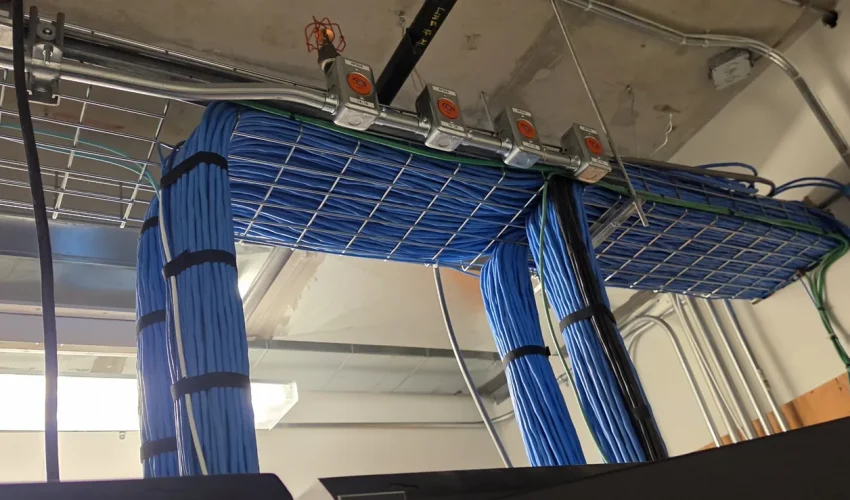
Horizontal cabling runs on one floor, from the patch panel in a telecom room to each wall or ceiling outlet, and is limited to 90 m per run. Vertical cabling, also called backbone cabling, connects the telecom rooms to each other and to the main equipment room, usually up a riser between floors. Horizontal cabling is almost always Cat6 or Cat6A copper. Backbone cabling is mostly fiber, with some copper.
Both are parts of a structured cabling system, and the TIA-568 and TIA-569 standards set out how each one is built. This guide covers the structure of each, the distance limits, the rules installers follow and how the cable is managed once it reaches the rack.
In this guide
Horizontal vs vertical cabling at a glance
| Horizontal cabling | Vertical (backbone) cabling | |
|---|---|---|
| Connects | Telecom room patch panel to each outlet in the work area | Main equipment room to telecom rooms, between floors and between buildings |
| Usual media | Cat6 or Cat6A copper, sometimes fiber to the desk | Multimode or single-mode fiber, plus some copper |
| Distance limit | 90 m permanent link, 100 m channel with patch cords | Depends on the media and speed: 90 m for copper data, hundreds of metres for multimode fiber, kilometres for single-mode |
| Layout | Star: every outlet has its own run back to the telecom room | Hierarchical star with no more than two levels of cross-connect |
| Pathways | Cable tray, J-hooks and conduit above the ceiling or under the floor | Riser sleeves, slots and conduit through the floors |
| Fire rating in Canada | FT4, or FT6 in return-air plenum ceilings | FT4 in vertical shafts, FT6 where it passes through a plenum |
Horizontal cabling structure
Horizontal cabling is everything between the telecom room and the outlet a user plugs into. It is called horizontal because it normally stays on one floor, running sideways through the ceiling or floor to the work area. It makes up most of the cable in a building, and once the walls and ceilings close it is the hardest part to change.
A horizontal run is made of these parts:
- Telecommunications outlet in the wall, floor box, furniture or ceiling, where the device plugs in.
- Horizontal cable, one continuous run of solid-conductor cable from the outlet back to the telecom room.
- Patch panel in the telecom room, where the run is terminated. This is the horizontal cross-connect.
- Patch cords and equipment cords that connect the panel to the switch, and the outlet to the device.
- Consolidation point (optional), an intermediate connection used in open offices so furniture can move without re-pulling the whole run.
The layout is a star. Every outlet gets its own cable back to the telecom room, with no daisy chains between outlets. That is what lets you move a desk or add a camera with a patch cord change.
The 90 m + 10 m rule
The most quoted number in structured cabling is 100 metres, but most of that is reserved for the fixed cable.
| Part of the run | Maximum length |
|---|---|
| Permanent link (patch panel to outlet, the cable in the walls and ceiling) | 90 m |
| Patch cords, equipment cords and work area cords combined | 10 m |
| Full channel, switch port to device | 100 m |
The 90 m is the length of cable that is installed, not the straight-line distance on the floor plan. Rises to the ceiling, drops down walls and the routing around obstacles all count. On long warehouse and distribution floors, this is usually what decides how many telecom rooms you need.
Choosing horizontal cable
For new work, Cat6A is the common choice. It carries 10 Gigabit over the full 90 m link and handles higher-power PoE for access points and cameras with less heat build-up. Cat6 still suits standard desk drops on many projects. Fiber to the desk is used where security rules or distances call for it. Our network cable guide compares Cat5e, Cat6, Cat6A and fiber in more detail, and the Cat6A installation page covers what changes on site.
Horizontal cabling requirements
These are the rules from TIA-568 and TIA-569 that matter most on site. A run can pass a cable test and still break several of them.
- One continuous cable per run. No splices or bridged taps in copper horizontal cable.
- No more than one consolidation point per run, placed at least 15 m from the telecom room.
- At least two outlets per work area, both cabled back to the telecom room.
- Bend radius of at least four times the cable diameter for 4-pair copper. Tight bends at the back of the outlet are a common cause of failed tests.
- Pulling tension under 110 N (25 lbf) for 4-pair cable, so the pairs do not stretch and untwist.
- Supports no more than 1.5 m (5 ft) apart where J-hooks are used, and cable never laid on ceiling tiles or tied to sprinkler pipes or ceiling wires.
- Labels at both ends, following TIA-606, so every outlet matches a panel port.
- A certification test on every run with a cable tester, with results kept for the building records.
Where the run goes through conduit, the fill limits apply as well. Our conduit fill chart lists how many Cat6 and Cat6A cables fit in each conduit size.
Vertical (backbone) cabling
Backbone cabling links the rooms together. In a typical building it runs from the main equipment room (often called the MDF) to a telecom room on each floor (an IDF), up a riser of sleeves or slots stacked through the floors. On a campus, it also runs between buildings.
The layout is a hierarchical star. The main cross-connect feeds the telecom rooms, sometimes through one intermediate cross-connect. TIA-568 allows no more than two levels of cross-connect between the main cross-connect and the horizontal cross-connect, so a signal never passes through a long chain of rooms.
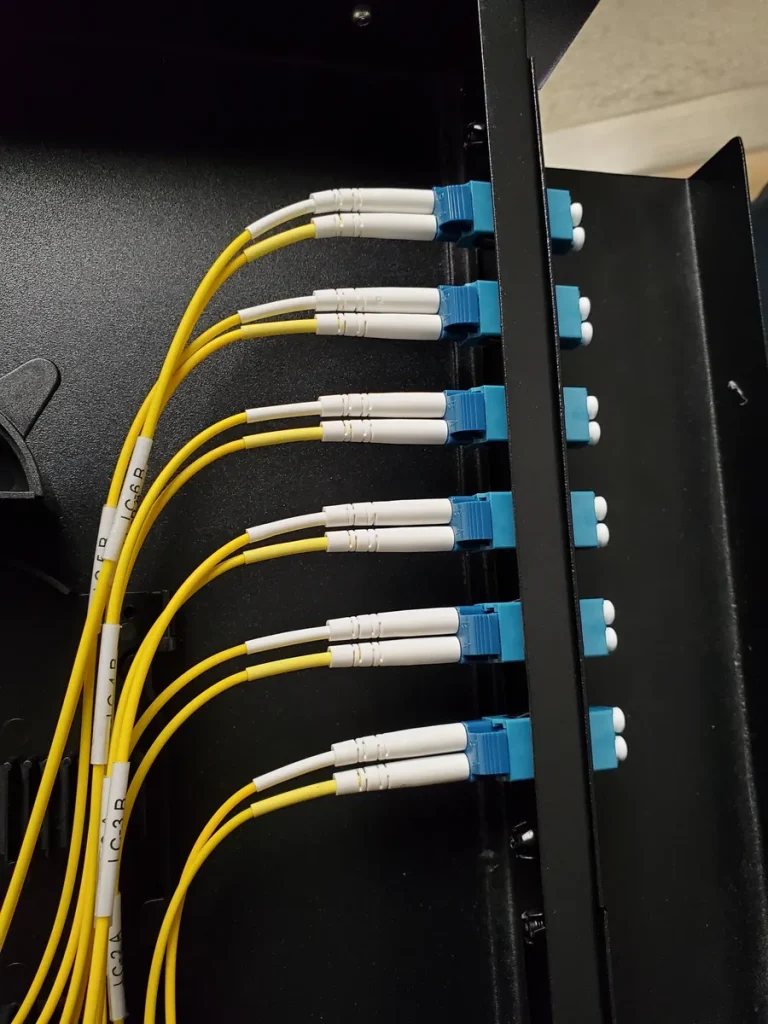
Most backbones are fiber. Multimode OM3 or OM4 is common inside one building, and single-mode OS2 is used between buildings and on long or tall risers.
Copper backbone is still used for short links between rooms and for voice and building systems.
Each strand or pair is terminated on a patch panel at both ends, so a link between floors can be repatched without pulling new cable.
Backbone media and distance
| Backbone media | 10 Gb/s reach | Where it fits |
|---|---|---|
| Cat6A copper | 100 m channel | Short runs between rooms on the same floor or the floor above |
| OM3 multimode fiber | 300 m | Risers in most office buildings |
| OM4 multimode fiber | 400 m | Taller buildings and longer runs |
| OS2 single-mode fiber | 10 km | Campus links, long runs and room for future speeds |
Reach shrinks as speed goes up, so plan for the speed the backbone will carry in ten years, not today. The single-mode vs multimode guide goes deeper on that choice.
Backbone requirements
- Stack the telecom rooms above each other so the backbone runs straight up the riser.
- Use the right fire rating. In Canada, riser cable is usually FT4 rated and cable through return-air plenums is FT6. Confirm with the building before ordering.
- Firestop every penetration through a rated floor or wall with a listed firestop system, and leave it re-enterable where more cable will follow.
- Protect fiber in innerduct or armoured cable and keep it outside its bend radius, roughly ten times the cable diameter at rest and fifteen times while pulling.
- Pull spare strands and spare sleeves. Adding a backbone later means another trip through every floor, so spare capacity now is the cheaper choice.
Our article on fiber backbones for multi-tenant buildings covers strand counts and riser planning for larger sites.
Telecom rooms and enclosures
Horizontal and backbone cabling meet in the telecom room. TIA-569 calls for at least one telecom room per floor. Add another one when the floor area served is more than 1,000 m² (about 10,000 ft²) or when runs to the far end of the floor would go past 90 m. Place the room near the middle of the area it serves to keep runs short.
A telecommunications enclosure is a smaller cabinet that does the same job for a small area, such as a single suite or a section of a warehouse. It saves floor space, but it has less room for growth, cooling and cable management than a proper room. For a fuller comparison of the main room and the floor rooms, read MDF vs IDF.
Horizontal vs vertical cable managers in the rack
“Horizontal and vertical cable management” also refers to the hardware in the rack, and it follows the same logic as the building.
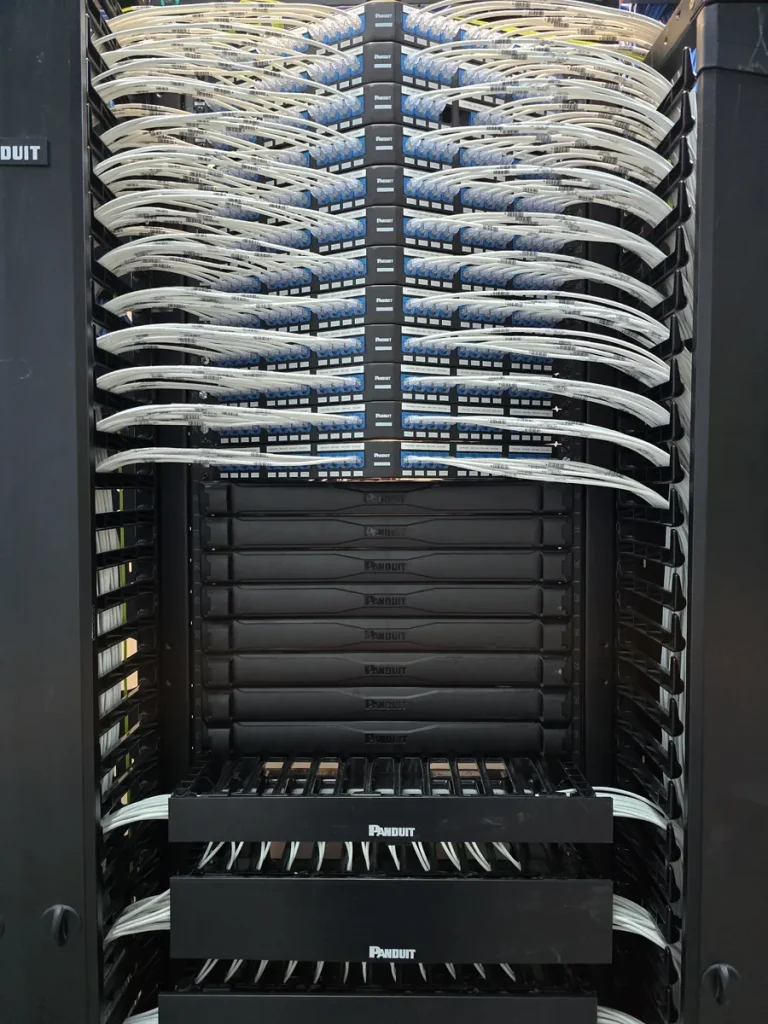
Horizontal cable managers are 1U or 2U panels with fingers, mounted between patch panels and switches. They carry patch cords sideways from the port to the edge of the rack and stop cords from hanging across other equipment.
Vertical cable managers run the full height of the rack on each side. They carry patch cords up and down between rows, and carry the horizontal cables from the tray down to the back of the patch panels.
A few things that make the difference in a busy rack:
- Size vertical managers for Cat6A. Cat6A is noticeably thicker than Cat6, so a manager that held a rack of Cat6 cords will be overfull with the same number of Cat6A cords. Leave room for growth when the rack is new.
- Put a horizontal manager next to each switch and between groups of patch panels, so every cord has a short, direct path.
- Use hook-and-loop straps, not tight cable ties, on bundles. Over-tightened ties crush the cable and cause test failures later.
- Cut patch cords to length and keep slack in the managers, not in loops across the front of the rack.
- Plan rack space before you buy. Our rack size and rack unit chart helps count the U you need for panels, managers and switches.
Common problems in existing buildings
| Problem | Why it matters | Fix |
|---|---|---|
| Horizontal runs over 90 m | Fails certification and causes errors at higher speeds | Add a telecom room or enclosure closer to the far end |
| Cable laid on ceiling tiles | Not allowed and easily damaged by other trades | Re-support on J-hooks or tray |
| Open riser penetrations | Breaks the fire separation between floors | Seal with a listed firestop system |
| Wrong fire rating in plenum ceilings | Fails inspection and can hold up occupancy | Replace with FT6 cable in return-air spaces |
| No labels or records | Every move and fault takes hours of tracing | Label both ends and keep a port map |
| Abandoned cable from past tenants | Fills the ceiling and pathways | Remove dead cable before new work |
Planning horizontal or backbone cabling?
Cablify designs and installs structured cabling for offices, warehouses and multi-floor buildings across Toronto and the GTA. Our own technicians run the horizontal cable, build the telecom rooms, pull and splice the fiber backbone, and test every link with a Fluke tester. Send us the floor plans and we will tell you what the building needs.
Related services: structured cabling, fiber optic installation, cable tray installation and server room cabling.
FAQ
What is horizontal cabling?
Horizontal cabling is the cable that runs from the patch panel in a telecom room to each outlet on the same floor. It includes the outlet, the cable, the patch panel termination and the patch cords, and each run is limited to 90 m of installed cable.
What is vertical cabling?
Vertical cabling, or backbone cabling, connects the main equipment room to the telecom rooms on each floor and links buildings on a campus. It usually runs up a riser and is mostly fiber.
What is the maximum length of horizontal cabling?
The installed cable between the patch panel and the outlet can be up to 90 m. Patch and equipment cords can add up to 10 m more, for a 100 m channel from switch to device.
Is backbone cabling always fiber?
No. Fiber carries most backbone data because it reaches much further than copper, but copper is still used for short backbone links and for some voice and building systems.
Can horizontal cable be spliced?
No. Copper horizontal cable should be one continuous run from the outlet to the patch panel. The only allowed break is a single consolidation point, placed at least 15 m from the telecom room.
What is the difference between horizontal and vertical cable managers?
Horizontal cable managers mount across the rack between patch panels and switches and route cords sideways. Vertical cable managers run up the sides of the rack and carry cords and cables up and down between rows.