
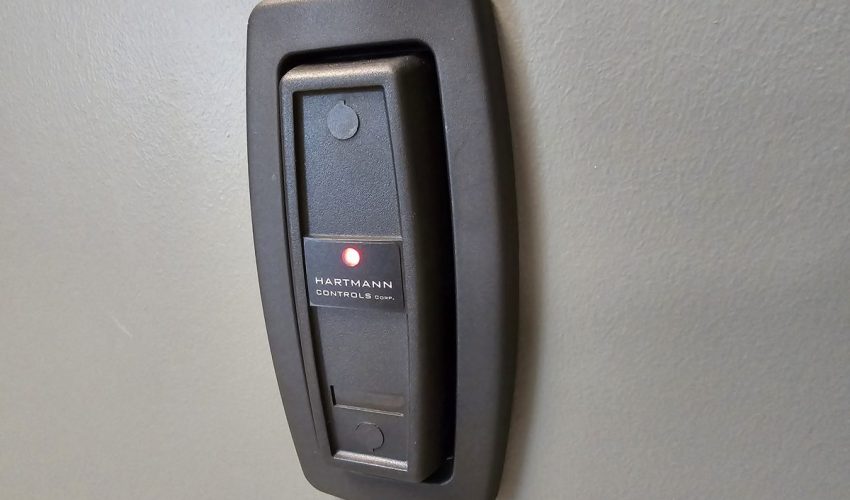
An access control system has two halves. The reader decides who gets in, and the lock is what actually holds the door. The main types of access control door locks are electric strikes, magnetic locks (maglocks), electrified locksets, electrified exit devices and wireless locks. The right one depends on the door, the frame, the fire code and what should happen when the power fails.
Cards, fobs, keypads, phones and fingerprints are not locks. They are credentials, and any of them can work with any of the locks below. We cover those in our guide to access control credentials.
The five lock types compared
| Lock type | How it works | If power fails | Best for |
|---|---|---|---|
| Electric strike | Replaces the strike plate in the frame and lets the latch swing free | Usually stays locked | Most office and interior doors with a handle and latch |
| Magnetic lock | An electromagnet on the frame holds a steel plate on the door | Always unlocks | Glass doors and doors with no latch |
| Electrified lockset | The lock inside the door locks and unlocks the handle | Either, set when ordered | Fire-rated doors and a clean look |
| Electrified exit device | A panic bar that retracts its own latch or unlocks the outside handle | Either, set when ordered | Exit doors and stairwells |
| Wireless lock | Battery lock with a built-in reader that talks to a hub | Runs on its own batteries | Interior doors where cabling is hard to run |
What is on an access-controlled door
The lock is one part of the door. A door that is set up properly also has a reader, a way for the system to know whether the door is open, and a way for people to leave without causing an alarm.
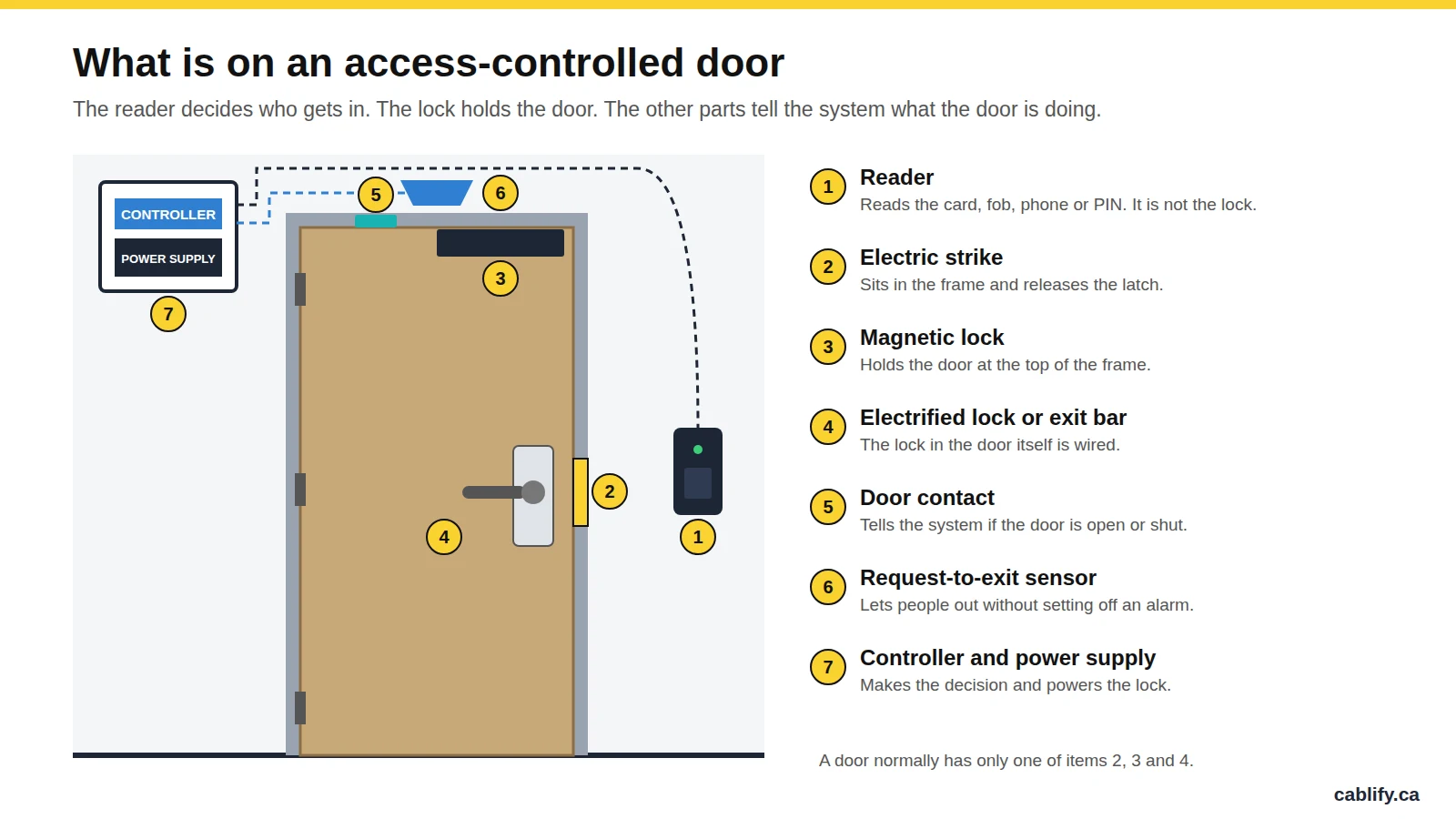
- Reader. Mounted on the outside. It reads the credential and passes it to the controller.
- Lock. One of the types in this guide.
- Door contact. A small switch that reports whether the door is open or shut. Without it, the system cannot tell you a door has been propped open.
- Request-to-exit. A motion sensor or button on the inside that tells the system someone is leaving, so the door opening is not treated as a break-in. With a maglock it also releases the lock.
- Controller and power supply. The controller makes the decision. The power supply runs the lock and should have a battery so the door behaves predictably in a power cut.
Fail-safe vs fail-secure
This is the first decision for any electric lock. It describes what the lock does when it loses power.
The lock needs power to stay locked. In a power cut the door can be opened from outside. Used where getting people through the door matters more than keeping it locked.
The lock needs power to unlock. In a power cut the door stays locked from the outside. Used for server rooms, stock rooms and most perimeter doors.
Both terms describe the outside of the door only. People inside must always be able to get out, with or without power. On a door with a handle or panic bar, that is taken care of by the hardware itself: turning the handle or pushing the bar always retracts the latch.
One rule to remember: a magnetic lock can only be fail-safe. There is nothing mechanical holding the door, so when the power goes, the door is open.
Electric strikes
An electric strike replaces the metal strike plate in the door frame. The lock and handle on the door stay as they are. When the system grants access, the strike releases its keeper and the latch swings free, so the door can be pushed open without turning the handle.
- Where it fits: wood and hollow metal doors with a lever handle or a rim panic bar. This covers most office doors.
- Why we use it: the existing lock and key still work, people leave by turning the handle as they always have, and the door stays locked in a power cut when the strike is fail-secure.
- What to watch: the strike has to match the lock on the door. The frame usually needs cutting, and on a fire-rated frame the strike must be fire-rated and fail-secure so the door still latches in a fire.
Magnetic locks
A magnetic lock, or maglock, is an electromagnet fixed to the frame and a steel plate fixed to the door. While it has power, the magnet holds the plate. Common sizes hold about 600 lb for interior doors and 1,200 lb for exterior doors.
- Where it fits: glass doors, aluminium storefront doors, gates and any door with no latch for a strike to release.
- Why we use it: it has no moving parts, it is quick to mount and it works on doors where nothing else will.
- What to watch: because the door has no handle that releases it, a maglock needs a request-to-exit sensor and a push-to-exit button on the inside. It must also release when the fire alarm sounds. And since it unlocks whenever power is lost, it needs battery backup if the door is meant to stay secure.
Ontario note: magnetic locks on exit doors are regulated by the Ontario Building Code. Municipalities such as Toronto require a building permit for them, and the lock has to be tied into the fire alarm. Confirm the requirements with your municipality or fire alarm contractor before a maglock is installed.
Electrified locksets
Here the lock inside the door is itself electric. It looks like an ordinary lever handle, in either a mortise or a cylindrical style. Power locks or unlocks the outside handle, and the inside handle always opens the door.
- Where it fits: fire-rated doors, doors where the frame cannot be cut, and offices that want no visible hardware on the frame.
- Why we use it: the door still latches properly, which keeps a fire rating intact, and many models have the request-to-exit switch built into the inside handle.
- What to watch: power has to reach the door. That means drilling through the door and fitting a power transfer hinge or a door loop, which adds labour.
Electrified exit devices
An exit device is the push bar found on exit doors, often called a panic bar or crash bar. An electrified version is controlled in one of two ways. With electric latch retraction, a motor pulls the latch back so the door can be pulled open from outside. With electrified trim, the outside handle is locked or unlocked while the bar works as normal.
- Where it fits: main exits, stairwell doors and any door where a push bar is required.
- Why we use it: pushing the bar always opens the door, so the way out is never affected by the access system. Latch retraction also works well with automatic door operators.
- What to watch: the hardware costs more than a strike, and latch retraction needs a power supply that can deliver a short, high burst of current.
Wireless locks
A wireless lock puts the reader, the lock and a set of batteries into one unit on the door. It talks to a hub over a wireless link, and the hub is wired to the access control system.
- Where it fits: rows of interior offices, older buildings and glass partitions where running cable to every door would cost more than the hardware.
- Why we use it: no cable to the door and very little cutting.
- What to watch: batteries have to be changed, and some models report events with a delay instead of in real time. For main entrances and high-security rooms we still recommend a wired lock.
Maglock vs electric strike
This is the choice that comes up most often. For a normal door with a handle and a latch, an electric strike is usually the better answer. A maglock earns its place on doors that have no latch.
| Question | Electric strike | Magnetic lock |
|---|---|---|
| When power fails | Stays locked (fail-secure) or unlocks, as ordered | Always unlocks |
| Leaving the room | Turn the handle, as on any door | Needs a sensor and an exit button |
| Fire alarm tie-in | Not normally needed | Required |
| Door types | Doors with a latch | Almost any door, including glass |
| Installation | Frame has to be cut | Surface mounted, but more devices to wire |
| Power use | Only when unlocking, if fail-secure | All the time |
Which lock for which door
These are the choices we usually start from. The final answer depends on the door, the frame and the building’s fire plan.
| Door | Usual choice | Why |
|---|---|---|
| Office door with a lever handle | Fail-secure electric strike | Keeps the existing lock and stays locked in a power cut |
| Aluminium and glass storefront door | Magnetic lock, or a strike made for narrow frames | Little room in the frame for standard hardware |
| Frameless glass door | Magnetic lock | No latch and no frame to cut |
| Fire-rated corridor or stair door | Electrified lockset or fire-rated strike | The door must still latch in a fire |
| Exit door with a push bar | Electrified exit device | The bar always lets people out |
| Server room or stock room | Fail-secure strike or lockset, with a door contact | Stays locked and reports if it is left open |
| Many interior offices in an existing building | Wireless locks | Avoids cabling every door |
Power and cabling
The lock is only as reliable as the power and cable behind it. This is the part of an access control job that is easiest to get wrong.
- Voltage. Most locks run on 12 or 24 V DC. On long cable runs 24 V is the safer choice, because voltage drop is smaller.
- Power supply. It has to cover every lock it feeds, with room to spare, and include a battery. An undersized supply shows up as doors that buzz, release slowly or do not release at all.
- Cable. A door normally needs separate conductors for the lock, the reader, the door contact and the request-to-exit device. Composite access control cable bundles all four in one jacket, which keeps the run tidy and easy to label.
- PoE door controllers. Some newer systems put a small controller at each door and power it, and the lock, from the network switch. That works well when the switch has the PoE budget for it. See our guides to PoE, PoE+ and PoE++ and UniFi door access.
Mistakes we get called to fix
- A maglock with no proper way out. No exit sensor, no button or no fire alarm connection. This is a safety problem, not just a fault.
- A fail-safe lock on a room that should stay locked. The first power cut leaves the stock room open.
- A strike that does not match the lock. The latch can then be slipped with a piece of plastic or pulled open.
- No door contact. The system shows the door as secure while it is wedged open.
- No battery. Every brief power dip unlocks or locks half the building.
- No key override. When the system is down, nobody can get into the room that holds the controller.
Frequently asked questions
What is the difference between a maglock and an electric strike?
An electric strike sits in the door frame and releases the latch of the existing lock. A maglock is an electromagnet that holds the door shut with no latch at all. A strike can stay locked when power fails. A maglock always unlocks.
Which is more secure, a maglock or an electric strike?
For most doors, a fail-secure electric strike, because it stays locked without power. A maglock holds with great force while it is powered, but it depends completely on its power supply and battery.
Is a magnetic lock fail-safe or fail-secure?
A magnetic lock is always fail-safe. It needs power to hold the door, so it unlocks whenever power is lost.
What happens to the doors when the power goes out?
With a battery in the power supply, nothing changes until the battery runs down. After that, fail-secure locks stay locked from the outside and fail-safe locks unlock. In both cases people inside can still leave.
Can I keep my existing door handle and key?
Usually yes, if an electric strike is used. The strike goes in the frame and the lock on the door is left alone, so the key still works as a backup.
Do magnetic locks need a permit in Ontario?
Magnetic locks on exit doors are regulated by the Ontario Building Code, and municipalities such as Toronto require a building permit. They must also release on a fire alarm. Check with your municipality before installing one.
Are card readers and keypads locks?
No. A reader or keypad identifies the person. A separate lock, such as an electric strike or a maglock, holds the door. Any reader can be paired with any lock type.
Need door locks installed or fixed?
Cablify installs and cables access control for offices, warehouses and multi-tenant buildings across Toronto and the GTA. See our access control systems and door access and card reader installation pages, or call 1-647-846-1925.