


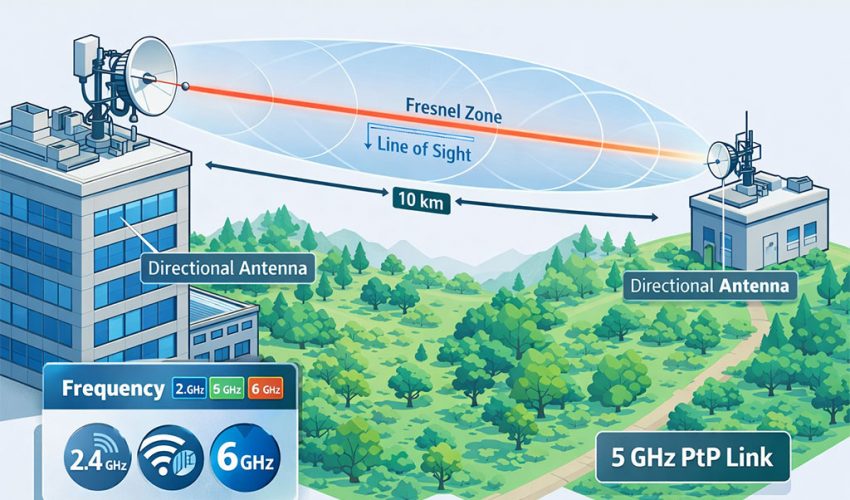
Introduction to Point-to-Point (PtP) Wireless
A Point-to-Point (PtP) wireless bridge is a high-performance networking solution designed to connect two locations wirelessly, acting as an “invisible Ethernet cable.” Whether you are extending internet to a guest house, connecting remote warehouses, or deploying IP security cameras across a large property, a PtP link eliminates the need for expensive trenching and fiber optic cabling.
In this guide, we will explore the four pillars of a successful wireless bridge: Distance, Line of Sight (LoS), Frequency Selection, and Hardware Choices.
1. Distance Planning and Link Budget
The distance between your two points determines the “Link Budget”—the accounting of all gains and losses in the system.
Understanding Path Loss
As radio waves travel through space, they naturally lose strength. This is known as Free Space Path Loss (FSPL). To compensate for this, longer links require higher-gain antennas (measured in dBi) and higher transmit power (dBm).
Distance Categories
- Short Range (< 1 km): Ideal for residential or small business campus links. High-frequency 60GHz equipment is often best here for gigabit speeds.
- Medium Range (1–5 km): The “sweet spot” for 5GHz AC technology. Requires clear elevation.
- Long Range (5–15 km): Requires high-gain dish antennas and precise alignment.
- Ultra-Long Range (15+ km): Professional-grade backhaul territory, often requiring licensed frequencies to avoid interference.
2. Line of Sight (LoS) and the Fresnel Zone
The most common cause of PtP failure is a lack of “Radio Line of Sight.” Even if you can see the other antenna with your eyes, the signal may still be blocked.
The Fresnel Zone
Radio signals do not travel in a laser-thin line; they travel in an elliptical shape called the Fresnel Zone. If objects like trees, buildings, or the ground itself enter this zone, the signal will reflect and cancel itself out (destructive interference).
- The 60% Rule: At least 60% of the first Fresnel Zone must be completely clear of obstructions for a stable link.
- Earth Curvature: For links over 2 km, the curvature of the Earth acts as a physical barrier. You must mount antennas higher as the distance increases to keep the Fresnel Zone clear of the “bulge” of the Earth.
Pro Tip: Use online tools like Ubiquiti ISP Design Center or LinkCalc to simulate your terrain and ensure your mounting height is sufficient.
3. Frequency Selection: 2.4GHz vs. 5GHz vs. 60GHz
Choosing the right frequency is a trade-off between speed, range, and interference.
| Frequency | Max Speed | Range | Interference | Best Use Case |
| 2.4 GHz | ~150 Mbps | Long | Very High | High-interference rural areas with light foliage. |
| 5 GHz | ~500+ Mbps | Medium | Moderate | The industry standard for most PtP links. |
| 60 GHz | 1 Gbps+ | Short | Near Zero | High-speed building-to-building (under 1.5km). |
| 900 MHz | ~20 Mbps | Short | High | Non-Line-of-Sight (NLOS) through dense trees. |
The 60GHz Revolution
Licensed Bands (e.g., 6–42 GHz):
- Require government spectrum licenses (e.g., FCC in the U.S.)
- Offer interference-free operation
- Used by WISPs and telecoms for carrier-grade backhaul
- Higher equipment cost but superior reliability
Best Practice: For most enterprise or SMB deployments, 5 GHz PtP links offer the best balance of performance, availability, and cost.
In 2026, 60GHz (mmWave) has become the preferred choice for short-range links. It offers fiber-like speeds with zero interference because the signal does not penetrate walls and is absorbed by oxygen, preventing it from traveling too far and interfering with other networks.
Hardware Choices: Top Recommendations
Selecting the right hardware depends on your technical expertise and performance needs.
Ubiquiti (Best for Ease of Use)
- NanoBeam 5AC: The gold standard for short-to-medium range 5GHz links.
- GigaBeam / airFiber 60: Best for high-speed gigabit links under 1km.
- LiteBeam 5AC: Budget-friendly option for long-range rural links.
MikroTik (Best for Advanced Users & Budget)
- Wireless Wire Dish: A pre-configured 60GHz pair that provides a 1Gbps “wire” up to 1.5km.
- Cube 60G: Compact, high-speed 60GHz bridge with a 5GHz failover.
Cambium Networks (Best for Enterprise/High Interference)
- ePMP Force 300-25: Exceptional performance in “noisy” environments where other 5GHz radios fail.
Key Hardware Specs to Compare:
- Transmit Power: Measured in dBm (e.g., 27 dBm = 500 mW)
- Receive Sensitivity: Lower = better (e.g., -92 dBm @ 100 Mbps)
- Antenna Gain: Higher gain = narrower beamwidth = longer range but harder alignment
- Throughput: Look for full-duplex or MIMO support for higher capacity
- Weatherproofing: IP66 or IP67 rating for outdoor use
- Management: SNMP, cloud controller (e.g., UNMS, cnMaestro), or CLI
5. Advanced Setup & Troubleshooting
To ensure your link stays up 99.9% of the time, follow these professional standards:
- Alignment is Everything: Use the built-in alignment tools. A 2-degree error on a 5km link can result in a total loss of signal.
- Fade Margin: Always design your link with at least a 20dB Fade Margin. This ensures that when it rains or snows, your link doesn’t drop.
- Shielded Everything: Use Shielded Twisted Pair (STP) Cat6 cables and grounded connectors to protect against ESD (Electrostatic Discharge) during storms.
- Spectrum Analysis: Before picking a channel, run a spectrum analysis (like airView) to see which frequencies are being used by neighbors.
Common Pitfalls & Troubleshooting
| Issue | Likely Cause | Solution |
|---|---|---|
| Low throughput | Misaligned antennas | Re-align using RSSI meter |
| Intermittent dropouts | Obstruction in Fresnel zone (e.g., growing trees) | Raise antenna height or trim foliage |
| High latency | Interference on channel | Switch to cleaner channel (use spectrum analyzer) |
| Link won’t establish | Incorrect IP/subnet or firewall rules | Verify Layer 2 connectivity; disable firewalls temporarily |
| Signal degrades in rain | Operating at high frequency (>10 GHz) | Add fade margin or switch to lower band |
A successful Point-to-Point wireless setup requires careful planning of distance, a clear Fresnel Zone, and the right frequency for your environment. By following this guide and choosing quality hardware from Ubiquiti or MikroTik, you can achieve a stable, high-speed connection that rivals traditional fiber optics.
Frequently Asked Questions (FAQ)
Q: Can I use PtP wireless through windows or walls?
A: No. Glass, concrete, and metal severely attenuate signals. PtP requires outdoor-to-outdoor installation with clear LoS.
Q: What’s the difference between PtP and PtMP?
A: PtP connects two points. PtMP (Point-to-Multipoint) connects one base station to multiple clients (e.g., WISP networks).
Q: Do I need a license for 5 GHz PtP?
A: In most countries, no license is required for unlicensed bands (like 5.8 GHz), but DFS/TPC rules may apply in the 5.25–5.725 GHz range.
Q: How much bandwidth can I expect?
A: Real-world throughput is typically 50–70% of advertised PHY rate due to overhead. A 1 Gbps radio may deliver 500–700 Mbps usable.