



1. What These Cables Do
Ethernet cables are the physical paths that let network devices communicate. Each wire inside carries an electrical signal that represents data being transmitted (Tx) or received (Rx). For communication to work, the Tx pins of one device must connect to the Rx pins of the other.
There are two main Ethernet wiring types, and they determine how these signal paths are aligned:
Straight-Through Cable: Used to connect different types of devices (for example, a computer to a switch, or a router to a modem). The wiring at both ends is identical, meaning Pin 1 connects to Pin 1, Pin 2 to Pin 2, and so on. This setup ensures that the transmit pins on one device line up with the receive pins on the other, enabling normal data flow.
Crossover Cable: Used to connect similar devices (like two computers or two switches). One end is wired as T568A and the other as T568B, which means certain wire pairs are swapped. This swap makes the transmit pins on one device connect directly to the receive pins on the other, allowing them to talk without a switch or router in between.
In short, the difference between these two cable types lies in how they route Tx and Rx signals between devices. Straight-through cables keep the wiring the same on both ends, while crossover cables flip the transmit and receive pairs to allow direct communication between similar devices.
When setting up a network, the type of Ethernet cable you use is crucial for proper connectivity. While it may seem like all cables are the same, choosing between a straight-through cable and a crossover cable can have a significant impact on how your devices communicate with each other. Let’s dive into the details of these cables, what sets them apart, and why it matters for your network.
Straight-Through Cable: The Networking Standard
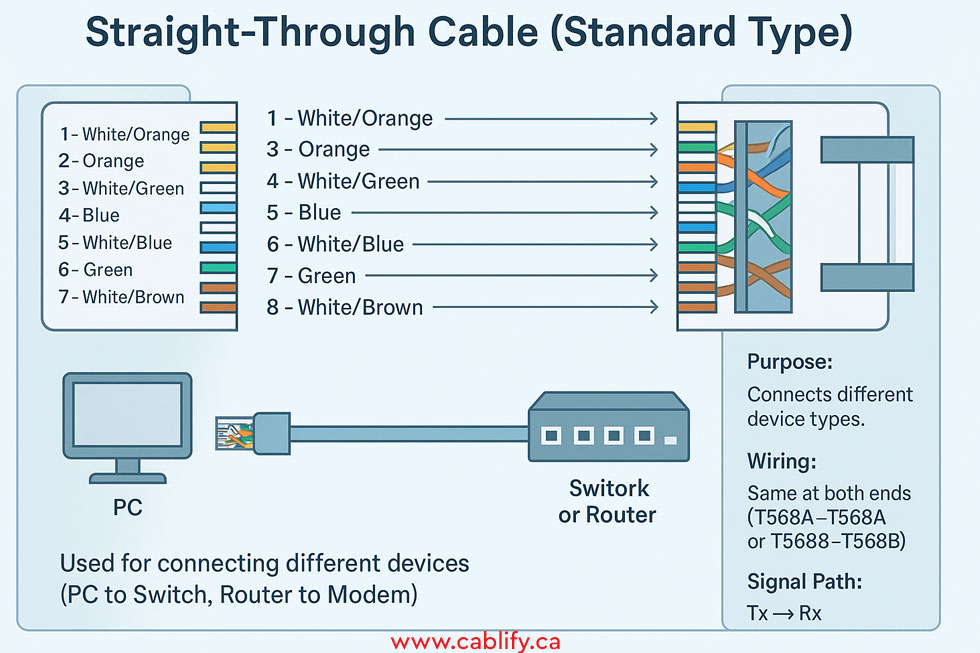
A straight-through cable is the most commonly used Ethernet cabling, designed to connect two different types of devices. Think of it as a bridge between your computer and a switch or router. In a straight-through cable, the wiring at both ends follows the exact same sequence, allowing for seamless data flow between different devices. The most widely used wiring standards for straight-through cables are T568A and T568B, and these define how the eight wires inside the cable are arranged.
For example, in the T568B standard:
-
- Pin 1 (orange/white) is connected to Pin 1 at the other end.
- Pin 2 (orange) goes to Pin 2, and so on.
This alignment is essential for transmitting and receiving data correctly. If you’re connecting your PC to a switch, or a router to a modem, a straight-through cable is the one you need.
When to use it?
-
- PC to switch
- Router to switch
- Switch to hub
These devices complement each other, so a straight-through cable will connect the transmit (Tx) pins on one device to the receive (Rx) pins on the other, ensuring smooth communication.
Crossover Cable: When Similar Devices Communicate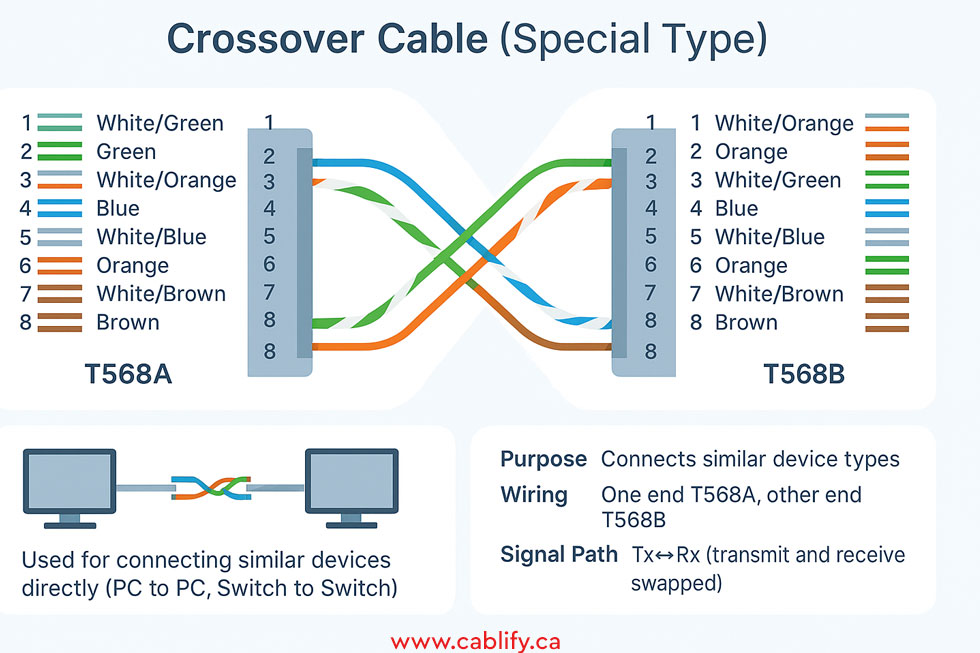
A crossover cable works differently—it’s used to connect similar types of devices directly, like two computers or two switches. As the name suggests, the wiring inside a crossover cable “crosses over” at one end. This is where things get interesting.
In a crossover cable, one end follows the T568A standard, while the other end uses T568B. This effectively swaps the transmit and receive pins so that two similar devices can send and receive data without getting their signals mixed up.
For example:
-
- Pin 1 (green/white) on one end connects to Pin 3 (orange/white) on the other.
- Pin 2 (green) connects to Pin 6 (orange), allowing direct communication.
When to use it?
-
- PC to PC
- Switch to switch
- Router to router
If you want to set up a peer-to-peer connection between two computers without needing a switch, a crossover cable will do the job.
Modern Networking and Auto-MDIX: Cables Made Simple
In the past, choosing the right cable type was critical to ensure network connectivity. However, modern devices have introduced a clever feature called Auto-MDIX (Automatic Medium-Dependent Interface Crossover). Auto-MDIX allows the device to automatically detect the type of cable in use and adjust its configuration accordingly, making the distinction between straight-through and crossover cables less critical in modern networking.
With Auto-MDIX, even if you plug a straight-through cable where a crossover is needed (or vice versa), the device will adjust, simplifying the process and reducing the need for multiple cable types. However, understanding the difference still matters in situations where older equipment or specific network setups are involved.
Straight-Through vs. Crossover: A Quick Comparison
| Feature | Straight-Through Cable | Crossover Cable |
|---|---|---|
| Wiring Configuration | Same at both ends (T568A or T568B) | Different wiring at each end (T568A to T568B) |
| Used For | Connecting different devices (e.g., PC to switch) | Connecting similar devices (e.g., switch to switch) |
| Example Devices | PC to switch, router to modem | PC to PC, switch to switch |
| Auto-MDIX Compatibility | Often not needed with Auto-MDIX-enabled devices | Largely obsolete with Auto-MDIX |
In today’s networking world, knowing these distinctions can save you time, avoid connection issues, and keep your network running smoothly.
Which Cable Do You Need?
The choice between straight-through and crossover cables boils down to what you’re connecting. For most home and office networks, a straight-through cable will suffice, especially with modern devices that support Auto-MDIX. However, if you’re working with older equipment or need to directly connect two similar devices, understanding the purpose of a crossover cable is essential.
Straight-through cables dominate data cabling due to their straightforward design and compatibility with modern Auto-MDIX, while crossover cables are a niche tool for specific legacy direct connections. For most users, stocking up on straight-through (Cat6 or higher) suffices. Always label cables and use certified testers for reliability in professional installs.
In today’s networking world, knowing these distinctions can save you time, avoid connection issues, and keep your network running smoothly.
Role of Cross-Connecting Data Cables in Networks
Pinout Comparison
Both cable types use RJ45 connectors with four twisted pairs (eight wires). For straight-through, both ends match exactly. For crossover, the pairs are crossed as noted.
Using T568B standard (most common):
| Pin | Straight-Through (Both Ends) – Color & Function (MDI) | Crossover (One End T568A, Other T568B) – Swapped Pairs |
|---|---|---|
| 1 | White/Orange (TX+) | White/Green (RX+) on swapped end |
| 2 | Orange (TX-) | Green (RX-) on swapped end |
| 3 | White/Green (RX+) | White/Orange (TX+) on swapped end |
| 4 | Blue (Unused in 10/100 Mbps) | Blue (Unused) |
| 5 | White/Blue (Unused in 10/100 Mbps) | White/Blue (Unused) |
| 6 | Green (RX-) | Orange (TX-) on swapped end |
| 7 | White/Brown (Unused in 10/100 Mbps) | White/Brown (Unused) |
| 8 | Brown (Unused in 10/100 Mbps) | Brown (Unused) |
Note: For 10/100 Mbps, only pins 1-2 (TX) and 3-6 (RX) are active. Gigabit Ethernet uses all pairs bidirectionally.
Key Differences
The core distinctions revolve around wiring, device compatibility, and application. Straight-through cables are far more common today due to their versatility.
| Aspect | Straight-Through Cable | Crossover Cable |
|---|---|---|
| Wiring Configuration | Identical pin assignments on both ends (e.g., both T568A or both T568B). TX pins connect directly to RX pins on the opposite device. | Swapped pin assignments: TX pins on one end connect to RX pins on the other (e.g., pins 1-2 swapped with 3-6; pins 4-5 with 7-8 for Gigabit). |
| Device Connection | Dissimilar devices (e.g., PC to switch/router, hub to modem). One end is MDI (Media Dependent Interface), the other MDI-X. | Similar devices (e.g., PC to PC, switch to switch, hub to hub). Both ends are the same type (e.g., both MDI). |
| Signal Flow | Direct: TX from one device goes straight to RX on the other. Unidirectional per pair in 10/100 Mbps; bidirectional in Gigabit+. | Crossed: TX from one device routes to TX on the other, but effectively crosses to RX via the swap. |
| Common Categories | Cat5e, Cat6, Cat6a+ (UTP/STP). Supports up to 10 Gbps over 100m. | Same categories, but less common; often custom-made. |
| Length Limit | 100 meters (328 feet) for most speeds. | Same as straight-through. |
| Prevalence | Standard and most used; works with Auto-MDIX. | Rare; mostly for legacy or specific direct-link needs. |