


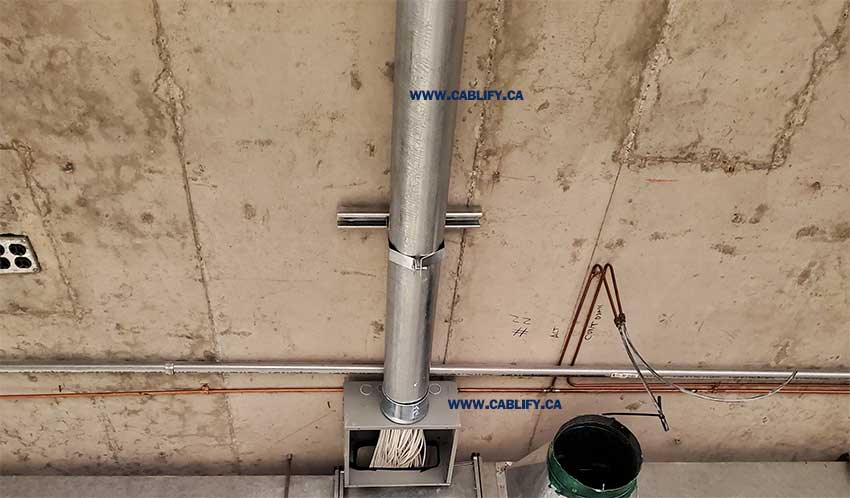
If you are an electrical contractor, IT installer, or network engineer, choosing the wrong conduit size can turn a simple cable pull into a nightmare of snags, deformed jackets, and failed certification tests. This conduit fill guide for data cables answers the practical question on every job site: how many Cat5e, Cat6, or Cat6A cables can you safely pull through EMT or PVC conduit and still pass inspection?
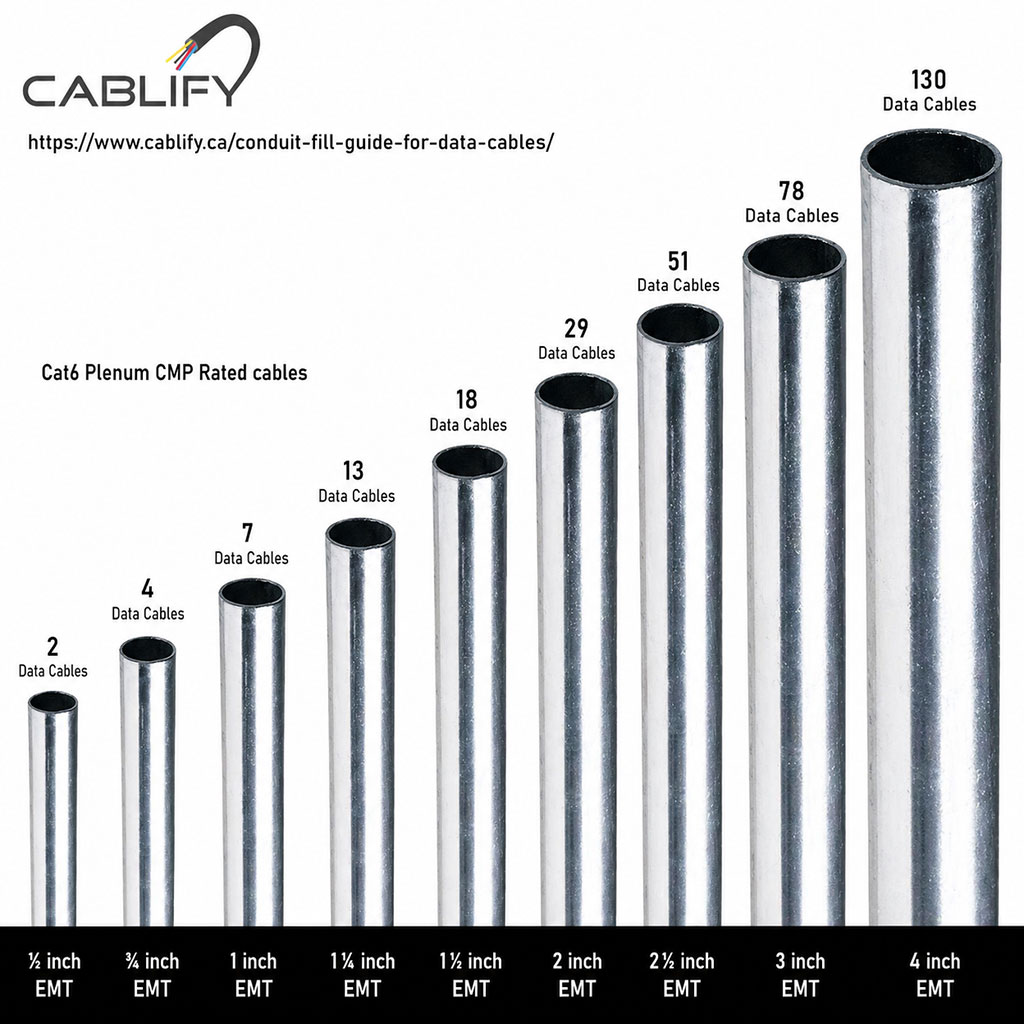
Following the NEC 40% fill rule protects your cables from overheating, physical damage during pulls, and signal degradation — while leaving headroom for future circuits. The tables below are calculated using consistent cable outer-diameter (OD) assumptions based on NEC Chapter 9 internal conduit dimensions, giving you job-site-ready numbers for quoting and pathway design.
Jump to: NEC Fill Rule | Cat6 Table | Cat5e Table | Cat6A Table | PVC Table | How to Calculate | Cat6 vs Cat6A | Pulling Tips | FAQ
NEC Conduit Fill Rule — The 40% Limit Explained
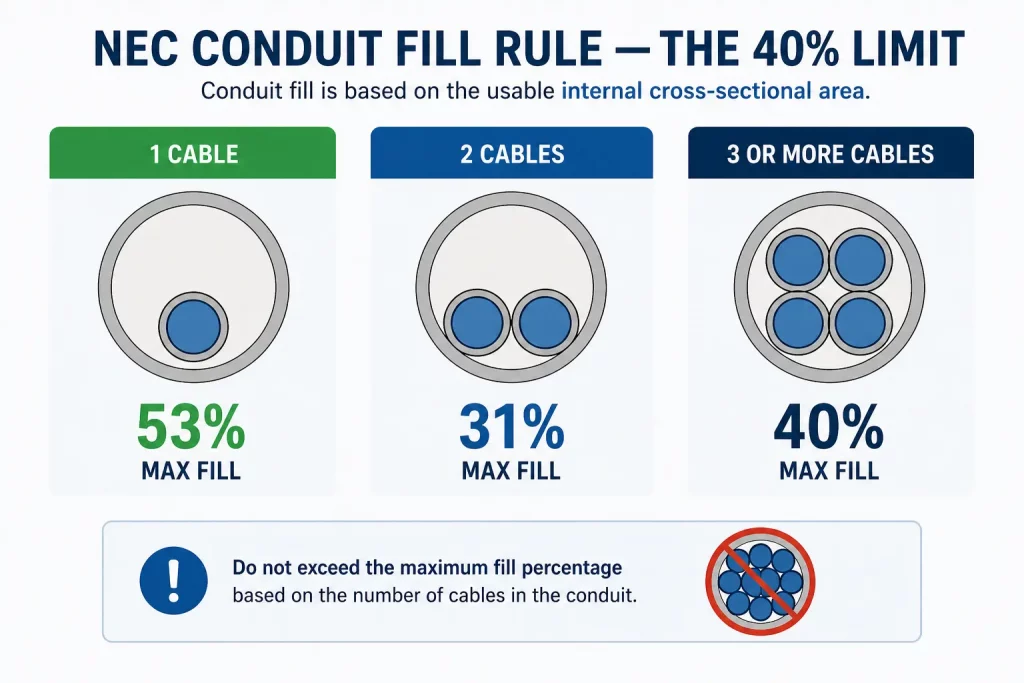
The National Electrical Code (NEC), Chapter 9, Table 1, establishes maximum fill percentages based on the number of conductors sharing a conduit. These percentages apply to the conduit’s internal cross-sectional area — not its trade size or outer diameter.
| Number of Cables | Maximum Fill % | Typical Application |
|---|---|---|
| 1 cable | 53% | Rare for data — single homerun to isolated device |
| 2 cables | 31% | Dual-cable drops to a workstation or dual-port outlet |
| 3 or more cables | 40% | Standard for all structured cabling runs |
For virtually every commercial or structured cabling installation, you will be pulling three or more cables — which means the 40% rule applies. Design to this limit as your maximum and target 30–35% actual fill to leave room for moves, adds, and changes without re-pulling conduit.
Canadian context (CEC): The Canadian Electrical Code, Part I, Section 12-1014 mirrors the NEC fill percentages. ANSI/TIA-569-D (Telecommunications Pathways and Spaces) also recommends a maximum 40% fill for data cable pathways, with 30% recommended for new installations to support future growth.
⚠️ Never run Ethernet or data cables in the same conduit as electrical power wiring. NEC Article 800.133(A)(2) prohibits data cables from sharing conduit with mains-voltage conductors. It introduces electromagnetic interference (EMI), violates code, and can cause permanent signal degradation and fire risk.
Cat6 Conduit Fill Chart — EMT (NEC 40% Limit)
The table below uses a typical Cat6 UTP outer diameter of 0.24 inches (6.1 mm) — cross-sectional area 0.0452 in². EMT internal areas are from NEC Chapter 9, Table 4. Slim plenum Cat6 cables (0.21–0.22″ OD) can fit approximately 20–25% more; thicker STP cables fit fewer. Attenuation increases ~2–3% in metal conduit — use EMT only where code or protection requires it.
| EMT Size | Max Cat6 Cables (40% NEC limit) |
Design Target (30% recommended) |
Typical Use |
|---|---|---|---|
| ½” EMT | 2 | 1 | Single outlet drops |
| ¾” EMT | 4 | 3 | Small drops, 2-port outlets |
| 1″ EMT | 7 | 5 | Workstation bundles, APs |
| 1¼” EMT | 13 | 9 | Office clusters, small IDF |
| 1½” EMT | 18 | 13 | IDF/MDF feeds |
| 2″ EMT | 29 | 22 | Main horizontal pathways |
| 2½” EMT | 51 | 38 | Heavy PoE bundles |
| 3″ EMT | 78 | 58 | Campus backbone, riser |
| 4″ EMT | 130 | 97 | Major backbone, multi-floor |
For professional Cat6 cabling installation across the GTA, our certified technicians design pathway systems that comply with NEC and ANSI/TIA-569 fill requirements.
Cat5e Conduit Fill Chart — EMT (NEC 40% Limit)
Cat5e cables have a smaller outer diameter than Cat6, allowing more cables per conduit for the same trade size. Typical Cat5e OD: 0.20 inches (5.1 mm) — cross-sectional area 0.0314 in². Cat5e supports Gigabit Ethernet (1GbE) up to 100 metres.
| EMT Size | Max Cat5e Cables (40% NEC limit) |
Design Target (30% recommended) |
|---|---|---|
| ½” EMT | 3 | 2 |
| ¾” EMT | 6 | 4 |
| 1″ EMT | 11 | 8 |
| 1¼” EMT | 19 | 14 |
| 1½” EMT | 25 | 19 |
| 2″ EMT | 42 | 31 |
| 2½” EMT | 74 | 55 |
| 3″ EMT | 112 | 84 |
| 4″ EMT | 187 | 140 |
Looking to upgrade existing Cat5e infrastructure? Learn about Cat5e cabling services or explore whether a Cat6 upgrade makes more sense for your project.
Cat6A Conduit Fill Chart — EMT (NEC 40% Limit)
Cat6A is the current standard for 10 Gigabit Ethernet (10GbE) over 100 metres. Its larger outer diameter — typically 0.35 inches (8.9 mm) — means significantly fewer cables fit per conduit compared to Cat6. Many installers switching from Cat6 to Cat6A designs undersize their conduit as a result.
⚠️ Critical sizing warning: A 1″ EMT conduit that holds 7 Cat6 cables only holds 3 Cat6A cables. Always re-size conduit when upgrading from Cat6 to Cat6A specifications.
| EMT Size | Max Cat6A Cables (40% NEC limit) |
Design Target (30% recommended) |
Max Cat6 (same conduit) |
|---|---|---|---|
| ½” EMT | 1 | — | 2 |
| ¾” EMT | 2 | 1 | 4 |
| 1″ EMT | 3 | 2 | 7 |
| 1¼” EMT | 6 | 4 | 13 |
| 1½” EMT | 8 | 6 | 18 |
| 2″ EMT | 13 | 10 | 29 |
| 2½” EMT | 24 | 18 | 51 |
| 3″ EMT | 36 | 27 | 78 |
| 4″ EMT | 61 | 46 | 130 |
Based on Cat6A UTP OD of 0.35″ (8.9 mm). Shielded Cat6A (F/UTP) at 0.32–0.33″ OD fits slightly more. Always confirm with your cable manufacturer’s spec sheet before finalizing pathway design.
Planning a 10GbE network installation? Our team specializes in Cat6A pathway design and installation across Toronto, Mississauga, Brampton, and the GTA. Contact us for a free site assessment.
Cat6 Conduit Fill Chart — PVC Schedule 40 (NEC 40% Limit)
PVC Schedule 40 conduit has a slightly larger internal diameter than EMT for the same trade size. PVC is the standard for underground data cable runs, direct burial conduit systems, and wet or damp locations. It does not provide EMI shielding, which is usually an advantage for data cables.
| PVC Sch 40 Size | Max Cat6 (40%) |
Max Cat6A (40%) |
Max Cat5e (40%) |
|---|---|---|---|
| ½” PVC | 2 | 1 | 3 |
| ¾” PVC | 4 | 2 | 6 |
| 1″ PVC | 7 | 3 | 10 |
| 1¼” PVC | 12 | 6 | 18 |
| 1½” PVC | 17 | 8 | 25 |
| 2″ PVC | 29 | 13 | 41 |
| 2½” PVC | 48 | 22 | 69 |
| 3″ PVC | 72 | 34 | 104 |
| 4″ PVC | 122 | 57 | 176 |
PVC Schedule 80 has thicker walls — fit counts will be slightly lower. Use Schedule 80 in high-traffic areas where additional mechanical protection is needed.
How to Calculate Conduit Fill for Data Cables
You do not need a specialized tool to calculate conduit fill — just three pieces of information and basic arithmetic.
Step 1 — Find each cable’s cross-sectional area
From the cable manufacturer’s spec sheet, get the outer diameter (OD) in inches. Then calculate the area:
Cable Area (in²) = 0.7854 × OD²
Example: Cat6 cable with 0.24″ OD → 0.7854 × (0.24)² = 0.7854 × 0.0576 = 0.0452 in²
Step 2 — Add up total cable area
Multiply the area per cable by the number of cables you plan to pull:
Total Used Area = Cable Area × Number of Cables
Example: 10 Cat6 cables → 10 × 0.0452 = 0.452 in²
Step 3 — Find the conduit’s 40% fill threshold
Look up your conduit’s internal area from the tables above (or NEC Chapter 9, Table 4), then multiply by 0.40:
Max Fill Area = Internal Conduit Area × 0.40
Example: 2″ EMT → 3.356 × 0.40 = 1.342 in²
Step 4 — Compare and confirm
Total Used Area ≤ Max Fill Area = NEC Compliant ✅
Example: 0.452 in² ≤ 1.342 in² → 2″ EMT passes comfortably. (1″ EMT at 0.346 in² would fail — it cannot hold 10 Cat6 cables.)
Common cable OD reference values
| Cable Type | Typical OD | Area (in²) | Speed Rating |
|---|---|---|---|
| Cat5e UTP | 0.20″ (5.1 mm) | 0.0314 | 1 GbE to 100 m |
| Cat6 UTP | 0.24″ (6.1 mm) | 0.0452 | 1 GbE / 10 GbE to 55 m |
| Cat6 STP/FTP | 0.27″ (6.9 mm) | 0.0573 | 1 GbE / 10 GbE to 55 m |
| Cat6A UTP | 0.35″ (8.9 mm) | 0.0962 | 10 GbE to 100 m |
| Cat6A STP/FTP | 0.32″ (8.1 mm) | 0.0804 | 10 GbE to 100 m |
| Duplex Fiber (SM/MM) | 0.20″ (5.0 mm) | 0.0314 | 10–100 GbE |
These are typical values. Always use your specific cable datasheet for final design calculations. For horizontal cabling pathway design that meets TIA-569 and local code, our team can handle the full pathway engineering for your project.
Cat6 vs Cat6A: Which Should You Install?
The cable type you specify at design time determines your conduit sizing — and once conduit is in the wall, changing it is expensive. Here is how Cat6 and Cat6A compare on the factors that affect pathway design:
| Factor | Cat6 UTP | Cat6A UTP |
|---|---|---|
| Max Speed | 1 GbE (100 m) / 10 GbE (55 m) | 10 GbE (100 m) |
| Typical OD | 0.24″ (6.1 mm) | 0.35″ (8.9 mm) |
| Weight / stiffness | Lighter, flexible | Heavier, stiffer — harder to pull |
| Cables in 1″ EMT (40%) | 7 | 3 |
| Cables in 2″ EMT (40%) | 29 | 13 |
| Min bend radius | 4× OD during pull | 8× OD during pull |
| Supports PoE++ | Yes (with bundle derating) | Yes (better thermal dissipation) |
| New build recommendation | Acceptable for 1 GbE environments | Preferred for all new commercial installs |
| Conduit upsize needed | Baseline | Typically 1–2 trade sizes larger |
Recommendation: For any new commercial installation — offices, schools, healthcare, retail — specify Cat6A and size conduit accordingly. The higher upfront cost of larger conduit is far less expensive than retrofitting pathways when you upgrade to 10GbE later. For renovations or budget-constrained residential projects where 1 GbE is sufficient, Cat6 remains appropriate.
Choosing the Right Conduit Type for Data Cable Installations
Not all conduit is interchangeable. The type you select affects internal diameter, installation environment suitability, mechanical protection, fire code compliance, and cost.
| Conduit Type | Abbrev. | Best For | Not Suitable For |
|---|---|---|---|
| Electrical Metallic Tubing | EMT | Indoor commercial, above-ceiling, IDF rooms | Direct burial, outdoor, wet locations |
| Intermediate Metal Conduit | IMC | Outdoor exposed runs, damp/wet, industrial | Direct burial without protection |
| Rigid Metal Conduit | RMC | Direct burial, concrete, hazardous locations | Cost-sensitive indoor projects |
| PVC Schedule 40 | PVC Sch 40 | Underground, direct burial, wet locations | High-traffic areas needing Sch 80 |
| PVC Schedule 80 | PVC Sch 80 | Underground high-traffic, mechanical risk areas | Where Sch 40 is adequate |
| Liquid-Tight Flexible Metal | LFMC | Final equipment connections — short sections only | Long runs |
For data cabling specifically: EMT is the standard for indoor commercial installations. PVC is correct for underground inter-building runs or outdoor conduit sections. Never use flexible conduit (LFMC) for long horizontal runs — it compresses easily under building loads and makes future cable replacement nearly impossible.
Tips for Pulling Ethernet Cables Through Conduit
A correctly sized conduit that is badly pulled is still a failed installation. Data cables are particularly sensitive to pulling tension and bend radius violations — damage that occurs during the pull is permanent and often invisible until certification testing fails. Follow these best practices on every pull:
- Use a fish tape or pull string first: Thread a spring-steel fish tape or pre-installed nylon pull string through the conduit before attaching cables. Never pull data cables without a dedicated pull point.
- Apply cable lubricant: For any run over 15 metres, any run with more than two bends, or any run with more than 12 cables, use a cable-rated, water-based lubricant. Never use petroleum-based lubricants — they degrade cable jackets.
- Respect maximum pulling tension: Most Cat6 cables have a maximum pulling tension of 25 lbs (110 N). Exceeding this deforms the twisted pairs and causes permanent impedance discontinuities. Use a tension gauge on long or complex pulls.
- Respect minimum bend radius: Cat6 and Cat5e require a minimum bend radius of 4× the cable OD during installation (approximately 1 inch for 0.24″ Cat6). Cat6A requires 8× OD during installation due to its stiffer construction. Conduit bends must account for this.
- Limit bends between pull points: NEC and TIA-569 both recommend a maximum of 360° of total bends (four 90° bends) between pull boxes or junction boxes. Beyond this, pulling forces increase dramatically and cable damage is likely.
- Pull all cables together: Pull all cables in a bundle simultaneously rather than one at a time. Pulling individually causes the first cable to act as a fulcrum, increasing bend stress on subsequent cables.
- Label both ends immediately: Label cables at both ends before leaving the pull — tracing unlabeled cables after the fact wastes more time than the labelling takes.
- Leave pull string in place: After completing the pull, leave a new nylon pull string in the conduit for future adds and changes.
Frequently Asked Questions — Conduit Fill for Data Cables
Can I fill conduit to 100% or even 60%?
No. The NEC Chapter 9, Table 1 limits conduit fill to 40% of the internal cross-sectional area for three or more conductors. There is no 60% provision for data cables — any source citing 60% is incorrect. Exceeding 40% risks cable jacket deformation during pulls, excessive heat buildup under PoE load, and code violations that will fail inspection. Industry best practice is to design to 30% to leave room for future circuits without re-pulling.
How many Cat6A cables fit in a 1-inch conduit?
A 1″ EMT conduit has an internal area of 0.864 in². At 40% fill (0.346 in²), you can fit a maximum of 3 Cat6A UTP cables (each approximately 0.0962 in²). For the design target of 30%, fit 2 cables. If you are replacing a Cat6 design for the same 1″ conduit, note that the same conduit held 7 Cat6 cables — you will need to upsize to at least 1¼” or 1½” EMT to maintain an equivalent number of Cat6A circuits.
Cat6A vs Cat6 — which should I install in new construction?
For any new commercial installation built to serve for 15+ years, Cat6A is the recommended standard. It supports 10GbE over 100 metres, handles high-wattage PoE++ better due to lower DC resistance in larger conductors, and future-proofs the cabling plant. The tradeoff is larger conduit — typically one to two trade sizes larger than equivalent Cat6 designs. Budget the pathway size upfront rather than retrofitting later.
Can I put Cat6 and Cat6A cables in the same conduit?
Yes — mixed cable types can share a conduit provided the combined cross-sectional areas of all cables stay within the 40% NEC fill limit. Add the individual cable areas together: (number of Cat6 × 0.0452 in²) + (number of Cat6A × 0.0962 in²) = total used area. Compare against 40% of the conduit’s internal area. Note that the physical size difference between Cat6 and Cat6A can make the bundle harder to pull, as smaller cables tend to bunch around the larger ones.
Can I put Cat6 cables in the same conduit as electrical wiring?
No. NEC Article 800.133(A)(2) prohibits data communications cables from occupying the same conduit as electrical power wiring. Running them together causes electromagnetic interference that degrades network performance, increases fire risk, and will fail electrical inspection. Always use separate, dedicated conduit for data cabling.
Should I use EMT or PVC conduit for my data cables?
It depends on the installation environment. Use EMT for exposed indoor runs above suspended ceilings, in IDF rooms, or anywhere mechanical protection and EMI shielding are needed. Use PVC Schedule 40 for underground runs between buildings, below-grade horizontal runs, or outdoor conduit sections where metal conduit would corrode. Use PVC Schedule 80 in high-traffic or high-mechanical-risk underground locations. Never install either conduit type in applications outside their code rating.
Does conduit type affect Ethernet signal quality?
Metal conduit (EMT, RMC, IMC) can increase signal attenuation by approximately 2–3% compared to open-air or non-metallic pathways. In practice, this increase is within ANSI/TIA-568 channel limits for properly specified Cat6 and Cat6A installations. For highly sensitive environments, use shielded cable (F/UTP or S/FTP) with bonded metal conduit to provide additional EMI rejection rather than relying on cable alone.
How many bends can a conduit run have before I need a pull box?
NEC Article 358.26 (for EMT) states that a conduit run between pull points must not contain more than the equivalent of four 90° bends — a total of 360°. ANSI/TIA-569 also recommends pull boxes or access points every 30 metres on straight runs. Exceeding these limits makes cable pulls difficult or impossible without exceeding safe pulling tension limits, which will damage the cable.
What is the minimum conduit size recommended for data cabling?
Most professional structured cabling standards recommend ¾” EMT (or ¾” PVC) as the practical minimum for data cabling installations. ½” conduit is rarely used for data because even a single Cat6A cable nearly fills it, leaving no room for pulling or future adds. For new commercial installations, starting at 1″ EMT and sizing up from there provides the best balance of cost and future flexibility.
Do I need conduit for Ethernet cables in commercial buildings in Ontario?
In many Ontario commercial installations, conduit is required or strongly preferred for data cables installed in finished wall cavities, above suspended ceilings, in mechanical rooms, and anywhere cables might be subject to physical damage. The Ontario Building Code and local Authority Having Jurisdiction (AHJ) interpretations vary — always confirm requirements with your AHJ before designing a non-conduit installation. For advice specific to your Toronto or GTA project, contact our team.
Need Expert Conduit and Data Cabling Help in the GTA?
Cablify’s certified cabling technicians design and install structured cabling systems — Cat6, Cat6A, fiber optic, and enterprise network infrastructure — across Toronto, Mississauga, Brampton, Oakville, Hamilton, and the broader Ontario region. Every installation is engineered to NEC / CEC fill compliance and tested to ANSI/TIA-568 channel standards.
- Network Cabling Toronto
- Cat6 Cabling Services
- Data Cabling Toronto
- Fiber Optic Cabling
- Horizontal & Vertical Pathway Design
Call us: 1-647-846-1925 | Request a free quote →