


Network Cabling Basics
In the OSI model, cabling anchors the physical layer, ensuring clean data transmission between switches, servers, and endpoints in your office tower or industrial space. Poor cabling causes packet loss, slow Wi‑Fi, and downtime—common headaches in fast‑growing GTA businesses.
Twisted‑pair copper (Cat cables) handles most horizontal runs, while fiber serves backbones and inter‑building links. GTA codes often demand plenum or riser ratings, especially in multi‑tenant buildings or above false ceilings.
Ethernet Cable Categories
Select based on speed needs, distance, and future growth like 10G upgrades for AI workloads or video surveillance.
-
Copper Ethernet Categories (Cat5e to Cat8)
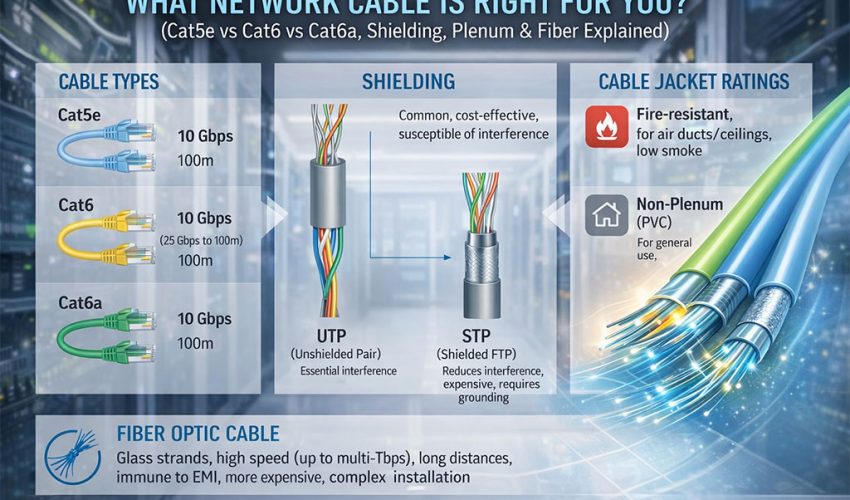
Choosing the right category is usually your first decision: speed, bandwidth, and distance.
Common Categories in 2025–2026
-
Cat5e
-
Up to 1 Gbps to 100 m, 100 MHz.
-
Acceptable for basic home networks, but no longer recommended for new commercial installs.
-
-
Cat6
-
1 Gbps to 100 m, 10 Gbps up to about 55 m, 250 MHz.
-
Good default choice for small offices; affordable and widely supported.
-
-
Cat6a
-
10 Gbps to 100 m, 500 MHz, improved shielding and tighter twist.
-
Ideal for new office builds and server rooms that want to be 10G‑ready for the next decade.
-
-
Cat7 / Cat7a
-
Up to 10 Gbps and higher bandwidth (600+ MHz), usually fully shielded, with GG45 or TERA style in standards, though many cables terminate to RJ45 for practicality.
-
Niche choice for high‑EMI or specialized deployments; often overkill for general offices.
-
-
Cat8
-
25/40 Gbps over very short distances (typically up to 30 m) for data centers and top‑of‑rack links.
-
Not used for general office horizontal runs; better suited to rack‑to‑rack connections.
-
-
Recommended Category by Scenario
-
Home users and small offices (1G today, maybe 10G later in a few spots):
-
Cat6 is usually enough.
-
-
New commercial office build or major renovation (planning for 10G to the desk or at least to Wi‑Fi access points):
-
Cat6a as the standard horizontal cable.
-
-
Data centers, labs, and EMI‑heavy/industrial environments:
-
Cat6a or Cat7, with attention to shielding, or move to fiber where distances or interference demand it.
-
UTP vs STP (Shielding) and When to Use Fiber
Twisted‑pair cables can be unshielded (UTP) or shielded (STP/FTP/S‑FTP). Shielding improves interference resistance but adds cost, thickness, and installation complexity.
UTP (Unshielded Twisted Pair)
-
Most common choice for office and home networks.
-
Light, flexible, and easier to terminate; lower material and labor cost.
-
Good for typical office environments with normal levels of electromagnetic interference (EMI).
STP / FTP / S‑FTP (Shielded)
- Extra foil or braid shields around pairs or the whole bundle reduce EMI and crosstalk.
- Recommended near heavy machinery, large bundles of power cables, radio equipment, elevators, or in dense data centers.
- Requires correct grounding and consistent shielding across jacks, patch panels, and patch cords; mixing shielded and unshielded incorrectly can cause issues.
When Fiber‑Optic Makes Sense
Fiber uses light instead of electricity, so it is immune to electromagnetic interference and ideal for:
- Long runs beyond 100 m (e.g., between telecom rooms, between floors, or between buildings).
- Backbone links in office towers or campuses (multimode fiber) and long‑haul inter‑building links (single‑mode fiber).
- High‑bandwidth, low‑latency core and data center connections where 10G, 25G, 40G, or higher speeds are required.
Fiber also avoids grounding and lightning issues between separate buildings, which is important in campus or multi‑building sites.
Plenum vs Riser vs PVC Jackets (Fire Rating)
Beyond category and shielding, jacket rating is critical for safety and code compliance. The big decision is usually between plenum (CMP) and riser (CMR).
Plenum‑Rated Cable (CMP)
- Designed for plenum spaces (often the space above suspended ceilings or below raised floors used for air return).
- Made with low‑smoke, flame‑retardant materials that limit toxicity and smoke spread in a fire.
- Required by fire code in many buildings whenever cable is installed in air‑handling spaces; using riser or PVC there is typically not allowed.
Riser‑Rated Cable (CMR)
- Designed for vertical shafts and riser spaces between floors.
- Fire‑resistant so fire does not easily travel floor‑to‑floor along the cable bundle.
- Used for vertical runs where the space is not an air plenum; not permitted in plenum spaces.
General PVC / CM / CEC Rated Cable
- Used for general purpose areas like open walls or raceways where local code allows.
- Typically cheaper but with lower fire/smoke performance; not allowed in risers or plenums.
In Southern Ontario and the GTA, new construction often requires plenum‑rated cabling in return‑air ceiling spaces, while some older buildings may be grandfathered under older rules. Always confirm with the general contractor or local fire/building inspector before ordering large volumes of cable.
Solid vs Stranded, Patch Cords & Best Practices
Even with the right category and jacket, installation details can make or break performance.
Solid vs Stranded Conductors
- Solid conductor cable
- Stranded conductor cable
Practical Best Practices
- Keep horizontal copper runs at or below 90 m of permanent link length plus patch cords to stay within the standard 100 m channel.
- Respect bend radius and pull tension; over‑bending or stretching can damage pairs and degrade performance.
- Avoid running parallel to high‑voltage power for long distances; if necessary, separate by distance or use shielding or conduit.
- Use matching rated components (keystones, patch panels, patch cords) for Cat6/Cat6a so the whole channel meets the target performance.
Simple Decision Guide (What to Choose)
Use this as a quick reference when planning cabling for your home or office in the GTA.
Ready to upgrade or audit your network cabling in Toronto, Brampton, Mississauga, Vaughan, or Markham? Cablify offers free onsite assessments, certified installs of Cat6/Cat6a/fiber, and full structured cabling for offices, warehouses, and relocations—no weekend surcharges.
Contact Cablify today for:
- Free site surveys and cable audits.
- Clean, labeled, Fluke‑certified installs with warranties.
- Office moves, CCTV integration, and server rack builds.
Serving the GTA for over 10 years—book your free quote at cablify.ca or call for same‑day response.