


Electrical Installation for IT Systems

Most IT equipment that fails early does not fail because of the equipment. It fails because of what it is plugged into. Getting the power right in a server room or an IDF closet is cheaper before the racks go in than after.

What it coversPower for server rooms, IDF closets and equipment racks
Typical workDedicated circuits, panels, PDUs, UPS tie-in, grounding
CodeOntario Electrical Safety Code, ESA permit and inspection
Also done by usThe data cabling in the same room, same crew
WhereToronto, Mississauga and across the GTA
QuotingFree site visit, itemized written quote

What we usually find

When a client calls us about power for their IT room, it is almost always one of the same handful of problems:

  • The whole rack on one 15 amp circuit, shared with the office lighting or a kitchen receptacle. Someone runs a heater in December and the rack goes down
  • Power bars daisy-chained into other power bars, which is both a code violation and a fire risk
  • A UPS sized for the equipment three refreshes ago, now giving about four minutes of runtime
  • No dedicated ground for the rack, so the equipment bonds through whatever path it finds
  • Data cable cable-tied to the power conduit for the length of the run
  • A UPS needing a 30 amp twist-lock receptacle sitting next to a standard 15 amp outlet, because nobody checked the plug before it was delivered

None of these are exotic. They happen because the electrical got planned by whoever was closest to it at the time, rather than from the equipment list.

Electrician working inside a commercial electrical panel during an IT room power install in Toronto
Panel work for a server room feed. At this level the job needs a permit and an ESA inspection in Ontario.

What the work involves

  • Load calculation from your actual equipment list, including headroom for the next refresh
  • Dedicated circuits to the racks, split across breakers so one trip does not take everything down
  • New panels or sub-panels where the existing panel has no spare capacity, common in older Toronto buildings
  • The right receptacles for what you are actually plugging in, including 5-20R, L5-30R and 208 volt configurations
  • Power distribution units in the rack, fed properly rather than through a consumer power bar
  • UPS installation and tie-in, sized from the load and the runtime you need
  • Standby generator connection where the building has one, or the transfer equipment if you are adding it
  • Grounding and bonding for the telecom room, so the racks bond back to building ground on a proper path
  • Surge protection at the panel, which matters more than the plug-in strips
  • Conduit, tray and pathways, coordinated with the data runs
  • Testing, labelling of the new circuits at the panel, and the certificate at the end

Permits and ESA inspection

In Ontario, electrical work for hire has to be done by a licensed electrical contractor, and the work has to be notified to the Electrical Safety Authority and inspected. That is not paperwork you can decide to skip. If you ever have an electrical fire, an insurer will ask for the certificate, and an unpermitted install is the kind of thing that turns a claim into an argument.

On our jobs the notification, the inspection booking and the Certificate of Acceptance are part of the work. You should be handed that certificate at the end of any electrical job, along with a panel schedule showing what the new breakers feed.

Licensed electrical contractor working behind safety barrier tape on a commercial site in Toronto
Barriers, lockout and a permit are not optional extras. They are what separates a licensed contractor from a handyman.

Keeping power and data apart

This is the part that gets missed when the electrician and the cabling contractor are two different companies. Power cable running alongside unshielded data cable induces noise into it. On a short run you may never notice. On a long parallel run you get intermittent errors that look like a switch problem and cost days to chase.

The rule of thumb is simple: keep the separation, and where power and data have to cross, cross them at right angles rather than running them together. On a job where we do both trades, that gets planned once on the drawing. When it is two contractors, it usually gets discovered in the ceiling.

Diagram comparing a conduit of power conductors against a conduit of data cables, showing why the two are kept separate
Power and data share a ceiling but should never share a conduit.

Sizing the UPS honestly

A UPS is sized by two numbers: the load it has to carry and how long it has to carry it. Most of the disappointment comes from the second one. Battery runtime falls away quickly as load goes up, so a unit rated for thirty minutes at half load may give you eight at full load, and less again once the batteries are three years old.

The useful question is not how long you want to run on battery. It is what needs to happen during an outage. If you only need time for the servers to shut down cleanly, that is a small unit. If you need to keep working through a twenty-minute outage, that is a different unit and probably a different circuit. Our guide to sizing UPS wattage walks through the arithmetic.

Diagram of the correct power chain in a rack: utility feed to UPS, UPS to PDU, PDU to servers
The order matters. Utility to UPS, UPS to PDU, PDU to the equipment.

Why use one contractor for power and data

We do the network cabling in the same rooms, which is the reason most clients bring us in for the electrical as well. The pathways get planned together. The separation is designed rather than negotiated. The rack gets its circuits and its copper from the same crew on the same schedule, and there is one company to call when something needs adjusting.

It also removes the gap where things usually go wrong: the point where the electrical contractor says the data guy will handle it and the data guy says the electrician was supposed to.

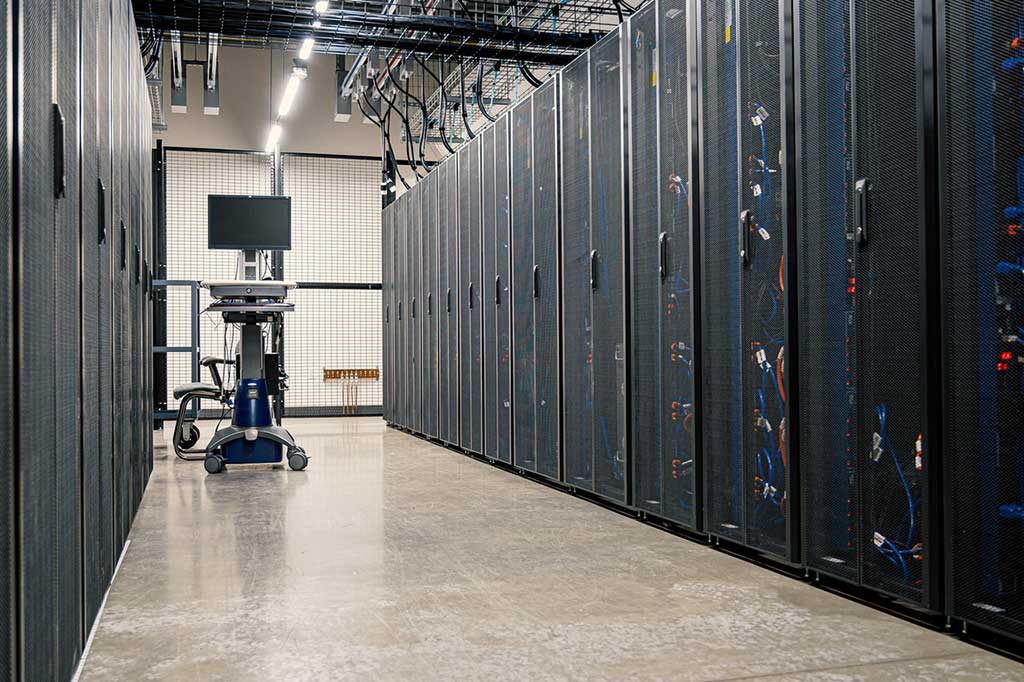
Server racks in a commercial IT room showing power feeds and cable management
Racks draw more than most offices expect. The circuit count gets decided before the equipment arrives.

Common questions

Do I need an electrician, or can my IT company plug the rack in?

If it plugs into an existing receptacle, anyone can plug it in. The moment you need a new circuit, a new receptacle, a panel change or anything hard-wired, it is electrical work and in Ontario it has to be done by a licensed electrical contractor and inspected. Running a rack off an extension cord or a daisy-chained power bar is the version of this that fails an insurance inspection.

Do you pull the permit?

Yes. We take out the ESA notification, arrange the inspection and hand you the Certificate of Acceptance when it passes. You should get that certificate on any electrical job. If a contractor does not mention it, ask why.

How many circuits does a server rack need?

It depends on the load, but one 15 amp circuit for a full rack is the mistake we see most often. A typical rack gets at least two dedicated circuits fed from different breakers so a single trip does not take the whole rack down, and dual-corded equipment gets one feed on each. We work it out from your equipment list rather than guessing.

Can you do the electrical and the network cabling together?

That is most of what we do. One crew, one schedule, and the power and data get planned against each other instead of two contractors finding out on site that they both wanted the same wall.

How long does it take?

A couple of circuits into an existing panel with an open route is usually a day. A new sub-panel, a UPS tie-in and a full rack build is a week or more, and the ESA inspection has to be booked into that. We give you the schedule with the quote.

What does it cost?

It depends on the panel capacity you already have, the distance from the panel to the room, and whether the route is open ceiling or finished walls. We quote from a walk-through and give you an itemized price before anything starts.

Related pages

Have a look at server room cabling, electrical conduit installation, cable tray installation and office cabling in Toronto. If you want the detail, our guides on electrical work for IT rooms, data and electrical conduit under the Canadian Electrical Code and the amp to wire size chart cover the parts people ask about most.

Need power for a server room or IDF closet?

We will walk the building, check what your panel can actually give you, and put a written price in front of you before any work starts. Free site visit across Toronto and the GTA. Call 1-647-846-1925.

Book a free site visitServer room cabling

Service areasTorontoMississaugaBramptonVaughanMarkham & Richmond HillOakvilleMilton & HaltonBoltonAurora & NewmarketBarrieHamilton & BurlingtonGuelphKitchener-WaterlooLondonSt. Catharines & NiagaraMontrealVancouver

© 2026 Cablify. Commercial network cabling and fiber optic installation across Toronto and the GTA.

Call 1-647-846-1925Get a Free Quote